
AirClip Pro
Copy, capture, and paste web content faster across Airtable and trusted work sites.
As of June 2026, AirClip Pro has — users in the Productivity category.
Usersno change0%
—
—
Ratingno change0%
—
— reviews
Reviewsno change0%
—
Version
1.0.0
Manifest V3
History
1 snapshotsTracking since Jun 11, 2026.
Not enough history yet for this metric — the chart fills in as we collect more snapshots.
View as table
| Date | Users | Rating | Reviews | Version |
|---|---|---|---|---|
| Jun 11, 2026 | — | — | — | 1.0.0 |
| Now | — | — | — | 1.0.0 |
Permissions & access
- Permissions
- storagescriptingactiveTabclipboardWrite
- Host access
- https://airtable.com/*, https://*.airtable.com/*, https://*/*, http://*/*
Screenshots



About
AirClip Pro is a local-only productivity extension designed to streamline copy, capture, and paste workflows across Airtable and your favorite trusted websites.

Key features:

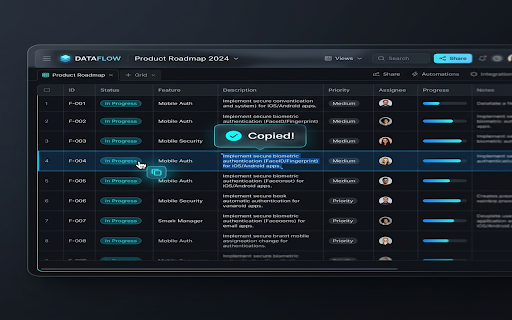
- Airtable Cell Copy: Instantly hover cells to display a floating copy icon and copy clean text values, bypasses normal spreadsheet dragging limits.
- Auto-Copy Selection: Instantly copy text to your clipboard when highlighted on whitelisted domains, displaying a temporary "Copied!" notification.
- Input Auto-Paste Bubble: Focused text inputs on whitelisted pages display a fast paste helper that directly integrates with modern JS frameworks.
- Double-Click Paste: Double-clicking empty text areas pastes clipboard values.
- Page Capture FAB: A draggable, bottom-right floating action button that extracts clean page HTML directly to your clipboard, removing styles, scripts, and extension nodes.

Security and Privacy first:
AirClip Pro does not run globally by default. It remains dormant on standard websites until you explicitly whitelist them via the popup dashboard. The extension stores all settings locally, conducts no network requests, features zero analytics tracking, and reads the clipboard only when you click or double-click to paste.
Technical
- Version
- 1.0.0
- Manifest
- V3
- Size
- 110KiB
- Min Chrome
- 88
- Languages
- 1
- Featured
- No
Metadata
- ID
- mhpmhaapacmekmmnjbndphfcjjjakaob
- Developer ID
- ucf6fcda16f1ad895016501b8150c7bff
- Developer Email
- [email protected]
- Created
- Jun 10, 2026
- Last Updated (Store)
- Jun 10, 2026
- Last Scraped
- Jun 11, 2026
- Website
- —
- Support URL
- —
- Privacy Policy
- —
Data sourced from the Chrome Web Store · last verified Jun 11, 2026.