
Bingoogle Shortcuts - Browse with Keyboard
“Bingoogle shortcuts” provides keyboard shortcuts for “Bing” and “Google“. You will be able to search and browse without mouse.
As of May 2026, Bingoogle Shortcuts - Browse with Keyboard has 274 users and a 5.00/5 rating from 2 reviews in the Productivity category.
Usersup 3.8 percent+3.8%
274
274
Ratingno change0%
5.00
2 reviews
Reviewsno change0%
2
Version
3.1.4
Manifest V3
History
2 snapshotsTracking since Apr 24, 2026.
View as table
| Date | Users | Rating | Reviews | Version |
|---|---|---|---|---|
| Apr 24, 2026 | 264 | 5.00 | 2 | 3.1.4 |
| May 19, 2026 | 281 | 5.00 | 2 | 3.1.4 |
| Now | 274 | 5.00 | 2 | 3.1.4 |
Permissions & access
- Permissions
- storage
- Host access
- None declared
Screenshots


About
Features
===================================

✓ navigate search pages by typing in home position.
✓ select search results simply [ j / k ] & open the link [Enter]
✓ use Vim key bindings
✓ easily switch search type (all ⇔ work etc.)
✓ simple UI/UX
✓ enable or disable each short-cuts on option page
✓ gray out ads
✓ support continuous scrolling in Google search (NEW)


Keybindings
===================================

■ Navigation on search results
• ’j’ / ‘↓’ : Select next search result
• ’k’ / ‘↑’ : Select previous previous result
• ‘h’ / ‘←’ : Navigate to previous search result page
• ’l’ / ‘→’ : Navigate to next search result page
• ’Enter‘ : Open selected result
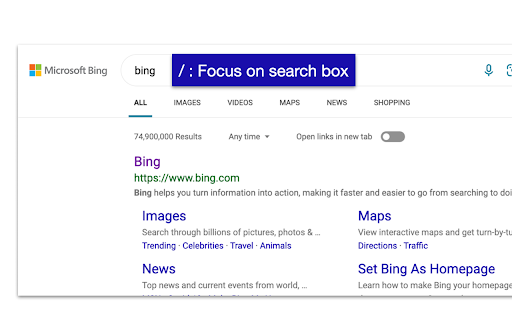
• ’/‘ / ‘i’: Focus on input search box
• ’ESC‘ / ‘Ctrl+[‘ : unfocus on input search box
• ’Shift+a’ : Navigate to all search tab
• ’Shift+c’ : Navigate to chatbot
• ’Shift+w’ : Navigate to work search tab
• ’Shift+n’ : Navigate to news search tab
• ’Shift+i’ : Navigate to images search tab
• ’Shift+v’ : Navigate to videos search tab
• ’Shift+m’ : Navigate to maps search tab
• ’Shift+s’ : Navigate to shopping search tab

■ Control for Bing AI chatbot (Only available for the Edge version)
• ’/‘ / ‘i’ : focus on the input field
• ’Enter‘ : Confirm and send the input sentence
• ’ESC‘ / ‘Ctrl+[‘ : Remove focus from the input field
• ’Ctrl+Shift+q’ : Stop response during generation
• ’Ctrl+Shift+n’ : Start a new topic

■ Page transition
• ’Shift+h’ : Go back
• ’Shift+l’ : Go forward

■ switching of search engine
• ’Ctrl+b’ : to Bing
• ’Ctrl+g’ : to Google

■ restrict a language from search results
• ’Ctrl+e’ : English
• ’Ctrl+d’ : Default language

■ Scroll operation in all web sites
• ’j’ / ‘↓’ : Scroll down
• ’k’ / ‘↑’ : Scroll up
• ’d’ : Scroll down (large)
• ’u’ : Scroll up (large)
• ’gg’ : Scroll to the top
• ’Shift+g’ : Scroll to the bottom


Misc
===================================

• Please feel free to let us know if you have any requests or find bugs.
• Edge : https://microsoftedge.microsoft.com/addons/detail/bingoogle-shortcuts/kkjkkfplkpioclicbmaehaadbhclfdhn?hl=en (Bing AI chat is only available for Edge version!)
Technical
- Version
- 3.1.4
- Manifest
- V3
- Size
- 34.31KiB
- Min Chrome
- 88
- Languages
- 2
- Featured
- Yes
Metadata
- ID
- mhpibokabfeiimdmnfdmipkmpagjlbaa
- Developer ID
- u546b135e13bce946308f4265c18913f7
- Developer Email
- [email protected]
- Created
- Aug 5, 2021
- Last Updated (Store)
- Jun 1, 2023
- Last Scraped
- May 19, 2026
- Website
- —
- Support URL
- —
- Privacy Policy
- —
Similar extensions
Alternatives to Bingoogle Shortcuts - Browse with Keyboard, ranked by description similarity.

Search navigator
Navigate search results with shortcuts
954
★ 4.5

Google Search Boost
vim-like keyboard shortcuts for search page
15
★ 5.0

Vim-like Google Search Navigator
Navigate Google search results efficiently with Vim-like keyboard shortcuts
68
★ 5.0

KeyLeap
Keyboard shortcuts for Google search results navigation
—

GHop
Keyboard navigation for Google Search. Use J and K to move through search results without touching your mouse.
2
★ 5.0

Quick Search (Fast Web & AI Search)
Double-tap Alt/Option or select text to search instantly. Supports Google, Perplexity, ChatGPT, YouTube, GitHub, and more.
49
★ 5.0

Big Search
Handily use/switch any one/multiple search engines. More than GET/POST sender, with special tech. Open souce on Github
792
★ 4.6

Google Search Keyboard Shortcuts
Adds keyboard shortcuts/hotkeys back to Google search results
9.0K
★ 4.6
Data sourced from the Chrome Web Store · last verified May 19, 2026.