
TabVault AI - Privacy-First Smart Tab Manager
Intelligently group and manage your tabs using AI. 100% private - all processing happens locally on your device.
As of June 2026, TabVault AI - Privacy-First Smart Tab Manager has 2 users in the Productivity category.
Usersno change0%
2
2
Ratingno change0%
—
— reviews
Reviewsno change0%
—
Version
1.0.0
Manifest V3
History
3 snapshotsTracking since Apr 17, 2026.
Not enough history yet for this metric — the chart fills in as we collect more snapshots.
View as table
| Date | Users | Rating | Reviews | Version |
|---|---|---|---|---|
| Apr 17, 2026 | — | — | — | 1.0.0 |
| Apr 27, 2026 | — | — | — | 1.0.0 |
| Jun 8, 2026 | — | — | — | 1.0.0 |
| Now | 2 | — | — | 1.0.0 |
Permissions & access
- Permissions
- tabstabGroupsstorageidlecontextMenusnotifications
- Host access
- None declared
Screenshots


About
**Organize your browser tabs intelligently - powered by AI, protected by privacy.**

### 🔥 The Problem

You open a few tabs for work, some for research, a couple for shopping... suddenly you have 50+ tabs across 4 windows. Finding anything takes forever. Your browser is slow. You're distracted by tabs you forgot to close.

### ✨ The Solution

TabVault AI intelligently groups your tabs into meaningful categories automatically:

- **Development** (blue) - GitHub, Stack Overflow, docs, npm packages
- **Research & Reference** (green) - Wikipedia, Medium, academic papers
- **Entertainment** (pink) - YouTube, Reddit, streaming
- **Shopping** (orange) - Amazon, Etsy, shopping carts
- **Social Media** (cyan) - Facebook, Instagram, X/Twitter
- **Work & Productivity** (yellow) - Notion, Slack, Jira
- **News** (red) - BBC, CNN, TechCrunch
- **Other** (grey) - Everything else

### 🚀 How It Works

1. **Click TabVault AI icon** in your toolbar
2. **Click "Analyze All Tabs"** (or select specific tabs)
3. **Wait 2-3 seconds** - AI analyzes and categorizes your tabs
4. **Done!** Your tabs are now organized into smart, color-coded groups

**IMPORTANT NOTE ON AI AVAILABILITY:**
TabVault AI utilizes Chrome's cutting-edge Built-in AI (Gemini Nano). Since this is a new technology, it is currently rolling out progressively to Chrome users (v130+).

- **If AI is ready on your device:** TabVault AI uses premium LLM analysis for deep semantic categorization.
- **If AI is still coming to your device:** TabVault AI automatically uses our advanced, lightning-fast **Rule-Based Smart Grouping** so you never miss a beat. All features work 100% on every version!

**Why our Local AI is better:**
- ✅ All AI processing happens on your device (100% local)
- ✅ No data is sent to cloud servers
- ✅ No account or login required
- ✅ Works offline (after initial AI model download)
- ✅ Your browsing stays private
- ✅ Zero latency - no waiting for API responses

**Privacy First:**
Unlike other AI-powered tools, TabVault AI never uploads your tabs to external servers. We don't track you, don't collect data, and don't show ads. Your tabs belong to you - not us.

### 🎯 Key Features

**Smart Tab Grouping**
- One-click AI analysis of all open tabs
- Intelligent categorization into 7+ categories
- Automatic color-coding for easy recognition
- Selective grouping (organize only what you want)

**Tab Management**
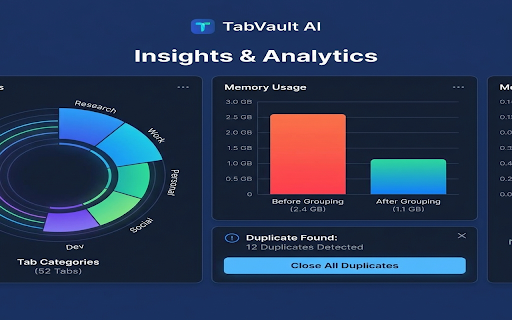
- Duplicate tab detection
- Real-time tab statistics
- Insights dashboard (usage patterns, suggestions)
- Window and group management
- Context menu integration (right-click → "Group Similar Tabs")

**Privacy & Security**
- 100% local AI processing
- No cloud uploads or external API calls
- No account required
- No tracking, analytics, or ads
- Manifest V3 compliant (modern, secure)

**Smart Insights**
- High tab count warnings
- Duplicate tab suggestions
- Top-used domains
- Window consolidation tips
- Idle state cleanup suggestions

### 📊 Use Cases

**For Developers:**
- Organize GitHub repos, Stack Overflow questions, and docs into "Development"
- Keep research papers separate from code examples
- Quick access to all project tabs

**For Researchers:**
- Group Wikipedia, academic papers, and Medium articles into "Research"
- Separate shopping distractions from serious reading
- Find relevant tabs instantly

**For Casual Users:**
- Organize YouTube, Reddit, and social media into "Entertainment"
- Keep shopping tabs together for easy price comparison
- Reduce browser memory usage

### 🔧 Technical Details

- **Chrome Extension:** Manifest V3 (modern, secure framework)
- **Chrome Version:** 130+ required for AI features (works on older versions with rule-based fallback)
- **Permissions:** tabs, tabGroups, storage, idle (minimal and necessary only)
- **Size:** ~64 KB (lightweight)
- **Dependencies:** None (pure vanilla JavaScript)
- **AI Processing:** Hybrid Engine (Chrome Built-in AI + Regex-based Smart Logic)
- **Network Requests:** None (100% air-gapped local processing)

### 🌟 What Users Say

*"I had 80 tabs open and my browser was crashing. TabVault AI organized everything into 8 clean groups in seconds. Game changer!"*

*"Finally an AI tool that doesn't send my data to cloud. The categorization is spot on."*

*"Simple, fast, and private. Exactly what I needed."*

### 🎁 Free Features

All core features are 100% free:

- ✅ Smart tab grouping (AI + rule-based)
- ✅ Tab insights and statistics
- ✅ Duplicate detection
- ✅ Real-time tab count badge
- ✅ Privacy-first local processing
- ✅ No account required
- ✅ No limits, no restrictions

### 📚 Documentation & Support

- **Quick Start Guide:** Get started in 30 seconds
- **Detailed Installation:** Step-by-step instructions
- **Privacy Policy:** Comprehensive data handling transparency
- **Troubleshooting:** Common issues and fixes

### 🛡️ Privacy Commitment

At TabVault AI, your privacy is non-negotiable:

- ❌ No account or registration
- ❌ No cloud data uploads
- ❌ No tracking or analytics
- ❌ No third-party data sharing
- ❌ No ads or sponsored content
- ✅ All AI processing is local
- ✅ Your tabs stay on your device
- ✅ Open source transparency (coming soon)

### 🔮 What's Next

**Planned Features:**
- Keyboard shortcuts for quick actions
- Custom category creation
- Category color customization
- Cross-device sync (optional, user-controlled)
- Advanced analytics and reporting
- Integration with productivity apps

### 🚀 Get Started

**Install in 30 seconds:**

1. Visit chrome://extensions/
2. Enable "Developer mode"
3. Click "Load unpacked"
4. Select TabVault AI folder
5. Click the icon and start organizing!

**Or wait for Chrome Web Store release:**
Search for "TabVault AI" in the Chrome Web Store.

### 💬 Feedback & Support

We're a small team passionate about privacy and productivity. Your feedback helps us improve:

- **GitHub:** [Submit issues and feature requests]
- **Email:** [email protected]
- **Reviews:** Rate us on Chrome Web Store

---

**Reclaim your browser. Stay productive. Keep your tabs private.**

**TabVault AI** - Smart organization, zero compromise on privacy.
Technical
- Version
- 1.0.0
- Manifest
- V3
- Size
- 550KiB
- Min Chrome
- 130
- Languages
- 1
- Featured
- No
Metadata
- ID
- mhgbfclekegkfcmagfalilcjhnikbdil
- Developer ID
- uae79df094612c2aa900aad85c6837b37
- Developer Email
- [email protected]
- Created
- Feb 1, 2026
- Last Updated (Store)
- Feb 1, 2026
- Last Scraped
- Jun 8, 2026
- Website
- —
- Support URL
- —
- Privacy Policy
- https://thakoreh.github.io/tabvaultai/
Similar extensions
Alternatives to TabVault AI - Privacy-First Smart Tab Manager, ranked by description similarity.

Tabs - AI Tab Organizer
Smart tab organization powered by AI - learns from your usage
3
★ 3.5

AI Tab Manager - Group & Organize
Automatically organize your tabs with AI. Clean up clutter, auto-group related tabs, and boost productivity.
1

Tab Mind - AI Tab Organizer
An AI-powered extension that intelligently organizes and groups your browser tabs
6
★ 5.0

AutoGroup: AI Tab Organizer (Privacy-First)
Organize tabs instantly with local AI. Privacy-first smart grouping that runs 100% on your device. No data leaves your browser.
56
★ 5.0

Flocci Tabs
Color-Grouped Tabs. Automatically creates a colored tab group with the tab's title when dragged into a new window.
16
★ 5.0

GenTabsAI
AI-powered browser tab management with multi-AI support. Integrated with gentabs.pro.
1

Declutter Tabs
Intelligent tab management with auto-close, manual cleanup, and smart organization. Keep your browser organized and performant.
3

Tab Folio - AI Tabs Bookmark Manager
Group and bookmark your tabs with AI
23
★ 5.0
Data sourced from the Chrome Web Store · last verified Jun 8, 2026.