
TagScanner
Scan your Adobe Tag property and export your library output with custom code.
As of June 2026, TagScanner has 142 users and a 4.50/5 rating from 2 reviews in the Developer Tools category.
Usersup 52.7 percent+52.7%
142
142
Ratingup 12.5 percent+12.5%
4.50
2 reviews
Reviewsup 100.0 percent+100.0%
2
Version
2.5.6
Manifest V3
90-day change · In the last 90 days this extension 4 version updates, changed permissions.
History
11 snapshotsTracking since Apr 2, 2026.
View as table
| Date | Users | Rating | Reviews | Version |
|---|---|---|---|---|
| Apr 2, 2026 | 93 | 4.00 | 1 | 2.3.0 |
| Apr 17, 2026 | 94 | 4.00 | 1 | 2.3.0 |
| Apr 22, 2026 | 103 | 4.00 | 1 | 2.3.0 |
| Apr 27, 2026 | 100 | 4.00 | 1 | 2.3.0 |
| May 5, 2026 | 106 | 4.00 | 1 | 2.3.0 |
| May 10, 2026 | 104 | 4.00 | 1 | 2.4.0 |
| May 16, 2026 | 117 | 4.50 | 2 | 2.5.4 |
| May 22, 2026 | 119 | 4.50 | 2 | 2.5.4 |
| May 29, 2026 | 130 | 4.50 | 2 | 2.5.5 |
| Jun 4, 2026 | 134 | 4.50 | 2 | 2.5.5 |
| Jun 10, 2026 | 132 | 4.50 | 2 | 2.5.6 |
| Now | 142 | 4.50 | 2 | 2.5.6 |
Changelog
- Jun 4, 2026description
TagScanner helps you understand and optimize your Adobe Tags (Launch) implementation. Open it on any site that uses your Tags property to see a full picture of rules, data elements, and extensions—and export the data for audits and reports.

What you can do • Audit – See all rules, data elements, and extensions with triggers, conditions, actions, and usage
• Analyze – Identify unused data elements and rules, and see size impact of each component
• Export – Download summaries as CSV or PDF, or copy tables for reports and presentations
• Explore – View relationships between rules and data elements, and use guided tours to learn the UI

Features • Summary dashboard with counts and unused-component lists
• Detailed tables for Rules, Data Elements, and Extensions with search and sort
• Relationship view between rules and data elements
• CSV export for rules, data elements, and extensions
• PDF summary export
• Built-in tours for new users

How it works
Visit a page that loads your Adobe Tags property, then open TagScanner. It reads the Tags library from the page (no remote code) and shows rules, data elements, extensions, sizes, and usage so you can audit, clean up, and document your implementation.

Who it’s for
Implementers, analysts, and developers who manage or audit Adobe Tags (Launch) and want a quick way to scan a property, find unused items, and export data for documentation or optimization.
TagScanner is a free Chrome extension for anyone working with Adobe
Tags (Launch). Open it on any live site running Adobe Tags and get an
instant, complete view of the property — rules, data elements,
extensions, dependencies, and custom code — with no API credentials,
no backend access, and no admin rights required.

It reads directly from the _satellite container object that Adobe Tags
injects into every page. That object is always there. TagScanner just
surfaces everything inside it.

━━━━━━━━━━━━━━━━━━━━━

WHAT YOU CAN DO

Audit — Browse every rule with its events, conditions, actions, and
custom code. Sortable, searchable, paginated. No more opening rules
one by one in the Launch UI.

Analyse — See full data element usage tracking: which rules reference
each DE, which extensions use them, and DE-to-DE dependency chains.
Deep Scan detects ghost dependencies — data elements referenced in
custom code that don't exist in the compiled library.

Visualise — Flow Diagram generates an interactive visual map of your
entire property — data elements, rules, extensions, and the
connections between them. Always reflects the current published
library.

Search — Global Code Search runs full-text search across every rule,
data element, and extension including all custom code blocks, with
line-level match highlighting.

Export — One-click .xlsx export of every rule, data element, and
extension including custom code. The export Launch itself can't give
you.

Debug — Environment Override redirects the live Tags library to dev
or staging at the network level. No proxy tools. No test pages. No
page changes required.

━━━━━━━━━━━━━━━━━━━━━

AI-POWERED FEATURES (Preview / Beta)

AI Property Health Scan — A–F health score for your entire property
with an executive summary, category scores, critical issues, and
ranked recommendations. A manual audit that takes hours: this does it
in under a minute.

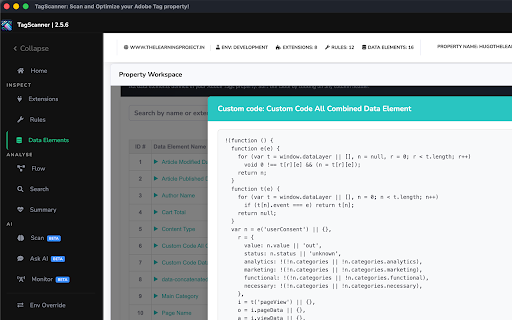
Custom Code Explanation — Plain-English breakdown of any custom code
block: what it does, what data it reads, what it returns, risks, and
ready-to-run debug commands.

Ask AI — Natural language questions about your live property. "Which
rules fire on page load?" "What data elements use the data layer?"
Answered instantly with conversation persistence.

Note: AI features are available on a best-effort basis. Core features
are fully available with no restrictions.

━━━━━━━━━━━━━━━━━━━━━

WHO IT'S FOR

Tag managers, analytics engineers, MarTech consultants, and
implementation architects who audit, document, or optimise Adobe Tags
properties — and want to spend less time in the Launch UI and more
time on the actual work.

━━━━━━━━━━━━━━━━━━━━━

FREE. No sign-in required for core features.
Google OAuth required for AI features only.

For feedback: [email protected]
- May 10, 2026permissions
activeTab, storage, scripting, identity
activeTab, storage, scripting, identity, declarativeNetRequest
- May 5, 2026permissions
activeTab, storage
activeTab, storage, scripting, identity
Permissions & access
- Permissions
- activeTabstoragescriptingidentitydeclarativeNetRequest
- Host access
- <all_urls>
Screenshots



About
TagScanner is a free Chrome extension for anyone working with Adobe
Tags (Launch). Open it on any live site running Adobe Tags and get an
instant, complete view of the property — rules, data elements,
extensions, dependencies, and custom code — with no API credentials,
no backend access, and no admin rights required.

It reads directly from the _satellite container object that Adobe Tags
injects into every page. That object is always there. TagScanner just
surfaces everything inside it.

━━━━━━━━━━━━━━━━━━━━━

WHAT YOU CAN DO

Audit — Browse every rule with its events, conditions, actions, and
custom code. Sortable, searchable, paginated. No more opening rules
one by one in the Launch UI.

Analyse — See full data element usage tracking: which rules reference
each DE, which extensions use them, and DE-to-DE dependency chains.
Deep Scan detects ghost dependencies — data elements referenced in
custom code that don't exist in the compiled library.

Visualise — Flow Diagram generates an interactive visual map of your
entire property — data elements, rules, extensions, and the
connections between them. Always reflects the current published
library.

Search — Global Code Search runs full-text search across every rule,
data element, and extension including all custom code blocks, with
line-level match highlighting.

Export — One-click .xlsx export of every rule, data element, and
extension including custom code. The export Launch itself can't give
you.

Debug — Environment Override redirects the live Tags library to dev
or staging at the network level. No proxy tools. No test pages. No
page changes required.

━━━━━━━━━━━━━━━━━━━━━

AI-POWERED FEATURES (Preview / Beta)

AI Property Health Scan — A–F health score for your entire property
with an executive summary, category scores, critical issues, and
ranked recommendations. A manual audit that takes hours: this does it
in under a minute.

Custom Code Explanation — Plain-English breakdown of any custom code
block: what it does, what data it reads, what it returns, risks, and
ready-to-run debug commands.

Ask AI — Natural language questions about your live property. "Which
rules fire on page load?" "What data elements use the data layer?"
Answered instantly with conversation persistence.

Note: AI features are available on a best-effort basis. Core features
are fully available with no restrictions.

━━━━━━━━━━━━━━━━━━━━━

WHO IT'S FOR

Tag managers, analytics engineers, MarTech consultants, and
implementation architects who audit, document, or optimise Adobe Tags
properties — and want to spend less time in the Launch UI and more
time on the actual work.

━━━━━━━━━━━━━━━━━━━━━

FREE. No sign-in required for core features.
Google OAuth required for AI features only.

For feedback: [email protected]
Technical
- Version
- 2.5.6
- Manifest
- V3
- Size
- 7.16MiB
- Min Chrome
- 88
- Languages
- 1
- Featured
- No
Metadata
- ID
- mhejdbndckkddicchjjbaehfbmjjlmjn
- Developer ID
- u94beebc2a94715e3b49023d70027917f
- Developer Email
- [email protected]
- Created
- Jan 26, 2025
- Last Updated (Store)
- Jun 4, 2026
- Last Scraped
- Jun 10, 2026
- Website
- —
- Support URL
- —
Similar extensions
Alternatives to TagScanner, ranked by description similarity.

Tag Inspector
Analyze scripts, links, iframes, and meta tags. Track performance, validate tags, detect issues, and export data.
75

Adobe Tag Inspector
DevTools panel for capturing Adobe Analytics hits (AppMeasurement/Web SDK). Master–detail UI, newest-first list, empty values shown.
18
★ 5.0

Tag Explorer
Tag Explorer is designed to simplify and enhance your tag monitoring process.
50.0K
★ 4.2
Get Google Tag Manager Size
Advanced Google Tag Manager container monitor & Performance analyzer
What does this extension do?
This extension provides complete…
10.0K
★ 5.0

Drupal Site Audit Inspector
Inspect Drupal clues, analytics, SEO, and tech stack from the current page.
18

Meta Tag Reader
Reads SEO meta tags from any webpage — includes Open Graph, Twitter Card, canonical, robots, and more.
20

ROME TAG Checker
Verify your marketing tags are firing correctly. Inspect events, validate data quality, and generate professional audit reports.
21
★ 5.0

TAGLAB - Analytics & Datalayer Console Viewer
Inspect & QA analytics tags, marketing tags, conversion pixels, and data layer variables for data auditing and tag monitoring.
1.0K
★ 5.0
Data sourced from the Chrome Web Store · last verified Jun 10, 2026.