
LeetHub v2
Automatically integrate your Leetcode & GeeksforGeeks submissions to GitHub
As of June 2026, LeetHub v2 has 20,000 users and a 2.99/5 rating from 74 reviews in the Workflow & Planning category.
Usersno change0%
20.0K
20,000
Ratingno change0%
2.99
74 reviews
Reviewsno change0%
74
Version
2.0.9
Manifest V3
History
1 snapshotsTracking since Apr 18, 2026.
View as table
| Date | Users | Rating | Reviews | Version |
|---|---|---|---|---|
| Apr 18, 2026 | 20.0K | 2.99 | 74 | 2.0.9 |
| Now | 20.0K | 2.99 | 74 | 2.0.9 |
Permissions & access
- Permissions
- unlimitedStoragestoragewebNavigation
- Host access
- None declared
Screenshots



About
What is LeetHub v2?
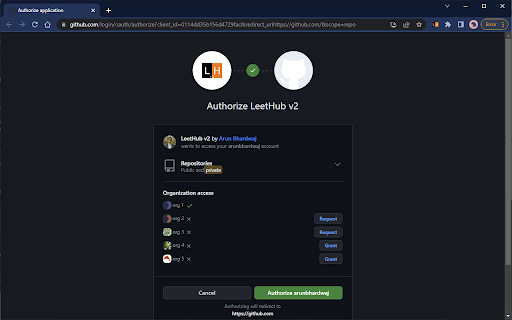
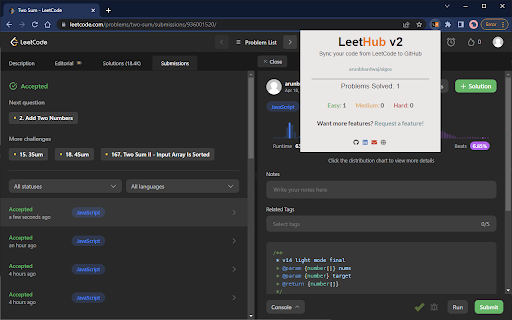
A chrome extension that automatically pushes your code to GitHub when you pass all tests on a Leetcode problem. Re-built from the original popular LeetHub extension, it improves and expands upon the original, now featuring support for the new Leetcode UI.

Why LeetHub?
1. Recruiters *want* to see your contributions to the Open Source community, be it through side projects, solving algorithms/data-structures, or contributing to existing OS projects.
As of now, GitHub is developers' #1 portfolio. LeetHub just makes it much easier (autonomous) to keep track of progress and contributions on the largest network of engineering community, GitHub.
2. There's no easy way of accessing your leetcode problems in one place!
Moreover, pushing code manually to GitHub from Leetcode is very time consuming. So, why not just automate it entirely without spending a SINGLE additional second on it?
3. Completely secure! The extension runs entirely on your device and only makes 3rd-party API calls to GitHub for authentication.

How does LeetHub work?
After installing the extension and launching LeetHub, it's as simple as:
1. Click on "authorize with GitHub" button to automatically set up your account with LeetHub.
2. Setup an existing/new repository with LeetHub (private by default) by clicking "Get Started" button.
3. And that's it 🎉 ...begin Leetcoding! To view your progress, simply click on the LeetHub icon!

BONUS: Star LeetHub v2 on GitHub for further development of features @ https://github.com/arunbhardwaj/LeetHub-2.0

Let's see you ACE that coding interview!

UPDATES:
** Nov. 19 2025 **
- Fixes mismatch with problem numbers. Now uses the proper id numbers visible on LeetCode.

** Jun. 28 2024 **
- Persistent stat tracking across LeetHub v2 installations

** Jun. 2 2024 **
- Manual submission button (beta)
- fixes GitHub rate-limit issue with problem/topic organization README feature

** May. 31 2024 **
- adds new feature organizing problems via their topics in repo README

** May. 30 2024 **
- fixes issue where submission sometimes does not upload to GitHub
- fixes upload progress spinner not appearing
- fixes issue with submissions not going through on study plan pages

** Apr. 3 2024 **
- restores submission functionality

** Jul. 24 2023**
- fixes an issue preventing submission to GitHub for LeetCode submissions due to UI change

** Apr. 14 2023 **
- adds Leetcode UI v2 support
Technical
- Version
- 2.0.9
- Manifest
- V3
- Size
- 258KiB
- Min Chrome
- 88
- Languages
- 1
- Featured
- Yes
Metadata
- ID
- mhanfgfagplhgemhjfeolkkdidbakocm
- Developer ID
- u51f8d08bf9f47e71b33429f6a10f0880
- Developer Email
- [email protected]
- Created
- Apr 24, 2023
- Last Updated (Store)
- Nov 21, 2025
- Last Scraped
- Jun 5, 2026
- Website
- —
Similar extensions
Alternatives to LeetHub v2, ranked by description similarity.

LeetHub-3.0
Automatically integrate your Leetcode submissions to GitHub
9.0K
★ 4.3

StructyHub
Automatically integrate your Structy submissions with GitHub.
30
★ 5.0
LeetTracker
Chrome extension that helps track solved LeetCode problems.
644
★ 4.2

GitCode
GitCode
91
★ 5.0

LeetCode Forcer
An extension which force you to solve daily leetcode problem. Say no to procrastination.
1.0K
★ 4.5

ShipIt
ShipIt: Push accepted LeetCode solutions to GitHub.
3

CF Fetcher
Fetch your Codeforces accepted submissions and generate a README.md file for your GitHub repository
59
★ 5.0

LeetFlash
A simple extension that record your LeetCode performance for everyday.
520
★ 5.0
Data sourced from the Chrome Web Store · last verified Jun 5, 2026.