
smudge.ai
Add AI-powered commands to your browser’s right-click menu.
As of May 2026, smudge.ai has 343 users and a 4.43/5 rating from 7 reviews in the Productivity category.
Usersdown 2.3 percent−2.3%
343
343
Ratingno change0%
4.43
7 reviews
Reviewsno change0%
7
Version
1.13.3
Manifest V3
History
5 snapshotsTracking since Apr 1, 2026.
View as table
| Date | Users | Rating | Reviews | Version |
|---|---|---|---|---|
| Apr 1, 2026 | 351 | 4.43 | 7 | 1.13.3 |
| Apr 20, 2026 | 356 | 4.43 | 7 | 1.13.3 |
| May 6, 2026 | 327 | 4.43 | 7 | 1.13.3 |
| May 17, 2026 | 343 | 4.43 | 7 | 1.13.3 |
| May 30, 2026 | 359 | 4.43 | 7 | 1.13.3 |
| Now | 343 | 4.43 | 7 | 1.13.3 |
Permissions & access
- Permissions
- activeTabcontextMenusscriptingsidePanelstorage
- Host access
- None declared
Screenshots


About
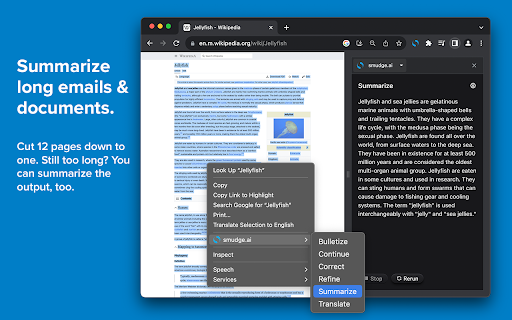
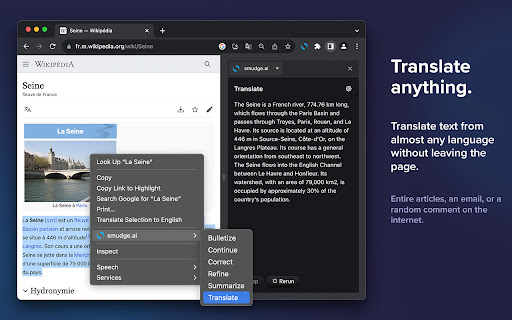
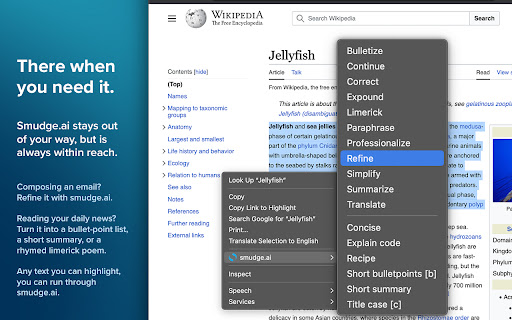
Smudge is a browser extension that puts AI tools powered by ChatGPT into your right-click menu, so you can do things like Revise/Translate/Summarize just as easily as commands you already use, like Cut/Copy/Paste. It’s one of the easiest ways to integrate AI into your everyday workflow. There are over a dozen built-in commands you can use for free, or you can create your own custom commands in the pro version for $5/mo.

———————————————————
Learn more at https://smudge.ai
———————————————————

Popular commands
➤ Summarize. Briefly recap the main points of a long article or document.
➤ Correct. Fix any spelling, punctuation, and grammar mistakes.
➤ Bulletize. Convert walls of text into a concise bullet-point list.
➤ Refine. Polish and revise your writing to improve its readability.
➤ Translate. Translate text from just about any language.

You can also create your own commands. Use custom commands to automate repetitive tasks, improve upon our built-in commands, or do something fun and creative.

For example:
➤ Extract a concise bullet-point to-do list from an email.
➤ Improve the readability and flow of your website copy.
➤ Describe the functionality of computer code in plain English.
➤ Rewrite an email to make it more friendly or professional
➤ Generate study notes from a passage, using markdown formatting for headers and lists.

———————————————————

Pricing

Free tier:
- No account required
- Never expires
- 10 GPT-5 Nano commands every 8 hours
- No custom commands
- ~150,000-word limit per command

$5/mo subscription tier:
- Custom commands
- More powerful AI (GPT-5 with Priority)
- Unlimited devices
- 2,000 monthly
credits
- ~150,000-word limit per command with up to 1 million tokens per thread

$20/mo subscription tier:
- Everything in the $5/mo tier
- 10,000 monthly credits

———————————————————

What's new:
👉 Summarize entire webpages without needing to highlight any text
👉 Reply to the AI and create multiple chat threads
👉 Restore and continue old threads from your chat history
👉 Run your commands with GPT-5
Technical
- Version
- 1.13.3
- Manifest
- V3
- Size
- 23.72MiB
- Min Chrome
- 116
- Languages
- 1
- Featured
- No
Metadata
- ID
- mhagofdaceclicecldngmdlnljcmebcn
- Developer ID
- ud487604a85e19a95ec4674cda79399d1
- Developer Email
- [email protected]
- Created
- Sep 23, 2023
- Last Updated (Store)
- Aug 12, 2025
- Last Scraped
- May 30, 2026
- Website
- smudge.ai
- Support URL
- —
- Privacy Policy
- https://smudge.ai/privacy
Data sourced from the Chrome Web Store · last verified May 30, 2026.