
Mass Unfollow on Twitch
A Chrome extension to Mass Unfollow on Twitch.
As of May 2026, Mass Unfollow on Twitch has 3,000 users and a 3.95/5 rating from 39 reviews in the Social & Communication category.
Usersno change0%
3.0K
3,000
Ratingdown 0.5 percent−0.5%
3.95
39 reviews
Reviewsup 2.6 percent+2.6%
39
Version
1.1.3
Manifest V3
History
1 snapshotsTracking since Apr 20, 2026.
View as table
| Date | Users | Rating | Reviews | Version |
|---|---|---|---|---|
| Apr 20, 2026 | 3.0K | 3.97 | 38 | 1.1.3 |
| Now | 3.0K | 3.95 | 39 | 1.1.3 |
Permissions & access
- Permissions
- scripting
- Host access
- https://*.twitch.tv/*
Screenshots

About
The Twitch Mass Unfollow Extension is a helpful tool for making it easy to stop following lots of Twitch channels all at once. It's like cleaning up your list of channels in just a few clicks.

Why Choose the Updated Twitch Mass Unfollow Extension?

- Effortless Unfollowing: Say goodbye to the tedious process of unfollowing Twitch channels one by one. Our extension enables you to declutter your following list quickly and efficiently, all with just a few clicks.

- Customizable Experience: With our new optional feature, you can now safeguard your favorite channels from being unfollowed. Simply add exceptions for those you wish to keep and let the extension handle the rest.

- Simplified User Interface: Navigate through the extension's features with ease, thanks to our improved design and layout. Whether you're analyzing your follower list or selecting exceptions, every step is intuitive and user-friendly.

- Enhanced Performance: Experience faster load times and smoother operation, ensuring a hassle-free unfollowing process from start to finish.

How It Works:

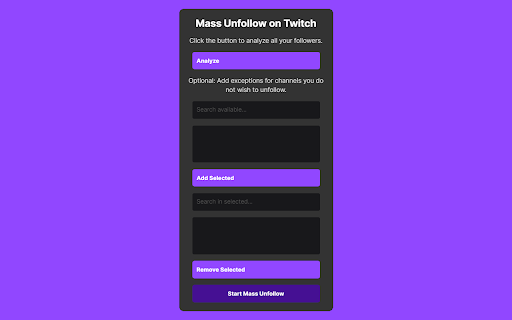
1. Login & Analyze: Ensure you're logged into Twitch and click on the extension icon. You'll be guided to the channels you follow.

2. Automatic Analysis: Hit the 'Analyze' button, and the extension will scroll through your follower list to present all the channels you're currently following.

3. Customize Your List: Optionally, search for and add exceptions for any channels you wish to keep following. These selected channels will be saved to your 'safe list'.

4. Mass Unfollow: Once you've set your preferences, click 'Start Mass Unfollow' to clean up your follower list. If you haven't selected any exceptions, the extension will unfollow all channels.

New Features Include:

- An enhanced analysis tool to quickly identify all the channels you're following.

- A flexible search function to easily find and select channels you want to exclude from unfollowing.

- The ability to add or remove channels from your safe list before finalizing your unfollowing action.

With the Twitch Mass Unfollow Extension, managing your Twitch following list has never been easier or more efficient. Download the latest version today and take the first step towards a more organized and personalized Twitch experience.
Technical
- Version
- 1.1.3
- Manifest
- V3
- Size
- 18.83KiB
- Min Chrome
- 88
- Languages
- 1
- Featured
- No
Metadata
- ID
- mgmagaekfiflfamjkogchapgmhfbkmnh
- Developer ID
- u226b9141eac59aa86cae9c5c1da0a0d8
- Developer Email
- [email protected]
- Created
- Aug 22, 2023
- Last Updated (Store)
- Aug 20, 2025
- Last Scraped
- May 30, 2026
- Website
- gabireze.com.br
Similar extensions
Alternatives to Mass Unfollow on Twitch, ranked by description similarity.

X (Twitter) Unfollow,Follow All 2026
Quickly unfollow all and follow all! 🚀 Save time by managing your following list with just one click. ✅
437
★ 4.2

Instagram Unfollow Pro - Search, Filter & Unfollow Accounts
Search, filter & unfollow Instagram accounts with precision. Find by username/verified/private status. Manual or bulk unfollow.
54

Unfollowers for Instagram - Insta Detective
Find Instagram unfollowers and non-followers. Unfollow multiple accounts with a single click - secure and user-friendly solution.
10.0K
★ 4.0

YouTube Bulk Unsubscriber
Clean up your YouTube feed. Automatically unsubscribe from all channels in one click.
661
★ 5.0

X-Unfollow Tool
Safely unfollow users on X with advanced filtering, whitelist protection, and smart delay logic. 100% free and unrestricted.
169
★ 5.0

YouTube Mass Unsubscribe
Bulk unsubscribe from YouTube channels. Scan all subscriptions, search and filter, then remove selected channels in one click.
242
★ 4.6

X Unfollow Pro - Search, Filter & Unfollow Twitter Accounts
Search, filter & unfollow X (Twitter) accounts with precision. Find by bio/keyword, filter by activity—manual or bulk unfollow.
444
★ 4.5

Twitch No Unfollow
Hide the unfollow button for Twitch streamers you follow.
337
★ 4.3
Data sourced from the Chrome Web Store · last verified May 30, 2026.