
Name My Download - Take control of your downloads
Take control of your downloads - rename files instantly before they hit your drive
As of June 2026, Name My Download - Take control of your downloads has 60 users and a 5.00/5 rating from 1 reviews in the Workflow & Planning category.
Usersup 100.0 percent+100.0%
60
60
Ratingno change0%
5.00
1 reviews
Reviewsno change0%
1
Version
1.1
Manifest V3
History
6 snapshotsTracking since Apr 18, 2026.
View as table
| Date | Users | Rating | Reviews | Version |
|---|---|---|---|---|
| Apr 18, 2026 | 30 | 5.00 | 1 | 1.1 |
| Apr 28, 2026 | 36 | 5.00 | 1 | 1.1 |
| May 7, 2026 | 39 | 5.00 | 1 | 1.1 |
| May 14, 2026 | 43 | 5.00 | 1 | 1.1 |
| May 23, 2026 | 51 | 5.00 | 1 | 1.1 |
| Jun 5, 2026 | 55 | 5.00 | 1 | 1.1 |
| Now | 60 | 5.00 | 1 | 1.1 |
Permissions & access
- Permissions
- downloadsstorageactiveTabscriptingtabs
- Host access
- <all_urls>
Screenshots

About
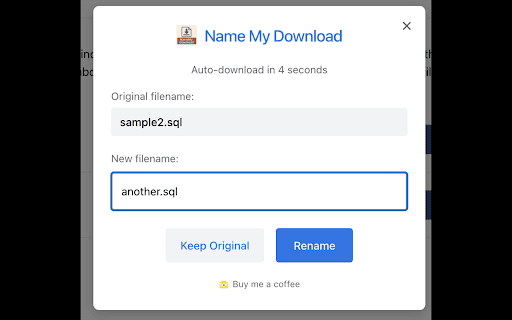
Name My Download gives you complete control over your downloaded files. Tired of cryptic filenames cluttering your downloads folder? This extension intercepts downloads and lets you rename files before they're saved to your device.

Features:
• Rename files instantly with a clean, intuitive interface
• Auto-countdown timer for quick downloads when you're in a hurry
• Works with all file types - documents, images, videos, and more
• Simple toggle to enable/disable when needed
• Lightweight and privacy-focused - no data collection

Version 1.1
• Removed download countdown.

Stop organizing files after downloading - name them right the first time!
Technical
- Version
- 1.1
- Manifest
- V3
- Size
- 1.81MiB
- Min Chrome
- 88
- Languages
- 1
- Featured
- No
Metadata
- ID
- mgipjpdmoclbjdjmbhhimadafcnjpeae
- Developer ID
- u7c8d15c00d076d35c72acb1ed1aefc52
- Developer Email
- [email protected]
- Created
- Jul 22, 2025
- Last Updated (Store)
- Nov 21, 2025
- Last Scraped
- Jun 5, 2026
- Website
- —
- Support URL
- —
Similar extensions
Alternatives to Name My Download - Take control of your downloads, ranked by description similarity.

Avoid Duplicate Downloads
Annoyed by the browser just download files with the same name by just appending "(1)" "(2)" to the filename without your…
1.0K
★ 3.3

SortMyDownloads
Automatically organizes your downloads into folders.
11

PDF Auto-Renamer by Nomos
Automatically rename PDF downloads with dates and website names for better file organization.
10

SortIt – Automatic Download Organizer
Automatically organize your downloads into folders by file type and custom rules. Keep your Downloads folder clean with zero setup.
—
★ 5.0

DownloadPilot - Auto Download Sorter
Automatically sort downloads into smart folders by website or file type. Keep your Downloads folder clean and clutter-free.
57
★ 4.5

File Renamer
Adds a word with a separator to downloaded filenames
33

DownloadTidy
Auto-rename and route downloads using simple rules.
2

SmartDownload Renamer
Rinomina automaticamente i file scaricati secondo regole personalizzabili
23
★ 5.0
Data sourced from the Chrome Web Store · last verified Jun 5, 2026.