
UGV Portal Customizer
Keep the portal your way
As of June 2026, UGV Portal Customizer has — users in the Productivity category.
Usersno change0%
—
—
Ratingno change0%
—
— reviews
Reviewsno change0%
—
Version
1.0
Manifest V3
History
1 snapshotsTracking since Jun 25, 2026.
Not enough history yet for this metric — the chart fills in as we collect more snapshots.
View as table
| Date | Users | Rating | Reviews | Version |
|---|---|---|---|---|
| Jun 25, 2026 | — | — | — | 1.0 |
| Now | — | — | — | 1.0 |
Permissions & access
- Permissions
- activeTabscriptingstorage
- Host access
- https://ugv.edu.bd/*
Screenshots

About
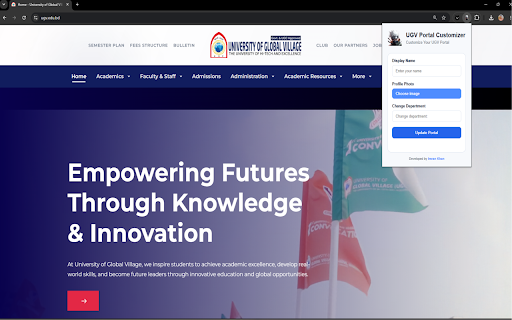
UGV Badge replaces the generic student portal link on ugv.edu.bd with a personalized nav button showing your name and profile photo — and keeps your settings applied automatically every time you visit.

──────────────────
WHAT IT CHANGES
──────────────────

▸ Navigation bar
Replaces the "Student Portal" link with a personalized chip showing your first name and profile photo.

▸ Profile photo
Updates your photo on the home page hero, your profile page, and the nav avatar circle.

▸ Department name
Overrides the department label on your dashboard overview, profile page, results page, and payments page.

──────────────────
HOW TO USE IT
──────────────────

1. Open ugv.edu.bd in Chrome
2. Click the UGV Badge icon in your toolbar
3. Enter your display name and select a profile photo
4. Optionally enter your department name
5. Click "Update Portal"

Your settings are saved locally and applied automatically on every future visit — no extra steps needed.

──────────────────
PRIVACY
──────────────────

All data (name, photo, department) is stored exclusively on your own device using Chrome's built-in local storage. Nothing is transmitted to any server or third party. The extension only activates on ugv.edu.bd.
Technical
- Version
- 1.0
- Manifest
- V3
- Size
- 52.8KiB
- Min Chrome
- 88
- Languages
- 1
- Featured
- No
Metadata
- ID
- mggbnmbkghlpbpgmljlcgjfnmlookmjg
- Developer ID
- uab223779287665648f4b9bb6e79f9f0b
- Developer Email
- [email protected]
- Created
- Jun 24, 2026
- Last Updated (Store)
- Jun 24, 2026
- Last Scraped
- Jun 25, 2026
- Website
- —
- Support URL
- https://www.mdimrankhansiam.pro.bd
- Privacy Policy
- https://codeboost.online/extension1_privacy
Data sourced from the Chrome Web Store · last verified Jun 25, 2026.