
Link Grabber & Dashboard
Drag a rectangle over any webpage area to capture all hyperlinks into a side panel dashboard. Copy and manage them easily.
As of June 2026, Link Grabber & Dashboard has 23 users and a 5.00/5 rating from 1 reviews in the Productivity category.
Usersup 109.1 percent+109.1%
23
23
Ratingno change0%
5.00
1 reviews
Reviewsno change0%
1
Version
1.0
Manifest V3
History
9 snapshotsTracking since Apr 2, 2026.
View as table
| Date | Users | Rating | Reviews | Version |
|---|---|---|---|---|
| Apr 2, 2026 | 11 | 5.00 | 1 | 1.0 |
| Apr 17, 2026 | 12 | 5.00 | 1 | 1.0 |
| Apr 24, 2026 | 20 | 5.00 | 1 | 1.0 |
| May 1, 2026 | 15 | 5.00 | 1 | 1.0 |
| May 8, 2026 | 16 | 5.00 | 1 | 1.0 |
| May 13, 2026 | 18 | 5.00 | 1 | 1.0 |
| May 22, 2026 | 19 | 5.00 | 1 | 1.0 |
| May 31, 2026 | 22 | 5.00 | 1 | 1.0 |
| Jun 9, 2026 | 20 | 5.00 | 1 | 1.0 |
| Now | 23 | 5.00 | 1 | 1.0 |
Permissions & access
- Permissions
- sidePanelactiveTabstorage
- Host access
- *://*/*
Screenshots
About
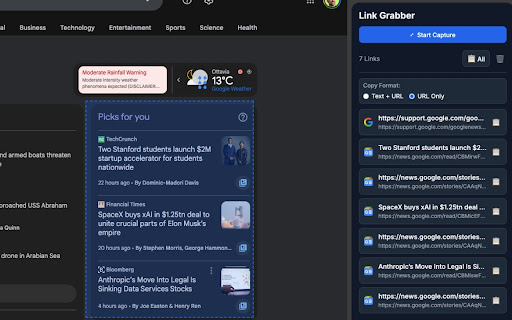
**Link Grabber & Dashboard** is a productivity tool that lets you visually select any area of a webpage and instantly collect every hyperlink found within that area into an organized side panel dashboard.

### How to use

1. Click the **Link Grabber** icon in the Chrome toolbar — the side panel dashboard opens on the right.
2. Press the **"Start Capture"** button in the side panel — a blue information banner appears at the top of the current webpage confirming selection mode is active.
3. On the webpage, **click and drag** to draw a rectangle over the area containing the links you want to capture — a blue dashed outline follows your selection.
4. **Release the mouse** — all hyperlinks found inside the selected area are automatically captured and displayed in the side panel dashboard. Each link shows the page title, full URL, and the website favicon.
5. Use the **📋 copy button** next to any link to copy it individually, or click **"📋 All"** to copy every captured link at once.
6. Switch between **"Text + URL"** (tab-separated format, ideal for spreadsheets) and **"URL Only"** using the copy format toggle.
7. Press **🗑️** to clear all captured links and start fresh.
8. Press **ESC** at any time during selection to cancel without capturing.

### Features

- Visual area selection with drag-to-select rectangle
- Side panel dashboard that stays open while you browse
- Website favicon displayed for each captured link
- Flexible copy formats: Text + URL (TSV) or URL Only
- Copy individual links or all links at once
- Automatic deduplication of captured URLs
- Dark mode support (adapts to system theme)
- Keyboard shortcut: ESC to cancel selection
- Works on all standard web pages (http and https)
Technical
- Version
- 1.0
- Manifest
- V3
- Size
- 46.55KiB
- Min Chrome
- 88
- Languages
- 1
- Featured
- No
Metadata
- ID
- mgfbnpmadacpmddmfoieiagphgckgpoj
- Developer ID
- u41cc95ead32f18a054533ed7f81d81a1
- Developer Email
- [email protected]
- Created
- Feb 10, 2026
- Last Updated (Store)
- Feb 10, 2026
- Last Scraped
- Jun 9, 2026
- Website
- —
- Support URL
- —
- Privacy Policy
- https://sites.google.com/view/linkgrabber/privacy-policy
Similar extensions
Alternatives to Link Grabber & Dashboard, ranked by description similarity.

LinkSnap
LinkSnap - Easily copy and highlight all <a> tags on any webpage with a customizable floating button.
1

Grab Links from Webpage
Grab all links on the current page, filter, copy, and group them.
103

Link Dropper
Save links effortlessly and rediscover them when you need them
31
★ 5.0

EasyLinkClipper
Adds copy buttons next to the page title, allowing you to easily copy the URL or the title + URL to the clipboard.
178

Link Extractor V2
Extracts all links from a page and copies them to the clipboard.
889
★ 4.0

Hover Link Collector - Save & Download Links from Any Webpage
Collects hovered links and allows downloading them as a text file.
31

Link Extractor Pro
Extract all types of links from any webpage with filtering, selection, and multiple export options.
24

Link Harvest
Harvest all hyperlinks from the current page and organize them in a clean list you can filter, copy, or clear.
10
Data sourced from the Chrome Web Store · last verified Jun 9, 2026.