
Convert JPG to PDF
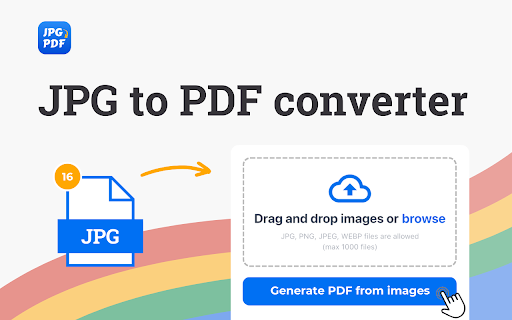
Easily convert JPG to PDF using our JPG to PDF converter. No limit on file size, no registration, no watermark, and absolutely free.
As of May 2026, Convert JPG to PDF has 5,000 users and a 4.88/5 rating from 33 reviews in the Productivity category.
Usersno change0%
5.0K
5,000
Ratingno change0%
4.88
33 reviews
Reviewsno change0%
33
Version
1.3.6
Manifest V3
History
1 snapshotsTracking since Apr 23, 2026.
View as table
| Date | Users | Rating | Reviews | Version |
|---|---|---|---|---|
| Apr 23, 2026 | 5.0K | 4.88 | 33 | 1.3.6 |
| Now | 5.0K | 4.88 | 33 | 1.3.6 |
Permissions & access
- Permissions
- None declared
- Host access
- http://*/*, https://*/*
Screenshots
About
Revolutionize your online content with our JPG to PDF converter browser extension. Effortlessly convert JPG files into universally accepted PDF format directly within your browser. Our user-friendly interface guarantees a seamless conversion experience, providing high-quality results in an instant. Enhance your content strategy by seamlessly incorporating PDF files, bringing a visually compelling aspect to your online identity.

💡 Advantages of Choosing JPG to PDF converter:
🔺 Outstanding image quality.
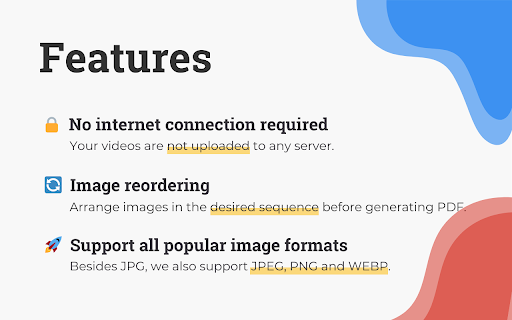
🔺 Convenient image reordering feature.
🔺 High-speed performance for quick conversions.
🔺 Completely free service with transparent pricing, no hidden charges.
🔺 Offline functionality – no need for an internet connection, ensuring convenience in any situation.
🔺 Capability for bulk converting multiple files at once.

🌟 Exceptional User Experience
➤ Seamless navigation with an intuitive interface.
➤ Assured security and confidentiality in communication.
➤ Prompt and efficient access to all features.

🌐 Community-Driven Growth
① Continuous improvements fueled by valuable user feedback.
② Active community involvement for ongoing enhancements.
③ Devoted to innovative and user-centric development.

🌍 Cultural and Language Support
🌐 Number formats tailored for local languages and dialects.
🌐 Cultural considerations for a more personalized experience.
🌐 Multilingual user support catering to a global audience.

📑 Clear Usage Policies
♦️ Concise guidelines for the proper use of the conversion tool.
♦️ Committed to transparency across all operations.
♦️ Expanded FAQ section covering a broader range of user queries.

🖼️ How to convert jpg to pdf?
1. Install the extension.
2. Upload images.
3. Click the "Generate PDF" button.
4. Download the generated PDF file.

🧐 FAQs about the extension

💸 Is this service truly free?
🔹 Absolutely! It is completely free, and there are no hidden fees.
🔹 Convert JPG to PDF without any cost to you.

⏳ Can I perform bulk JPG to PDF conversion?
🔹 Certainly! We do support converting multiple JPG to PDF.

🔄 Why should you convert JPG to PDF?

Converting JPG files to PDF format makes them easily shareable, accessible, and downloadable across various devices and operating systems, thanks to the open file format of PDF. Moreover, this conversion process compresses the file size of JPG images, freeing up storage space and saving you from additional costs. Impressively, despite the reduced size, PDF files maintain the quality and intricate details of the original images after conversion.

📄 How to combine multiple JPG files into a single PDF?

Effortlessly merge multiple JPG files into a unified PDF document using our online JPG to PDF converter. Simply drag and drop the desired images into our application. Arrange multiple pages and customize their layout according to your preferences. Streamline the process and achieve a tailored presentation with ease.

🔒 Is it safe to convert JPG to PDF?

Converting images to PDF, particularly with JPG formats, is generally safe using trustworthy software. It's essential to choose tools prioritizing data privacy and avoiding remote server transmission. Our JPG to PDF converter enhances security by performing all operations offline, safeguarding user information. No personal or sensitive data leaves the device, ensuring privacy during the conversion process.

🆓 How to change JPG to PDF for free?

Start by uploading JPG files with no size limits. Drag and drop them into the "Drop and drop images" area or use the "browse" button. Once uploaded, our tool processes the files automatically. Arrange the images in the desired order within the queue, remembering that the first image becomes page one of the PDF, the second image is page two, and so on. After the conversion is complete and the images are correctly ordered, click the "Generate PDF" button to download one PDF file with all the images.

📪 Contact us: Any questions or suggestions? Feel free to reach out at 💌 [email protected].
Technical
- Version
- 1.3.6
- Manifest
- V3
- Size
- 1.37MiB
- Min Chrome
- 88
- Languages
- 51
- Featured
- Yes
Metadata
- ID
- mgceiehcajpibpoeiddepnnmfkgiipdd
- Developer ID
- u3b6ee580b9a0e09c99c17553eddb218c
- Developer Email
- [email protected]
- Created
- Feb 20, 2024
- Last Updated (Store)
- Jun 6, 2024
- Last Scraped
- May 19, 2026
- Website
- jpg-to-pdf.pro
- Support URL
- https://jpg-to-pdf.pro/contact-us
Similar extensions
Alternatives to Convert JPG to PDF, ranked by description similarity.

JPG to PDF
JPG to PDF – your ultimate solution to convert JPG to PDF quickly, securely, and flawlessly every single time! Try now! 🚀
120

Convert PNG to PDF - Images to PDF converter
Easily convert PNG to PDF. Unlimited file size, no registration, no watermarks, absolutely free.
1.0K
★ 5.0

JPG to PDF Converter by PDFly
Convert JPG to PDF for free.
57

Convert PDF to JPG
Use Convert PDF to JPG to quickly convert PDF into high-quality JPG. A simple pdf2jpg converter for effortless conversion online
871
★ 5.0

Photo to PDF
Use Photo to PDF app to combine and convert photos, pictures, and images in PNG, JPG, HEIC, and WebP formats into a single PDF file.
491
★ 5.0

Convert WEBP to JPG
Convert WEBP to JPG images locally without losing quality. No server upload, keeping your data private
8.0K
★ 4.6

JPG to WebP
Convert JPG to WebP without losing quality! With just one click, convert to WebP format and easily process multiple images in bulk.
2.0K
★ 4.9

JPG to WebP
Convert JPG images to WebP format with adjustable quality settings
163
Data sourced from the Chrome Web Store · last verified May 19, 2026.