Grid View for Google Meet™
Adds a button to use a grid layout in Google Meet™.
As of May 2026, Grid View for Google Meet™ has 100,000 users and a 3.29/5 rating from 218 reviews in the Workflow & Planning category.
Usersno change0%
100.0K
100,000
Ratingup 0.3 percent+0.3%
3.29
218 reviews
Reviewsno change0%
218
Version
3.0.0
Manifest V3
History
1 snapshotsTracking since Apr 23, 2026.
View as table
| Date | Users | Rating | Reviews | Version |
|---|---|---|---|---|
| Apr 23, 2026 | 100.0K | 3.28 | 218 | 3.0.0 |
| Now | 100.0K | 3.29 | 218 | 3.0.0 |
Permissions & access
- Permissions
- None declared
- Host access
- None declared
Screenshots

About
Grid View for Google Meet™

This extension helps to adds a button to use a grid layout in Google Meet.
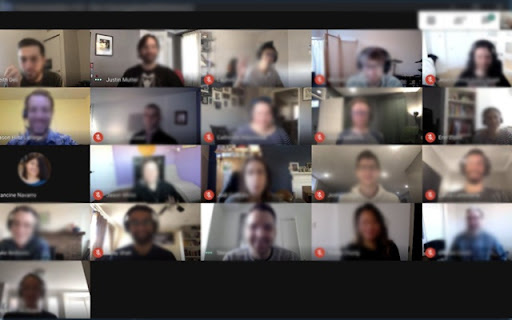
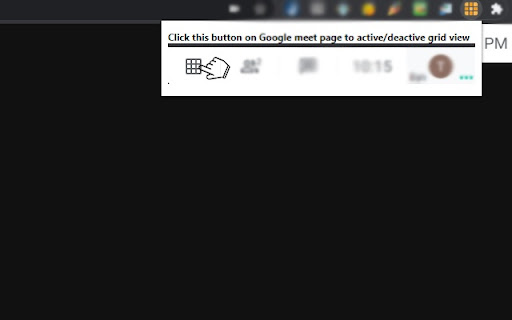
This extension adds a button to the top right bar (next to chat & participant list) to enable grid-view in Google Meet. Grid view gives every participant an equal sized video for use in meetings without a primary speaker
(such as working from home silent meetings ). Try Grid View for hangouts meet.

This extension forcibly loads every participant's video camera, when grid view is enabled and may cause performance issues in extremely large meetings . This software is helpful for Google Meet Grid View, it helps teachers who need to ensure students are paying attention during online classes. It also works for google hangouts meet

Change Log 1.0.2

- Fixed a bug when grid view did not work well if there were more then 12 participants inside a Google Meet meeting.

Change Log 1.0.5

- Fixed the bug for grid view not working correctly.

Change Log 1.0.7

- Added in "Push to Talk" functionality as well. By default, this functionality is switched off. Useful to prevent meeting blunders as you need to press the "space bar" to begin talking. Removes the risk of having "live microphone".

Includes a variety of options to enhance your meeting: include your own video, highlight who is speaking, and hide participants without video!

Change Log 1.0.8

Updated so it works with new design of Google Meet.

To begin using this extension for Google Meet or google meet app, here is what you need to do

Install the Software Extension
Go inside a Google Meet meeting.
Click on the extension icon when you are IN the meeting to activate our extension.
Please NOTE you HAVE to be inside the Google Meeting before you click on the extension icon for this grid view to be enabled.
Grid View will be enabled once you click on the extension icon when you are in a Google Meet online video call.

Please note if you have a large number of participants inside your Google Meet call, it may cause the meeting connection to be unstable if your internet connection is slow/you are using a older computer.

Leave us some feedback if you have any questions/issues for Grid View for google video conference

Disclaimer: Please note this extension is NOT made by Google and is made by an independent development team. All copyrights belong to their respective owners.
Google doesn’t endorse or sponsor this Chrome extension. This is not owned by, it is not licensed by and is not a subsidiary of Google Inc.
Technical
- Version
- 3.0.0
- Manifest
- V3
- Size
- 53.51KiB
- Min Chrome
- 88
- Languages
- 40
- Featured
- No
Metadata
- ID
- mgbmfbimbcffegjaagiolbjpfbepjogk
- Developer ID
- ue4d7df33e15be95b5bbbb3712bf13a45
- Developer Email
- [email protected]
- Created
- Jul 11, 2020
- Last Updated (Store)
- Mar 16, 2022
- Last Scraped
- May 18, 2026
- Support URL
- —
- Privacy Policy
- —
Similar extensions
Alternatives to Grid View for Google Meet™, ranked by description similarity.

Google Meet Grid View Fix
Enable grid view in Google Meet to see all participants at once for easier meetings and better focus.
40.0K
★ 3.1
Virtual Backgrounds for Google Meet™
Virtual Backgrounds for Google Meet™
60.0K
★ 3.0

Google Meet Meat
A collection of features to put a little extra Meat into your Google Meets.
1.0K
★ 5.0

Google Meet Enhancement Suite
40 new features for Google Meet such as mute all, remove all, auto admit, emojis, mirror videos, background color, and push to talk!
100.0K
★ 4.0

Blur Background for Google Meet™
Blur out your background during Google Meet calls. Protect your privacy!
1.0K
★ 3.6

Visual Effects Google Meet
Visual Effects for Google Meet
80.0K
★ 2.8

Reactions for Google Meet
Send your reactions during the Google Meeting
30.0K
★ 4.0

MeetApps: Google Calendar Video Call Links
Quickly start video calls without opening calendar (Zoom, Teams, Meet & 7 others supported)
1.0K
★ 5.0
Data sourced from the Chrome Web Store · last verified May 18, 2026.