
Fathom
Bionic Reading on sites you allow only—custom colors, AI summaries, and explanations for highlighted text.
As of June 2026, Fathom has 1 users in the Education category.
Usersno change0%
1
1
Ratingno change0%
—
— reviews
Reviewsno change0%
—
Version
1.2.0
Manifest V3
90-day change · In the last 90 days this extension 1 version update, changed permissions.
History
3 snapshotsTracking since Apr 17, 2026.
Not enough history yet for this metric — the chart fills in as we collect more snapshots.
View as table
| Date | Users | Rating | Reviews | Version |
|---|---|---|---|---|
| Apr 17, 2026 | — | — | — | 1.1.0 |
| Apr 27, 2026 | — | — | — | 1.2.0 |
| May 29, 2026 | — | — | — | 1.2.0 |
| Now | 1 | — | — | 1.2.0 |
Changelog
- Apr 17, 2026short_description
Bionic Reading mode with custom colors, AI page summaries, and AI-powered explanations for any highlighted text.
Bionic Reading on sites you allow only—custom colors, AI summaries, and explanations for highlighted text.
- Apr 17, 2026permissions
storage, activeTab, scripting, tabs
storage, activeTab, scripting, tabs, windows
Permissions & access
- Permissions
- storageactiveTabscriptingtabswindows
- Host access
- https://fathom-k39efyipn-dais-projects-19cd5676.vercel.app/*
Screenshots


About
Fathom: Your Simple Reading Companion

Reading online should be easy. Whether you are browsing a long blog post, catching up on the news, or trying to understand a new topic, Fathom is a lightweight tool designed to make your reading experience smoother.

It sits quietly in your browser until you need it, offering a few simple features to help you read better and save time.

✨ Core Features:

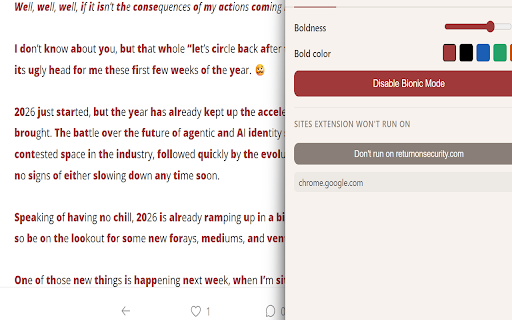
⚡ Bionic Reading Mode: Give your eyes a break. Fathom gently highlights specific parts of words to guide your eyes and improve your reading flow. You can easily customize the highlight colors to match your preferences!

📄 Quick Page Summaries: Don't have time to read the whole thing? Click the Fathom icon to get a clean, concise AI summary of the article you are currently on.

🧠 Explain Highlighted Text: Come across a confusing paragraph or an unfamiliar term? Just highlight the text right there on the page, and Fathom will instantly explain it to you in plain terms.

How to use Fathom:

- Pin the Fathom icon to your browser toolbar.

- Click the icon to turn on Bionic Reading or get a quick summary of the current page.

- Highlight any text and use the Fathom popup to get an instant explanation.
Technical
- Version
- 1.2.0
- Manifest
- V3
- Size
- 47.76KiB
- Min Chrome
- 88
- Languages
- 1
- Featured
- No
Metadata
- ID
- mgakipkecofbhphpknhkhkjgijippbjc
- Developer ID
- u437b7292310551a28f210fb1e195eff2
- Developer Email
- [email protected]
- Created
- Mar 11, 2026
- Last Updated (Store)
- Apr 8, 2026
- Last Scraped
- Jun 10, 2026
- Website
- —
- Support URL
- —
Similar extensions
Alternatives to Fathom, ranked by description similarity.

FocusRead
The ultimate tool for distraction-free reading. Read line-by-line, listen aloud, and test your comprehension with AI quizzes.
25
★ 5.0

Bionic Reader
Open current page or selected text in Bionic Reader
11

Briefly AI - Smart Text Summarizer
Instantly summarize any webpage, article, or selected text with AI. Save time reading with one click!
1

Simplified - Explain Complex Things
AI-powered assistant that explains selected text, code, and complex concepts in simple terms. Perfect for everyday use.
2

Simplify 4 Me
Offline text simplifier for Chrome. Replace complex words, simplify pages, and stay private.
1

Explain Like I'm 5
Highlight text, right-click and get a simple explanation using AI.
12
★ 5.0

LexiQ
Get instant word meanings when you select text.
16
★ 4.5

Explainify
Provides instant, context-aware, simplified explanations on text selection.
24
★ 5.0
Data sourced from the Chrome Web Store · last verified Jun 10, 2026.