AI Image Prompter - for Midjourney and more
An easier AI image prompting tool for Midjourney and more
As of May 2026, AI Image Prompter - for Midjourney and more has 2,000 users and a 4.00/5 rating from 4 reviews in the Workflow & Planning category.
Usersno change0%
2.0K
2,000
Ratingno change0%
4.00
4 reviews
Reviewsno change0%
4
Version
1.0.7
Manifest V3
History
1 snapshotsTracking since Apr 23, 2026.
View as table
| Date | Users | Rating | Reviews | Version |
|---|---|---|---|---|
| Apr 23, 2026 | 2.0K | 4.00 | 4 | 1.0.7 |
| Now | 2.0K | 4.00 | 4 | 1.0.7 |
Permissions & access
- Permissions
- activeTab
- Host access
- None declared
Screenshots

About
AI Image Prompter
 (v1.0.7).

Visual prompting for Midjourney and more.  Generate prompt by clicking without memerizing.

1  Features:
1)  Generate prompt by clicking
     Generate prompt by sample image clicking without memorizing.
     Fasten your prompt engineering efficiently.

2)  Categorized prompts for AI drawing
     Categorized preset prompts including Subject, Style and Parameter.
     Much easier to select.

3)  Lots of preset prompts
    100+ preset most commonly used prompts for AI drawing.
    More will be added.

2.  Quick Guide
         Final prompt = Input +  Select  + Copy
     1)Installing Image Prompter extension
                Now Edge add-on is available from Mirosoft Edge store
     2). Open Midjourney
               Open Midjourney workspace.
               official website: https://www.midjourney.com
               on dicord - https://discord.com
               on slack  - https://app.slack.com
     3). Open Image prompter ( see picture above )
                 Image Prompter will be shown automatically by clicking the show handle on the up-right corner of this page.
     4). Input Core Prompt
              Think about what to draw first, then input it in the Core Prompt area, e.g. "a cat in the garden".
     5).  Select prompt
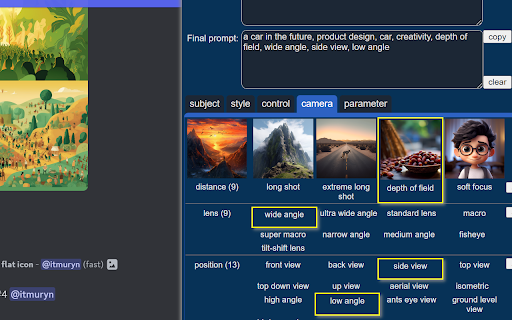
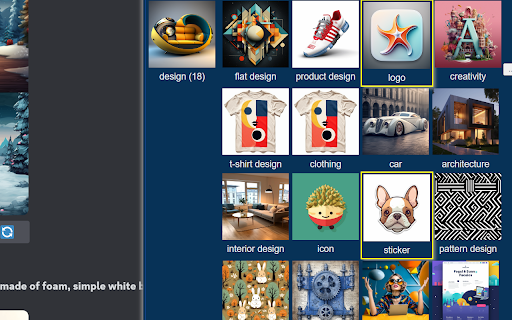
              by clicking Subject, Style, Parameter sample picture.   The final prompt will be added by your selection.
              Click the "..." button on the right of each feature line to show more features.
     6). Copy final prompt
            Click the copy button of Final Prompt, then paste it into Midjourney workspace to generate your image.

3. Concepts
     Feature
        The text prompt controlling how the image is generated. It's divided into three basic categories:  Subject , Style , Parameter.

    1)  Subject
         It defines what to draw,  i.e. the content of the image.
         First, you need think about your idea. The core subject prompt is up to you to input. Such as a boy,  a spaceship,  a cat running away.

         While as for the other supplement subject prompt , Image Prompter has provided many preset options to select, such as
         as for figure,     portrait ,  profile,  , headshot, selfie,  full body shot ...  ( see the picture above )
         as for design ,  flat design , product design,  logo ,  architecture ...      ( see the picture above )

    2)Style
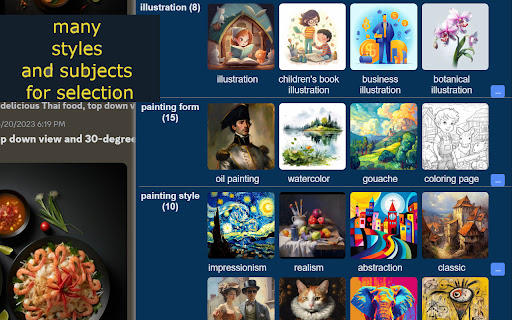
        It controls how to draw the image. Such as photography, cartoon, painting form , painting style etc.  For example:
           -  Painting form : oil painting , watercolor,
           -  realistic or impressionistic
        Style is the key element of AI Imaging when you work on Prompt Engineering.
        Image Prompter provides a large amount of preset style options for you.   See Style List for details.

    3)Parameter
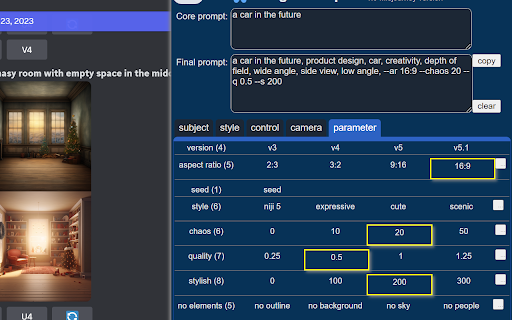
         It controls how to draw by the render engine, such as
        - Midjourney version
       -  aspect ratio:      2:3,  3:2, 16:9,  9:16 ...
        - quality
        - chaos
       -  stylish
       -  seed


4. Style

There are 7 style categories with 50 commonly used styles in version 1.0.
More styles will be updated continuously.
  1)   Photo        (6+):  real,  photography, cimematic, retro ...
  2)   New image style   (8+): fantasy, science fiction, cyperpunk ...
  3)   Cartoon       (8+): 2d cartoon, commic, disney, anime ...
  4)   Illustration   (6+): children illustration,  digital illustration ...
  5)   Painting form   (9+): oil painting, watercolor, coloring page ...
  6)   Painting style   (6+): realistic, impressionism, classic,pop art, ...
  7)   Artist          (6+): Van Gogh, Michelangelo, Peaky Blinders ...

5. Parameter
     Parameter is used to control the render engine how to work.

  The main paramters include :
  - 1)   engine version
  - 2)   aspect ratio
  - 3)   chaos
  - 4)   quality
  - 5)   seed

6. Future Version Plan
- More styles for your selection.
- More parameters for your selection.

7. Feadback and requirement
  Website - https://www.luupine.com/
  Feedback on Twitter -  https://twitter.com/raykkncc
- Bug or suggestion
- More style prompt requirement
Technical
- Version
- 1.0.7
- Manifest
- V3
- Size
- 346KiB
- Min Chrome
- 88
- Languages
- 1
- Featured
- Yes
Metadata
- ID
- mgakiomdaaebpebkmjleifhehclodgel
- Developer ID
- ub255603d86a18412291513eba8b34132
- Developer Email
- [email protected]
- Created
- May 30, 2023
- Last Updated (Store)
- Mar 5, 2025
- Last Scraped
- May 18, 2026
- Website
- —
- Support URL
- https://twitter.com/luupine_studio
- Privacy Policy
- —
Similar extensions
Alternatives to AI Image Prompter - for Midjourney and more, ranked by description similarity.

Prompt Tool - Midjourney Prompt Helper
Midjourney's prompt generation assistant saves the learning cost of AI drawing creators and improves drawing efficiency.
3.0K
★ 5.0

Cover Prompt
Save and manage AI prompts directly in the browser.
27

Prompt 01
Capture selected text, save prompts, and paste them into AI tools.
2

PromptitUp
PromptitUp: The Ultimate AI Prompt Engineering Tool
Stop struggling with basic prompts! PromptitUp transforms your simple ideas…
4

MyPrompts
Easily save, manage, and share your artificial intelligence prompts from any website with MyPrompts.
73

AI Images & Prompts Directory
Organize and search your AI-generated images and prompts across multiple platforms with ease.
314

PromptSave: Discover, Save & Share Prompts
Beautifully save your Chat GPT, mid-journey, Bing, or any other AI prompts you use & easily within your reach.
695
★ 5.0

Nice Prompt
Save, organize and easily bookmark your prompts and reach from anywhere.
116
★ 5.0
Data sourced from the Chrome Web Store · last verified May 18, 2026.