
ASIN Finder for Amazon™
ASIN Finder chrome extension finds and displays codes for all Amazon™ products with a single click.
As of June 2026, ASIN Finder for Amazon™ has 317 users and a 2.33/5 rating from 3 reviews in the Shopping category.
Usersup 0.3 percent+0.3%
317
317
Ratingno change0%
2.33
3 reviews
Reviewsno change0%
3
Version
1.2.0
Manifest V3
History
3 snapshotsTracking since Apr 1, 2026.
View as table
| Date | Users | Rating | Reviews | Version |
|---|---|---|---|---|
| Apr 1, 2026 | 316 | 2.33 | 3 | 1.2.0 |
| May 2, 2026 | 315 | 2.33 | 3 | 1.2.0 |
| Jun 1, 2026 | 332 | 2.33 | 3 | 1.2.0 |
| Now | 317 | 2.33 | 3 | 1.2.0 |
Permissions & access
- Permissions
- activeTabstoragetabswebNavigationwebRequest
- Host access
- None declared
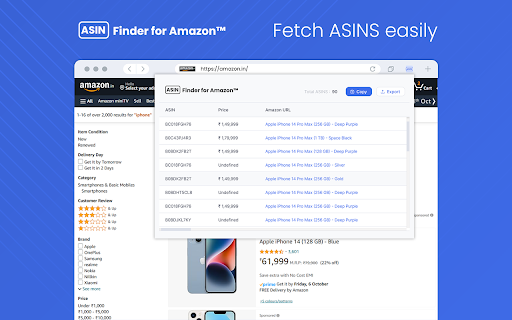
Screenshots
About
ASIN Finder for Amazon is a powerful chrome extension designed to simplify your Amazon shopping experience. It helps you quickly locate and display ASIN (Amazon Standard Identification Number) codes for products listed on Amazon. ASIN codes are essential for various purposes, including tracking products and conducting research.


Key Features:

>> Seamless Integration: ASIN Finder for Chrome seamlessly integrates into your Chrome browser, making it easy to access ASIN codes without leaving the Amazon product page.

>> One-Click ASIN Retrieval: With a single click, the extension automatically identifies and retrieves the ASIN code of the product you're viewing on Amazon.

>> Multiple ASIN Lookup: Users can check multiple product ASIN at once on Amazon product search page, and it will fetch ASIN codes for all of them at once.

How to Use ASIN Finder for Chrome?

>> Click on the extension and click "Add to Chrome" to install it.

>> Once installed, the extension icon will appear in your Chrome toolbar.

>> Navigate to an Amazon product page you want to retrieve the ASIN code for.

>> Click on the ASIN Finder icon in your Chrome toolbar

  >> Now the extension will display the ASIN codes & users can copy or export them on the system


ASIN Finder for Chrome streamlines your Amazon shopping experience by providing quick access to ASIN codes, ultimately saving you time and effort when researching or managing Amazon products.
Technical
- Version
- 1.2.0
- Manifest
- V3
- Size
- 3.03MiB
- Min Chrome
- 88
- Languages
- 1
- Featured
- No
Metadata
- ID
- mfhlbfloahiajdjfnllfmpfobdhfkfah
- Developer ID
- ub85c8ccbe61f809f0fe71a430155ce79
- Developer Email
- [email protected]
- Created
- Oct 15, 2023
- Last Updated (Store)
- Apr 11, 2024
- Last Scraped
- Jun 1, 2026
- Website
- https://ecombullet.com/
- Support URL
- —
Similar extensions
Alternatives to ASIN Finder for Amazon™, ranked by description similarity.

ASIN Harvester
Collect and manage ASINs from Amazon product pages across multiple pages
6
★ 5.0

Search on Amazon - Effortless Product Search on Amazon - Amazon Search
Search on Amazon: Quickly search products on Amazon (Alt + 1), supports 19 sites. Boost productivity & save time!
32
★ 5.0

Amazon Product Analyzer
Amazon product search analyzer: Sort products by price, rating, reviews and sales count.
28

Amazon Product Scraper
Scrape Amazon product information based on keywords
226
★ 3.7

comparizon.eu: Right-Click Amazon QuickSearch
QuickSearch Amazon products using the right-click context menu.
69
★ 5.0

Amazon Info Tool – ASIN, BSR, Seller & Price
View key Amazon product information such as ASIN, price, seller, rating, and Best Sellers Rank directly on product pages.
10
★ 5.0

Amazon Promo Code Finder
Automatically applies promo codes at Amazon checkout
232
★ 3.5

Amazon Coupon Finder
The Chrome extension that finds AMAZON coupons in autopilot.
92
Data sourced from the Chrome Web Store · last verified Jun 1, 2026.