
Collaborator Link Assistant
Your personal list assistant: link tracker & marketplace checker
As of June 2026, Collaborator Link Assistant has 2,000 users and a 3.87/5 rating from 15 reviews in the Developer Tools category.
Usersno change0%
2.0K
2,000
Ratingdown 3.2 percent−3.2%
3.87
15 reviews
Reviewsup 15.4 percent+15.4%
15
Version
2.1
Manifest V3
90-day change · In the last 90 days this extension 2 version updates, changed permissions.
History
2 snapshotsTracking since May 2, 2026.
View as table
| Date | Users | Rating | Reviews | Version |
|---|---|---|---|---|
| May 2, 2026 | 2.0K | 4.00 | 13 | 1.7.4 |
| Jun 24, 2026 | 2.0K | 4.07 | 14 | 2.0 |
| Now | 2.0K | 3.87 | 15 | 2.1 |
Changelog
- May 2, 2026description
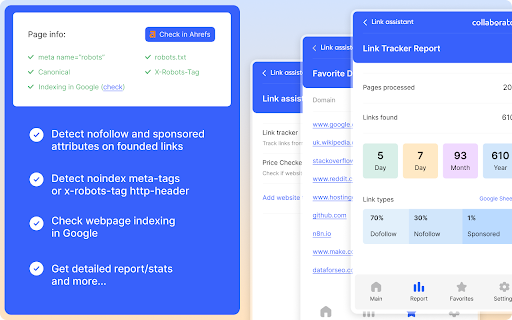
Hey there, link builder! How many times a day do you find yourself frantically searching for that one link you placed? Or worse, discovering whether the blogger placed it correctly, whether it’s dofollow or nofollow, or if the page is open for indexing? 😵💫 Well, fret no more! Introducing the Racoon Link Checker for link builders — your new best friend in the wild world of link building! 📌 What Racoon Link Checker does: 👉Automatically sniffs out your links: No more manual searching! Click "Scroll to link" to see where the link is placed. 👉Dofollow detective: Is it dofollow? Nofollow? Sponsored? The Racoon knows all and tells all! 👉Indexing insights: Find out if the page is indexed or if it's playing hide-and-seek with Google. 👉Google Sheets Export: Automatically export link details (page URL, date, anchor, dofollow/nofollow status) straight to Google Sheets. Perfect for organizing your link-building process. 📌How it works: No need to enter URLs manually – the extension automatically finds and analyzes links from your chosen domains on any webpage you visit in Chrome! Get instant details on link attributes, indexing status, and more with a handy popup. 🚀 Why you'll love it: 👉Time-saver: Say goodbye to hours of manual checking. Work smarter, not harder!💡 👉Organization made easy: With automatic exports to Google Sheets, your link-building process will be smoother than a freshly paved road. 👉Stay one step ahead: Catch any sneaky changes to your links before they become a problem. 👉Perfect for link builders: Whether you're a solo link-building ninja or part of a team, this tool is your secret weapon. 📌 Features of link building tool: 👉Detects dofollow, nofollow, and sponsored attributes in links. 👉Detects noindex meta tags on pages. 👉Checks for X-Robots-Tag headers for indexing status. 👉Checks if the page is indexed in Google search results. 👉Checks Robots.txt if a page with the placed link is not closed from indexing. 👉Check if the canonical domain matches the domain in the page URL. 👉Provides options to scroll to detected links. 👉Allows copying link information to the clipboard. 👉Option to export link data to Google Sheets (when enabled). 👉Allows users to specify domains to check and exclude. 👉Allows customization of the link builder name for Google Sheets export. 👉Report. The report provides an overview of the links that you placed. Dofollow, nofollow, and sponsored type distribution. ⚙️ How to set up: 1) Click on the extension icon in your browser toolbar. 2) Select "Settings" from the popup menu. 3) On the Settings page, add the domains for links from which the extension will detect on the opened page. 4) Add domains ("Domains to Exclude" field) where the link checker extension will not check the links, for example, on your website or Ahrefs. Enable Export to Google Sheets (Optional): 1) To use the Google Sheets export feature, click on "Export to Google Sheets Settings." 2) Follow the instructions to set up a Google Apps Script and enter the script URL in the provided field. 3) Click "Save Settings" at the bottom of the page. - So, why not let Racoon take the hassle out of link building and get back to what you do best? 🚀Instantly find your backlinks on websites along with their attributes and indexing data, and check placement costs on sites available in the Collaborator catalog using Link Assistant. This convenient Chrome extension for link builders helps save significant time when planning link-building campaigns and monitoring already posted links. 📌 Key Features 1. Monitoring Links for Your Domains (Link Tracker) ✦ Automatic detection of your backlinks when visiting websites. ✦ List of found links with their attributes (dofollow, nofollow, sponsored). ✦ Quick scroll to the specified link. ✦ Page indexing check: Google indexing, canonical tag, meta-robots, robots.txt, x-robots-tag. ✦ Export link lists to clipboard or Google Sheets. ✦ Domain-based exclusion settings. ✦ Reports on the number and type of detected links: daily, weekly, monthly, yearly. 2. Checking Placement Price via the Collaborator Marketplace (Price Checker) While analyzing search results by keywords or competitors’ referring domains in Ahrefs, instantly see placement costs on sites available in the Collaborator catalog. 📌 Additional Functionality Add sites to your favorites list and manage them easily for further work. 📌 Why Choose Collaborator Link Assistant ✦ Time-saving: no more spending hours manually checking links. ✦ Full control: instant information about links, their attributes, and indexing. ✦ Easy organization: exporting data to Google Sheets makes your workflow smooth and transparent. ✦ Suitable for any level: ideal for solo specialists or teams.
- May 2, 2026short_description
Automatically checks if your links are present on web pages and provides a summary report!
Your personal list assistant: link tracker & marketplace checker
- May 2, 2026name
Racoon SEO Link Checker
Collaborator Link Assistant
- May 2, 2026host_permissions
https://script.google.com/*, https://www.google.com/*, <all_urls>
(empty)
- May 2, 2026permissions
storage, clipboardWrite
storage, tabs, clipboardWrite, alarms
Permissions & access
- Permissions
- storagetabsclipboardWritealarms
- Host access
- None declared
Screenshots



About
Instantly find your backlinks on websites along with their attributes and indexing data, and check placement costs on sites available in the Collaborator catalog using Link Assistant.

This convenient Chrome extension for link builders helps save significant time when planning link-building campaigns and monitoring already posted links.

📌 Key Features

1. Monitoring Links for Your Domains (Link Tracker)
✦ Automatic detection of your backlinks when visiting websites.
✦ List of found links with their attributes (dofollow, nofollow, sponsored).
✦ Quick scroll to the specified link.
✦ Page indexing check: Google indexing, canonical tag, meta-robots, robots.txt, x-robots-tag.
✦ Export link lists to clipboard or Google Sheets.
✦ Domain-based exclusion settings.
✦ Reports on the number and type of detected links: daily, weekly, monthly, yearly.

2. Checking Placement Price via the Collaborator Marketplace (Price Checker)
While analyzing search results by keywords or competitors’ referring domains in Ahrefs, instantly see placement costs on sites available in the Collaborator catalog.

📌 Additional Functionality

Add sites to your favorites list and manage them easily for further work.

📌 Why Choose Collaborator Link Assistant

✦ Time-saving: no more spending hours manually checking links.
✦ Full control: instant information about links, their attributes, and indexing.
✦ Easy organization: exporting data to Google Sheets makes your workflow smooth and transparent.
✦ Suitable for any level: ideal for solo specialists or teams.
Technical
- Version
- 2.1
- Manifest
- V3
- Size
- 79.46KiB
- Min Chrome
- 88
- Languages
- 1
- Featured
- No
Metadata
- ID
- menngjohfmmcpcljplgioeoejblcfegc
- Developer ID
- uf91dfc16cc870408eff9287a075874bc
- Developer Email
- [email protected]
- Created
- Jul 30, 2024
- Last Updated (Store)
- Jun 13, 2026
- Last Scraped
- Jun 24, 2026
- Website
- —
- Support URL
- —
- Privacy Policy
- —
Similar extensions
Alternatives to Collaborator Link Assistant, ranked by description similarity.

Brand Backlinks Checker
A Chrome extension for monitoring backlinks with project management capabilities.
25
★ 5.0

Backlink Checker
Free backlink checker tool to verify links from freelancer reports. Upload CSV, PDF, or XLS and validate backlinks instantly.
86

Broken Link Checker
Broken Link Checker finds dead links, 404 errors & redirects on any page. One-click scan with color coding. Export results to CSV.
3.0K
★ 5.0

Broken Links Finder
Broken Link Finder can scan entire website or a single page. Effortlessly detect dead links and optimize your site's SEO!
16

Link Attributes
Highlights dofollow and nofollow external links on websites for SEO analysis
5

Technical SEO - Robots Status & Index Checker
Auto-checks robots.txt, meta robots, X-Robots-Tag & canonical. Instant Google index status. Smart icon alerts issues automatically.
43

All Links Extractor - SEO Link Audit Tool
Extract, audit, check, crawl, save, and export links for SEO with filters, history, reports, and broken link checks.
270
★ 4.7

Internal Links Spotter - DoFollow, NoFollow, Sponsored
Automatically detects and counts internal links on a web page, outlining them for easy visualization.
36
Data sourced from the Chrome Web Store · last verified Jun 24, 2026.