
SEO Meta Tags & OG Previewer
Preview, edit, and analyze meta tags & OG data directly from any webpage in one click.
As of June 2026, SEO Meta Tags & OG Previewer has 93 users and a 5.00/5 rating from 1 reviews in the Workflow & Planning category.
Usersup 16.3 percent+16.3%
93
93
Ratingno change0%
5.00
1 reviews
Reviewsno change0%
1
Version
1.0
Manifest V3
History
5 snapshotsTracking since Apr 1, 2026.
View as table
| Date | Users | Rating | Reviews | Version |
|---|---|---|---|---|
| Apr 1, 2026 | 80 | 5.00 | 1 | 1.0 |
| Apr 19, 2026 | 74 | 5.00 | 1 | 1.0 |
| May 4, 2026 | 90 | 5.00 | 1 | 1.0 |
| May 13, 2026 | 96 | 5.00 | 1 | 1.0 |
| May 25, 2026 | 89 | 5.00 | 1 | 1.0 |
| Now | 93 | 5.00 | 1 | 1.0 |
Permissions & access
- Permissions
- activeTabscripting
- Host access
- <all_urls>
Screenshots


About
Meta tags and Open Graph (OG) data are the backbone of how your website is presented online. They control how your site appears in search engine results and how it looks when shared on social media platforms like Facebook, Twitter, and LinkedIn.
The challenge? Editing and testing these tags often means digging into source code, making live changes, re-uploading files, and hoping everything looks right after publishing. This is time-consuming and often frustrating.
SEO Meta Tags & OG Previewer solves this problem by allowing you to instantly preview, analyze, and test meta tags and OG data directly from any webpage, without touching live code.
-----
## Why SEO Meta Tags & OG Previewer?
Your website’s first impression matters. On Google, it’s your title and description that attract clicks. On social platforms, it’s the OG image, title, and description that make users stop scrolling. Poorly optimized or missing tags mean fewer clicks, lower engagement, and missed opportunities.
Common problems include:
a. Missing meta descriptions
b. Duplicate titles across multiple pages
c. Broken or missing OG images
d. Canonical URL issues that confuse search engines
With this extension, you get instant previews and the ability to edit and test tags on the spot, ensuring your pages look perfect before publishing.
----
## Key Features
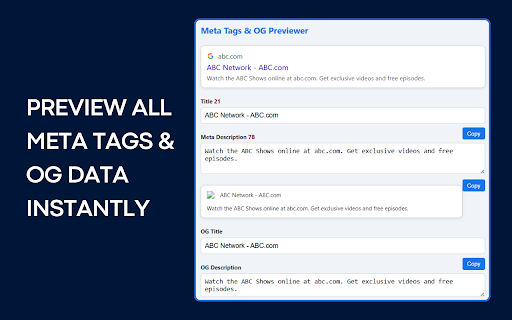
🔍 Preview All Meta Tags – View every meta tag on the current page in a clean, easy-to-read interface.
🌐 Open Graph (OG) Data Viewer – Instantly check OG title, description, image, type, and URL.
📱 Social Media Card Preview – See how your page looks when shared on Facebook, Twitter, LinkedIn, and WhatsApp.
✏️ Edit & Test Tags in Real Time – Try different headlines, descriptions, or images without changing live code.
📊 SEO Tag Analysis – Get insights into title length, description length, duplicate tags, and canonical issues.
⚡ One-Click Access – Install and start using instantly, no setup required.
----
## Who Is It For?
This extension is designed for:
👨💻 Developers – Debug meta tags quickly without opening code editors.
📈 SEO Experts – Analyze and optimize tags efficiently.
🎯 Marketers – Ensure campaigns look great across all platforms.
✍️ Bloggers & Content Creators – Test how articles appear when shared.
🚀 Business Owners & Startups – Control your brand’s first impression online.
----
## Real-Life Use Cases
a. SEO Specialist Verifying Product Pages – Quickly check titles, descriptions, and canonical tags before a site audit.
b. Blogger Testing Article Previews – Ensure posts look attractive when shared on Twitter or Facebook.
c. Startup Founder Preparing Landing Pages – Preview how the homepage or product launch page will appear on LinkedIn before going live.
----
## Benefits
⏳ Save Time – No more switching between dev tools and editors.
📊 Boost SEO Performance – Optimize tags for higher rankings.
📈 Improve CTR – Attractive previews encourage more clicks.
🛡️ Avoid Mistakes – Spot missing or broken tags early.
💼 Ensure Professional Previews – Links look polished across platforms.
🙌 Simple but Powerful UI – Beginner-friendly yet advanced enough for professionals.
----
## How to Use
1. Install the extension from the Chrome Web Store.
2. Open any webpage you want to analyze.
3. Click the Meta Tags & OG Previewer icon in your browser toolbar.
4. Explore the tabs:
a. Meta Tags → SEO-related tags
b. OG Data → Social sharing tags
c. Preview → See how your page looks on social media
5. Edit Mode → Test new titles, descriptions, or images instantly
Make adjustments and optimize confidently.
----
Meta tags and OG data may seem small, but they play a big role in how people discover, interact with, and share your content online. A missing tag or poorly written description could cost you valuable clicks and engagement.
With Meta Tags & OG Previewer, you gain full control over your website’s first impression. Whether you’re optimizing for SEO or preparing for a social media campaign, this extension ensures your content looks professional, polished, and ready to perform.
👉 Install today and take charge of your website’s visibility, SEO performance, and social media presence.
----
### Developer Disclaimer & Support
This extension only analyzes and previews meta tags from the websites you choose to inspect. It does not collect, store, or share your personal data.
📩 For support, feedback, or bug reports, please contact: [email protected]Technical
- Version
- 1.0
- Manifest
- V3
- Size
- 16.1KiB
- Min Chrome
- 88
- Languages
- 1
- Featured
- No
Metadata
- ID
- mekjdhoenipabelfjjhgmoccjpllinkk
- Developer ID
- ua8362b9c933affd1f91b3548900fb967
- Developer Email
- [email protected]
- Created
- Oct 10, 2025
- Last Updated (Store)
- Oct 10, 2025
- Last Scraped
- Jun 6, 2026
- Website
- —
- Support URL
- —
Similar extensions
Alternatives to SEO Meta Tags & OG Previewer, ranked by description similarity.
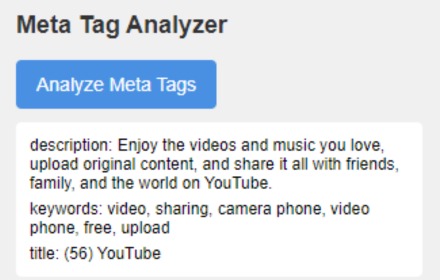
Meta Tag Analyzer
Analyze and display meta tags (title, description, and keywords) for the current webpage.
2.0K

SEO Brief&Blog Generator
Generate SEO briefs or complete blogs for your Shopify content from Chrome.
9
★ 5.0

Word Counter & Keyword Density Analyzer
Instant word count & keyword density analysis for any webpage.
54
★ 5.0

Kredo Competitor Keyword Finder
Analizza le keyword principali delle pagine competitor in un click
18
★ 5.0

OverdoAI
OverdoAI analyzes your Upwork and LinkedIn profiles, scores your pitches, and finds verified emails — so you win more clients
29

SEO Check Pro
Comprehensive SEO analyzer with 50+ checks - meta tags, Core Web Vitals, schema markup, accessibility & more.
7

MrxSEO - Light MetaTags Highlighter
Show the main SEO tags in the page: canonical(s), hreflangs, robots, amps
387
★ 5.0

AI SEO AEO Optimizer
All-in-One SEO: audit, content analysis, performance, AI insights & AI visibility checker
5.0K
★ 4.6
Data sourced from the Chrome Web Store · last verified Jun 6, 2026.