
Chinese Console Popup Dictionary
Hover over Chinese characters for definitions, images, examples, visualizations, radicals, frequencies, HSK info, & more
As of June 2026, Chinese Console Popup Dictionary has 947 users and a 4.29/5 rating from 17 reviews in the Workflow & Planning category.
Usersup 3.3 percent+3.3%
947
947
Ratingno change0%
4.29
17 reviews
Reviewsno change0%
17
Version
1.5.1
Manifest V3
History
3 snapshotsTracking since Apr 1, 2026.
View as table
| Date | Users | Rating | Reviews | Version |
|---|---|---|---|---|
| Apr 1, 2026 | 917 | 4.29 | 17 | 1.5.1 |
| May 2, 2026 | 950 | 4.29 | 17 | 1.5.1 |
| Jun 1, 2026 | 960 | 4.29 | 17 | 1.5.1 |
| Now | 947 | 4.29 | 17 | 1.5.1 |
Permissions & access
- Permissions
- activeTabstorage
- Host access
- None declared
Screenshots




About
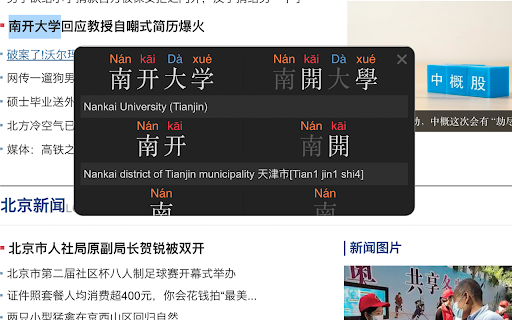
Chinese Console - Popup Chinese-English Dictionary is a tool to help you read, explore, and better understand the Chinese characters in any web page on the web.

By hovering over words and characters you are interested in, detailed information will be shown in the console area.  The information that Chinese Console shows includes:

- Mandarin Chinese-English Dictionary definitions
- Simplified and Traditional characters
- Pinyin tone pronunciation
- Animated stroke order digrams
- A list of example words that a character occurs in
- A list of similar characters (eg 大犬六穴太尢)
- Character radical composition information
- View images associated with the searched word
- Colorize all characters on the page by frequency in the language
- Colorize all characters on the page by frequency on the page
- A flexible layout (display in corners, or on left or right side
- Floatable mode, where a box of information follows your cursor
- Colorized themes, including light mode, dark mode, "morning", "ocean", "forest" & "candy"
- Minimized mode
- Navigate a history of searched words
- Search by typing interface
- HSK level information
- Configurable to display only info you want
- Global and Site-specific configuration
- Configurable hot-key (alt, ctl...) to activate console

You can color the characters on the page according to how common (green) or uncommon (red) the character is so you know how "important" the character is. Using this "distribution frequency" you can colorize characters by frequency in the language as a whole (based on a Chinese web corpus), or the page being viewed.

Another common way to know how "important" or "difficult" a character is is by using the HSK level (汉语水平考试 (Hanyu Shuiping Kaoshi ), Chinese Proficiency Test administered by the Hanban. Chinese Console

Characters are formed by radicals, and Chinese Console decomposes characters into radicals for better understanding. At the touch of a button you can view images associated with the word you've looked up to get a better idea of what that word means on the web. You can also customize where the console appears on the page so that your content is always easily viewable.

If you don't need to display some of this information the console can be configured to show only what you need. You can also maintain a separate configuration (position, and info display) both globally (all pages) and per-site if needed.

The console uses a 'hot-key' to activate it's searching, to stay out of the way of normal page interactions. This key is configurable by you in a variety of ways for both Mac and PC users.


ROADMAP

- Integrate Extension with a website backend so users can track their own words and pages.

CHANGELOG

Version 1.4.2

- Added animated stroke order diagrams for characters

Version 1.4.1

- Added colored theme support

Version 1.4.0

- Character information is now shown for sub-words and all characters. In previous version results for 共同体 would only show info for 共同体 and 共. In version 1.4 results will show 共同体, 共同, 共,同 and 体.
- A link to donate to support the project is now provided.
- Long words (5 chars or more) now show in smaller text, to prevent overlapping display.
Technical
- Version
- 1.5.1
- Manifest
- V3
- Size
- 7.53MiB
- Min Chrome
- 88
- Languages
- 1
- Featured
- No
Metadata
- ID
- mekipefdgdacoicbibojhhjppiiaoidp
- Developer ID
- u85600554646b5c056ebd18c426cce7af
- Developer Email
- [email protected]
- Created
- Nov 8, 2017
- Last Updated (Store)
- Dec 29, 2024
- Last Scraped
- Jun 1, 2026
- Website
- —
- Privacy Policy
- —
Similar extensions
Alternatives to Chinese Console Popup Dictionary, ranked by description similarity.

Teochew Pop-up Dictionary
Learn Chinese vocabulary in Teochew.
460
★ 5.0

Cantonese Popup Dictionary
Cantonese-English pop-up dictionary for Chrome
332
★ 5.0

Danmu - comics reader
漫畫閱讀器 - 自動下捲與翻頁,如同觀看動畫般的體驗。讓你可騰出雙手邊享受美食邊閱讀,並透過彈幕參與嘴砲的樂趣。
158

Oald 7 牛津高阶第七版
牛津高阶 Chrome App,您学习英语的好助手!
4.0K
★ 4.9

CantoTranslate
This extension helps you learn Cantonese straight from your browser, by creating a Cantonese Popover Dictionary!
533
★ 5.0

德语助手
提供权威的德汉-汉德词典参考,网页逐段对照翻译、PDF文献翻译功能,德语学习必备参考工具。可以和客户端同步学习记录。
3.0K
★ 5.0

LAOS — Your mandarin learning companion
LAOS is THE chinese learning toolbox! It offers a popup translator, personalised exercises and much more!
188

Less Translate - 鼠标指向翻译
无需点击, 鼠标指向0.05秒出翻译结果
4.0K
★ 3.6
Data sourced from the Chrome Web Store · last verified Jun 1, 2026.