
AnySnooze
Breeze through snoozing your tabs with plain English
As of June 2026, AnySnooze has 348 users and a 4.36/5 rating from 14 reviews in the Workflow & Planning category.
Usersdown 4.7 percent−4.7%
348
348
Ratingno change0%
4.36
14 reviews
Reviewsno change0%
14
Version
1.2.3
Manifest V3
History
9 snapshotsTracking since Apr 1, 2026.
View as table
| Date | Users | Rating | Reviews | Version |
|---|---|---|---|---|
| Apr 1, 2026 | 365 | 4.36 | 14 | 1.2.3 |
| Apr 16, 2026 | 373 | 4.36 | 14 | 1.2.3 |
| Apr 22, 2026 | 379 | 4.36 | 14 | 1.2.3 |
| Apr 27, 2026 | 380 | 4.36 | 14 | 1.2.3 |
| May 4, 2026 | 375 | 4.36 | 14 | 1.2.3 |
| May 11, 2026 | 369 | 4.36 | 14 | 1.2.3 |
| May 20, 2026 | 361 | 4.36 | 14 | 1.2.3 |
| May 30, 2026 | 368 | 4.36 | 14 | 1.2.3 |
| Jun 7, 2026 | 362 | 4.36 | 14 | 1.2.3 |
| Now | 348 | 4.36 | 14 | 1.2.3 |
Permissions & access
- Permissions
- alarmsstorageactiveTabscriptingnotificationscookies
- Host access
- <all_urls>
Screenshots


About
AnySnooze lets you snooze tabs naturally - just type when you want them back.

NATURAL LANGUAGE INPUT
Type like you talk:
• "tomorrow at 3pm"
• "in 2 hours"
• "next Monday morning"
• "later today"
• "in 30 minutes"

No clicking through date pickers. No confusing interfaces. Just type and snooze.

SMART SHORTCUTS
Even faster with single-letter shortcuts:
• l = Later today (6pm)
• t = Tomorrow morning
• m = Next Monday
• f = Friday afternoon
• h = In 1 hour
• r = Last snooze time

KEYBOARD POWER USERS
Cmd/Ctrl+J opens AnySnooze
Cmd/Ctrl+Shift+1/2/3 for instant snooze presets

FREE FEATURES
• Unlimited snoozes
• Natural language parsing
• Keyboard shortcuts (Cmd+J)
• Quick presets (Shift+1-3)
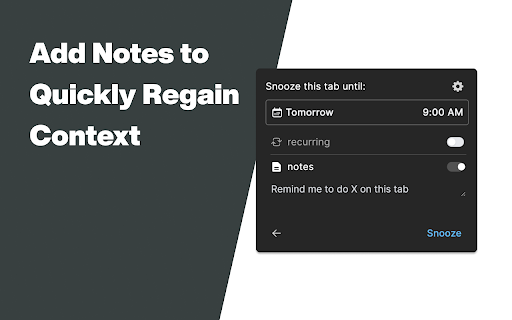
• Notes on snoozed tabs
• Light/dark themes
• 50 tab history
• Privacy-first local storage
• No account required

PLUS FEATURES ($9.99 one-time)
• 10 customizable keyboard shortcuts
• Recurring snoozes ("every Monday 9am")
• 1000 tab history
• Analytics dashboard
• Priority support

PRIVACY FIRST
All data stays on your device. No cloud sync. No tracking beyond optional anonymous analytics.

PERFECT FOR
• Inbox zero practitioners
• Research hoarders
• "I'll read this later" collectors
• Tab overload survivors
• Anyone who says "remind me about this"

WHY ANYSNOOZE?
Other snooze extensions make you click through calendars. AnySnooze understands "next tuesday at 2pm" - just like you'd say it.

4.3★ rating from users who love the clean design and natural language parsing.

SUPPORT
Questions? Feature requests? Email [email protected]
Technical
- Version
- 1.2.3
- Manifest
- V3
- Size
- 4.36MiB
- Min Chrome
- 88
- Languages
- 1
- Featured
- No
Metadata
- ID
- mebjcmajkcccdjbonefhlbkledilfnjj
- Developer ID
- u042a30f49ac034f5eb242fd0aacf880f
- Developer Email
- [email protected]
- Created
- Oct 13, 2022
- Last Updated (Store)
- Jan 31, 2026
- Last Scraped
- Jun 7, 2026
- Website
- —
- Support URL
- —
- Privacy Policy
- https://anysnooze.com/privacy.html
Similar extensions
Alternatives to AnySnooze, ranked by description similarity.

Tab Snooze - Manifest V3
Save articles, videos and todos for later. They'll magically reopen when you need them.
4.0K
★ 4.8

Snooze Tabs
Snooze tabs and todos for later. Dismiss tabs that you don't need now, and set an alarm to bring them back when you need them
1.0K
★ 3.3

Snooze Tabby
Snooze your tabs for later!
2.0K
★ 4.4

Snooooze
Snooze tabs for later.
6
★ 5.0

Tab Snooze & Organizer - PingLater
Tab snooze extension to save tabs for later. Set reminders, organize tabs, and get notified. Beautiful tab manager for Chrome.
183
★ 5.0

Tabz - Turn Your Tabs into Actionable Tasks
Turn tabs into tasks: snooze, annotate, add notes, and streamline your workflow to Tab Zero.
12

SnoozeTab
Snooze tabs and manage them easily. Sort, search, export, and import for full session control.
11
★ 5.0

Tab Snoozey
Snooze tabs and windows and have them automatically re-open at a selected time.
42
★ 5.0
Data sourced from the Chrome Web Store · last verified Jun 7, 2026.