
Copy True Link
Copies True Link as shown at the status bar
As of May 2026, Copy True Link has 120 users and a 3.67/5 rating from 3 reviews in the Productivity category.
Usersdown 4.0 percent−4.0%
120
120
Ratingno change0%
3.67
3 reviews
Reviewsno change0%
3
Version
1.0.1
Manifest V3
History
3 snapshotsTracking since Apr 1, 2026.
View as table
| Date | Users | Rating | Reviews | Version |
|---|---|---|---|---|
| Apr 1, 2026 | 125 | 3.67 | 3 | 1.0.1 |
| Apr 30, 2026 | 120 | 3.67 | 3 | 1.0.1 |
| May 28, 2026 | 115 | 3.67 | 3 | 1.0.1 |
| Now | 120 | 3.67 | 3 | 1.0.1 |
Permissions & access
- Permissions
- contextMenusclipboardWrite
- Host access
- None declared
Screenshots
About
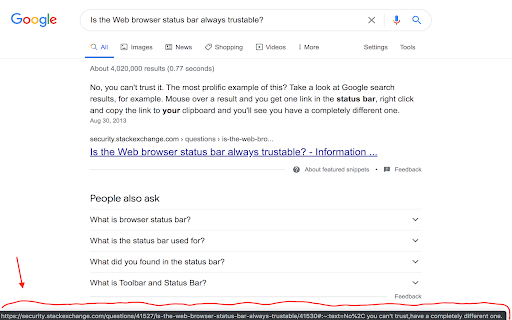
When you hover on a link the browser shows its URL at the status bar. But a lot of sites are faking this info. That is, if you will click on the link or copy its URL then you will get not what displayed at the status bar.

This add-on adds new context menu item called "Copy True Link". By pressing it, the actual URL (as displayed at the status bar) will be copied to your clipboard.
Technical
- Version
- 1.0.1
- Manifest
- V3
- Size
- 5.77KiB
- Min Chrome
- 88
- Languages
- 1
- Featured
- Yes
Metadata
- ID
- mcpokcikbbfcdogkpaebcekojhphhlfc
- Developer ID
- u5bc947e056718344d22304f122b38c7e
- Developer Email
- [email protected]
- Created
- Mar 18, 2021
- Last Updated (Store)
- Mar 9, 2024
- Last Scraped
- May 28, 2026
- Website
- —
- Support URL
- —
- Privacy Policy
- —
Similar extensions
Alternatives to Copy True Link, ranked by description similarity.

Send URL to Clipboard
Send URL to Clipboard from Toolbar
86
★ 5.0

Copy text from button/link
This extension allows you to easily copy text from buttons or hyperlinks using the right-click context menu.
9

LinkPhrase
Copy link text with one click from the context menu
—

Handy-Links
Chrome extension to keep your most used links handy.
—

LinkCapture
Copy any link URL instantly by hovering and pressing Ctrl+C or ⌘+C. No right-click needed by AIO.com.ai
65

Rassvet Hover Clipper
Effortlessly copy links — hover, hit Shift, and done.
14
★ 5.0

One-Click URL Copier
Instantly copy the current page's URL with a single click
23

Fast Hover Copy
Blazing fast link copying by hovering and pressing Ctrl+C (Cmd+C on Mac).
34
Data sourced from the Chrome Web Store · last verified May 28, 2026.