
SERP-Highlighter
SERP-Highlighter!
As of May 2026, SERP-Highlighter has 210 users and a 3.00/5 rating from 4 reviews in the Social & Communication category.
Usersup 17.3 percent+17.3%
210
210
Ratingno change0%
3.00
4 reviews
Reviewsno change0%
4
Version
1.5
Manifest V3
History
3 snapshotsTracking since Apr 1, 2026.
View as table
| Date | Users | Rating | Reviews | Version |
|---|---|---|---|---|
| Apr 1, 2026 | 179 | 3.00 | 4 | 1.5 |
| Apr 30, 2026 | 184 | 3.00 | 4 | 1.5 |
| May 28, 2026 | 193 | 3.00 | 4 | 1.5 |
| Now | 210 | 3.00 | 4 | 1.5 |
Permissions & access
- Permissions
- activeTabstoragescripting
- Host access
- None declared
Screenshots
About
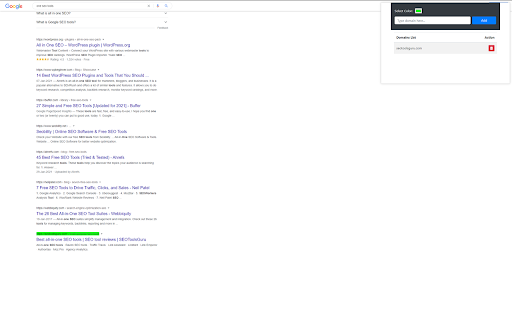
While searching a query or a keyword in search engines, we often search a relevant site, which takes a lot of time. By using our highlighter extension, you can quickly find the site you're in search of.
Moreover, This extension can highlight your website's domain to find the SERP ranking for a particular keyword.

For Instance

You want to find your site's ranking for a keyword like "Kesha Net Worth", or you need a trustworthy site to get accurate information; suppose your site's domain name is "thelistli.com." After that, the SERP highlighter will highlight your domain in search results.

How to use SERP Highlighter?

By using the following steps, you can use our highlighter extension:

Step 1:
Download the extension and pin it to your browser's bar menu.
Step 2:
Add the domain name in the search bar that you want to highlight in SERP.
Step 3:
Click to add button --> your domain will be added and displayed in the domain list.
Step 4:
To see the highlighted domain, type the keyword or query in your search engine's quest bar menu.
Step 5:
Locate the highlighted domain in the search results.

Note: You can add and highlight multiple domains for a particular query or keyword. e.g., you can add and highlight "wikipedia.com", "thelistli.com" for a particular search query, e.g. "Kesha Net Worth."


How to change SERP Highlighter color?

You can change the color of the highlighter as per your choice by using the following steps listed below:

Step 1:
After adding the domain name in the search bar, you want to highlight in SERP.
Step 2:
Click on the select color option located above the search bar of the extension.
Step 3:
After clicking on the option, a window will appear in the extension having a multiples option.
Step 4:
Select the color directly from the bar using the pointer located inside the bar; after selecting a color, click outside the bar. The extension will automatically save the color. Or, if you want to add the color code, jump to the next step.
Step 5:
To add a color code, click on the small arrow located at the left corner of a pop-up window.
Step 6:
Go to the HEX setting. Add the color code manually. Press the enter button --> your selected color will appear on the extension's screen and automatically saved.

Key Features of SERP highlighter

	•	Instantly find the ranking of your domain on a particular keyword by highlighting it.
	•	Compare the ranking difference by adding multiple sites (site of your competitors) to it.
	•	Find the site quickly on SERP that you want to surf.
	•	Change the color of the highlighter.
	•	Add or delete the domains easily.
	•	Easy and effective to use.
	•	Once the domain is added, you can see the highlighted domain anytime in SERP (you don't have to open an extension again and again).

Conclusion

If you're looking for the best domain highlighter for SERP, then this is a tool made for you. Download it now and find your highlighted domain instantly in search results.
To look at our privacy policy, feel free to click here and lets us know about your reviews and recommendations.
Technical
- Version
- 1.5
- Manifest
- V3
- Size
- 92.08KiB
- Min Chrome
- 88
- Languages
- 1
- Featured
- Yes
Metadata
- ID
- mcehpkjkhpepkhpapkklmpjnncelihan
- Developer ID
- u1f13a5865c1294614db29100b74521f5
- Developer Email
- [email protected]
- Created
- Apr 19, 2021
- Last Updated (Store)
- May 20, 2023
- Last Scraped
- May 28, 2026
- Website
- dixeam.com
- Support URL
- —
- Privacy Policy
- —
Similar extensions
Alternatives to SERP-Highlighter, ranked by description similarity.

SERP Scraper Tool – Extract Emails, Websites & Phone Numbers
SERP scraper tool to extract emails, websites, and phone numbers from search results using keywords and custom domains.
135
★ 5.0

Light Highlighter
Best Highlighter for your blogger
15

Username Checker By Serba Marketing
Check username and domain availability directly from a Chrome extension.
6
★ 5.0

Akonter Share link & Page Buttons
Chrome Extension to share links and pages to multiple networks, Akonter bookmarks, Facebook,Twitter,more share buttons.
283
★ 5.0

QLinkPath - Free URL Shortener, Branded Links & QR Codes
Shorten URLs, manage branded links, and track clicks with QLinkPath — a fast URL shortener.
76
★ 5.0

Pinpoint Pro
Organizes Chrome highlight links in a widget for quick access
6
★ 5.0

247Sports Highlighter
Includes User Highlighter, Heatmaps, Auto-Hide, and Portal Stats.
115
★ 5.0

Choseno Web Reviewer
Write and store reviews for websites and specific pages with a modern, visually stunning interface.
3
Data sourced from the Chrome Web Store · last verified May 28, 2026.