
UniCaption - Live Subtitles & Translation
Real-time subtitles & translation for any website — Zoom, Meet, YouTube, Teams. AI speech recognition with speaker detection.
As of June 2026, UniCaption - Live Subtitles & Translation has 7 users and a 5.00/5 rating from 1 reviews in the Accessibility category.
Usersno change0%
7
7
Ratingno change0%
5.00
1 reviews
Reviewsno change0%
1
Version
1.1.1
Manifest V3
90-day change · In the last 90 days this extension 1 version update, changed permissions.
History
2 snapshotsTracking since Jun 4, 2026.
Not enough history yet for this metric — the chart fills in as we collect more snapshots.
View as table
| Date | Users | Rating | Reviews | Version |
|---|---|---|---|---|
| Jun 4, 2026 | — | — | — | 1.0.0 |
| Jun 9, 2026 | — | — | — | 1.0.0 |
| Now | 7 | 5.00 | 1 | 1.1.1 |
Changelog
- Jun 9, 2026description
UniCaption — Live Subtitles and Translation for Any Website
UniCaption transcribes and translates audio from any browser tab in real time — whether it's a video call, online lecture, livestream, or video.
Key Features:
Live Transcription — Subtitles appear directly on the page as people speak, with minimal delay.
Translation into 60+ Languages — Shows both the original text and translation simultaneously. Supports all major languages of the world.
Speaker Identification — Automatically detects different speakers and highlights each one with their own color.
Expanded Mode — Opens subtitles in a two-column panel with full conversation history: original on the left, translation on the right.
Side Panel — Opens in Chrome’s native sidebar without covering the main page content.
Notebook — Built-in note editor for taking notes during the session, with automatic saving.
Flexible Settings — Choose recognition and translation languages, and decide whether to show original text, translation, or both.
See every word the moment it's spoken.

Unicaption adds live, accurate captions to any tab in your browser — so names, numbers, spellings, and tricky terms are on screen as a backup for your ears. Built for working interpreters, accessible to everyone.

WHAT IT DOES
- Live captions on any tab — Zoom, Google Meet, Microsoft Teams, YouTube, or any site with audio
- ~0.5 second speech-to-screen, so you read along in real time
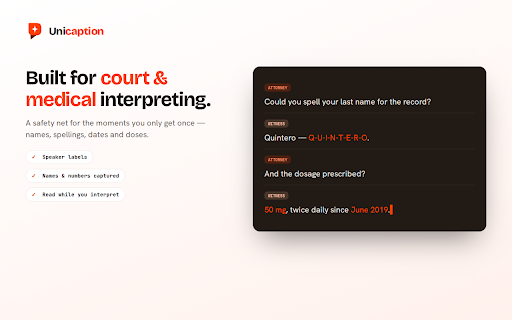
- Speaker labels, so you always know who said what
- Live translation — read the original and a second language side by side
- 100+ languages supported, including Spanish–English

BUILT FOR INTERPRETERS
In a live session you get one chance to catch a name or a number. Unicaption keeps the words on screen as a safety net — ideal for court, medical, and conference work where accuracy matters and there's no replay.

PRIVATE BY DESIGN
We never record, store, train on, or sell your personal or session data. Captions are processed live. HIPAA-conscious by design.

GETTING STARTED
1. Install the extension
2. Open any tab with audio and click the Unicaption icon
3. Captions appear instantly — turn on translation anytime

Currently in free beta. We'd love your feedback.

Learn more: https://unicaption.com
- Jun 9, 2026short_description
Live subtitles with real-time translation for Zoom, Meet, YouTube and more
Real-time subtitles & translation for any website — Zoom, Meet, YouTube, Teams. AI speech recognition with speaker detection.
- Jun 9, 2026name
UniCaption - Live Subtitles
UniCaption - Live Subtitles & Translation
- Jun 9, 2026category
productivity/tools
make_chrome_yours/accessibility
- Jun 9, 2026host_permissions
<all_urls>
https://soniox-backend-216350809512.us-central1.run.app/*, https://identitytoolkit.googleapis.com/*, https://accounts.google.com/*, https://securetoken.googleapis.com/*
- Jun 9, 2026permissions
activeTab, storage, offscreen, tabCapture, identity, scripting
activeTab, storage, offscreen, tabCapture, identity, scripting, sidePanel, alarms
Permissions & access
- Permissions
- activeTabstorageoffscreentabCaptureidentityscriptingsidePanelalarms
- Host access
- https://soniox-backend-216350809512.us-central1.run.app/*, https://identitytoolkit.googleapis.com/*, https://accounts.google.com/*, https://securetoken.googleapis.com/*
Screenshots



About
See every word the moment it's spoken.

Unicaption adds live, accurate captions to any tab in your browser — so names, numbers, spellings, and tricky terms are on screen as a backup for your ears. Built for working interpreters, accessible to everyone.

WHAT IT DOES
- Live captions on any tab — Zoom, Google Meet, Microsoft Teams, YouTube, or any site with audio
- ~0.5 second speech-to-screen, so you read along in real time
- Speaker labels, so you always know who said what
- Live translation — read the original and a second language side by side
- 100+ languages supported, including Spanish–English

BUILT FOR INTERPRETERS
In a live session you get one chance to catch a name or a number. Unicaption keeps the words on screen as a safety net — ideal for court, medical, and conference work where accuracy matters and there's no replay.

PRIVATE BY DESIGN
We never record, store, train on, or sell your personal or session data. Captions are processed live. HIPAA-conscious by design.

GETTING STARTED
1. Install the extension
2. Open any tab with audio and click the Unicaption icon
3. Captions appear instantly — turn on translation anytime

Currently in free beta. We'd love your feedback.

Learn more: https://unicaption.com
Technical
- Version
- 1.1.1
- Manifest
- V3
- Size
- 78.56KiB
- Min Chrome
- 88
- Languages
- 1
- Featured
- No
Metadata
- ID
- mcchoanfhajofphekfplgppgfniicmbn
- Developer ID
- ud14ebb6aaa8898a5559586b6520fb065
- Developer Email
- [email protected]
- Created
- Jun 3, 2026
- Last Updated (Store)
- Jun 7, 2026
- Last Scraped
- Jun 9, 2026
- Website
- —
- Privacy Policy
- https://unicaption.com/privacy
Data sourced from the Chrome Web Store · last verified Jun 9, 2026.