
PICAXE programmer
Download PICAXE .axe file to a device
As of May 2026, PICAXE programmer has 2,000 users.
Usersdown 33.3 percent−33.3%
2.0K
2,000
Ratingno change0%
—
— reviews
Reviewsno change0%
—
Version
1.0.3
Manifest V2
90-day change · In the last 90 days this extension lost 1.0K users.
History
1 snapshotsTracking since Apr 30, 2026.
View as table
| Date | Users | Rating | Reviews | Version |
|---|---|---|---|---|
| Apr 30, 2026 | 3.0K | — | — | 1.0.3 |
| Now | 2.0K | — | — | 1.0.3 |
Permissions & access
- Permissions
- webviewapp.window.alwaysOnTopserialstorage
- Host access
- None declared
Screenshots
About
Windows/Mac/Linux users should now download from picaxe.com/progapp instead. This PICAXE downloader app is now for Chromebook users only.

When generating your PICAXE program online using the cloud version of Blockly for PICAXE you cannot download the program directly to the PICAXE chip. This is because web browsers do not allow online websites to access your USB/COM port for security reasons. Therefore the online Cloud version of Blockly simply saves onto your computer an ‘.axe file’ which is a compiled version of your PICAXE program.

This PICAXE Downloader App, because it is installed separately as a trusted Chrome extension app, can then open this .axe file and download it to your PICAXE chip via the AXE027 USB cable.

Note that you do not need this app for any other PICAXE software that is installed directly on your computer (PE6, AXEpad, Logicator etc.) as they can already program the PICAXE chip directly.This app is only required when using the cloud (web) version of Blockly for PICAXE.

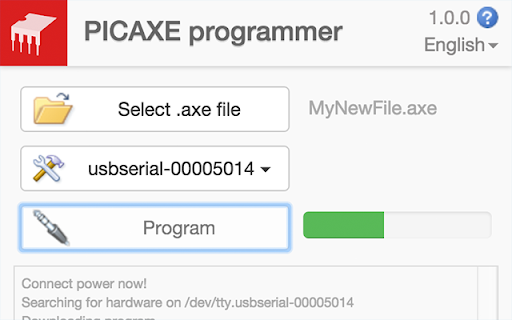
Using the Downloader App

- Click the ‘Open’ button and select the desired .axe binary image file
- Select the correct COM port for the AXE027 download cable
- Connect your PICAXE board and power and then click ‘Program’

Note that if you receive an 'update your Chrome version' upon running this app that is because your version of Chrome does not support the new API's required for PICAXE programming. You need v45 (or later) of Chrome to run this app.

See more at: http://www.picaxe.com/Software/Drivers/PICAXE-Programmer-App/
Technical
- Version
- 1.0.3
- Manifest
- V2
- Size
- 148KiB
- Min Chrome
- 45
- Languages
- 1
- Featured
- No
Metadata
- ID
- mcakegabnfookegpcpdmhgpdajgkjncp
- Developer ID
- u7e7f53c52a14cefed02f6252d101ca8e
- Developer Email
- —
- Created
- Sep 11, 2015
- Last Updated (Store)
- Dec 5, 2016
- Last Scraped
- May 28, 2026
- Website
- —
- Privacy Policy
- —
Similar extensions
Alternatives to PICAXE programmer, ranked by description similarity.

PICAXE Blockly
Blockly blocks coding for PICAXE microcontrollers
—
★ 3.6

S2Bot 4 Scratch
Scratch Chrome Helper App
10.0K
★ 2.7

Edbot Chromebook Helper
The Edbot Chromebook Helper is an app for Chromebooks designed to forward network traffic to the Edbot Software.
—

Finch Connection App
This is the official Google Chrome app for connecting to the Finch robot. The purpose of this app is to add support for the Finch…
—
★ 5.0

Parallax IDE
Write, compile, and download code to your Parallax Boe-Bot Robot or custom BASIC Stamp microcontroller-based electronic creations.
50.0K
★ 4.7
AVRChick
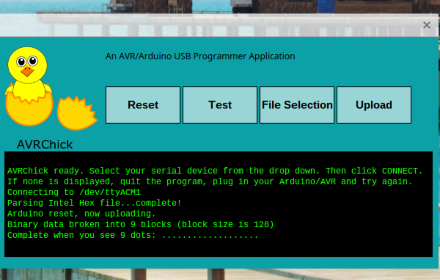
AVRChick is a simple serial uploader for the Arduino and AVR microcontrollers with a serial bootloader.
—
★ 2.0

BlocklyProp Launcher
A Chrome application that connects your Propeller-Powered Hardware to the BlocklyProp website.
—
★ 3.7
mBlock
This is the mBlock companion App needed to communicate with the robots in Chromebooks.
Usage:
- Install the Chrome App
- Open…
—
★ 1.7
Data sourced from the Chrome Web Store · last verified May 28, 2026.