
P&L History Tracker (Robinhood, Tradier, IBKR & Fidelity)
Track your Robinhood, Tradier, IBKR, and Fidelity options and stock trading P&L with detailed analysis
As of June 2026, P&L History Tracker (Robinhood, Tradier, IBKR & Fidelity) has 75 users and a 3.00/5 rating from 4 reviews in the Productivity category.
Usersup 134.4 percent+134.4%
75
75
Ratingno change0%
3.00
4 reviews
Reviewsno change0%
4
Version
3.2
Manifest V3
90-day change · In the last 90 days this extension 4 version updates, changed permissions.
History
10 snapshotsTracking since Apr 1, 2026.
View as table
| Date | Users | Rating | Reviews | Version |
|---|---|---|---|---|
| Apr 1, 2026 | 32 | — | — | 2.4 |
| Apr 9, 2026 | 37 | 3.00 | 1 | 2.4 |
| Apr 20, 2026 | 43 | 3.00 | 1 | 2.4 |
| Apr 25, 2026 | 47 | 2.00 | 2 | 2.4 |
| May 9, 2026 | 52 | 2.00 | 2 | 2.4 |
| May 17, 2026 | 54 | 3.00 | 3 | 2.4 |
| May 23, 2026 | 63 | 3.00 | 3 | 2.8 |
| May 30, 2026 | 61 | 3.00 | 3 | 2.8 |
| Jun 5, 2026 | 50 | 3.00 | 4 | 3.0 |
| Jun 13, 2026 | 56 | 3.00 | 4 | 3.1 |
| Now | 75 | 3.00 | 4 | 3.2 |
Changelog
- Jun 13, 2026description
SHORT DESCRIPTION
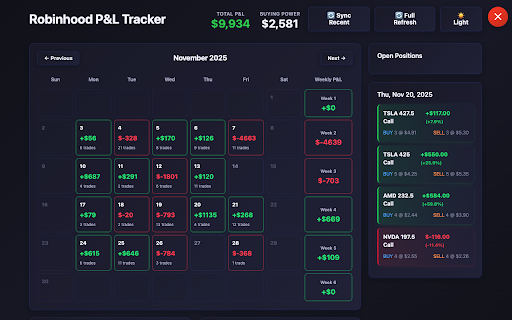
Track your broker's (Robinhood, Fidelity, Tradier, IBKR) trading P&L with a rich dashboard — candlestick calendar, per-day analytics pie charts, open positions, multi-chart timelines, and smart buy/sell matching.

Does:
📊 Interactive Calendar with Daily P&L Cells
🥧 Per-Day Analytics: Profit/Loss Pie, Win Rate, Profit Factor, Streak
📈 Open Positions with Symbol, Expiry, and Quantity
🕯️ Daily, Monthly & Yearly P&L Timeline Charts
🔍 Ticker Search — Match Buys & Sells by Symbol
💾 Smart Session Caching for Fast Reloads

Doesn't:
❌ Does NOT access your account credentials
❌ Does NOT make trades or touch your money
❌ Does NOT send data to external servers
❌ Does NOT work on mobile apps

Developed by
Pranay Raj Kyatham

https://linkedin.com/in/pranayraj09
https://pranaykyatham.com/

================================================================================

DETAILED DESCRIPTION

What This Extension Does
P&L History Tracker automatically analyzes your trade history on Robinhood, Fidelity, Tradier, or Interactive Brokers and gives you a full P&L dashboard — right in your browser tab.

──────────────────────────────────────────────────
🏦 Multi-Broker Support
──────────────────────────────────────────────────
• Robinhood — intercepts live API calls; stocks & options
• Fidelity — GraphQL-based history with exact-lot matching (ignores RSU Grants)
• Tradier — full paginated order history
• Interactive Brokers (IBKR) — portal order history

──────────────────────────────────────────────────
📊 Rich Calendar View
──────────────────────────────────────────────────
• Each day cell shows P&L with a subtle color gradient
• Green border = profitable day · Red = losing day · Blue = buy-only day
• Hover any cell for an instant tooltip: trades count, open buys, profit-only, loss-only, total P&L
• Weekly P&L summary column on the right
• Previous / Next month navigation
• Navigating back to the current month auto-selects today

──────────────────────────────────────────────────
🥧 Per-Day Analytics Panel
──────────────────────────────────────────────────
• Animated donut chart: one slice per trade, sequential reveal
• Hover a slice → tooltip showing symbol, invested, buy/sell legs, return %
• NET P&L · return % centered inside the ring
• Profit / Loss split with amounts and percentages
• Win Rate semi-circular gauge
• Profit Factor gauge (gross profit ÷ gross loss)
• Daily P&L Streak: wins count, losses count, cumulative sparkline

──────────────────────────────────────────────────
📈 Open Positions
──────────────────────────────────────────────────
• All open trades with symbol, quantity, average price, and cost basis
• Option positions display in human-readable format: "PLTR 140 Call 06/18"
• Collapsible section — auto-expands when viewing today, collapses for past dates

──────────────────────────────────────────────────
📉 Timeline Charts
──────────────────────────────────────────────────
• Single chart panel with Daily / Monthly / Yearly pills
• Line segments colored green/red by ending cumulative P&L
• Dots colored by individual trade sign
• Animated left-to-right reveal on load
• Auto-switches to Daily when you click a date, to Monthly when you change months

──────────────────────────────────────────────────
🔍 Ticker Search
──────────────────────────────────────────────────
• Search any symbol to see all matched buy/sell pairs
• FIFO matching per instrument — stocks and options shown in separate sections
• Still-open buys listed at the bottom
• Per-pair card: buy date, sell date, qty, price, P&L, return %

──────────────────────────────────────────────────
📋 Per-Day Trade Detail
──────────────────────────────────────────────────
• Click any calendar date to see trades for that day
• Expandable accordion per trade: matched buy lot(s) with date, qty, price + sell date + option expiry
• Multi-lot sells show "avg · N lots" tag when FIFO consumed multiple buys
• Separate "Bought" section: open buys on that day not closed same day
• RSU / Plan sales shown in their own "RSU stock — ignored" section (not in P&L)

──────────────────────────────────────────────────
🧮 Smart P&L Matching
──────────────────────────────────────────────────
• Options: FIFO with Fidelity exact-quantity preference
• Stocks: LIFO with Fidelity exact-quantity preference
• Exact-lot match tried first → then FIFO/LIFO fallback
• RSU tickers (all buys $0 cost) excluded from P&L totals automatically
• Tracks matched buy lots per realized trade for full traceability

──────────────────────────────────────────────────
🎨 Dashboard & UX
──────────────────────────────────────────────────
• Dark and Light theme toggle
• All font weights tuned for readability; dimmed text hierarchy
• Compact calendar with instant hover tooltips (no OS delay)
• Animated candlestick loading screen while fetching
• Top-edge launcher tab — draggable horizontally, hides when dashboard opens
• Close via × button, Escape key
• Date filter on header to scope all P&L from a specific start date

──────────────────────────────────────────────────
💾 Privacy & Data
──────────────────────────────────────────────────
• All processing happens in your browser — nothing leaves your device
• Trade data cached in session storage (cleared when tab closes)
• No external API calls, no servers, no accounts, no analytics

──────────────────────────────────────────────────
What This Extension Does NOT Do
──────────────────────────────────────────────────
❌ Does NOT access your account credentials or passwords
❌ Does NOT make trades, buy, sell, or transfer funds
❌ Does NOT send any data to external servers
❌ Does NOT work on mobile broker apps

──────────────────────────────────────────────────
⚠️ Important Limitations
──────────────────────────────────────────────────
• Depends on each broker's current API/webpage structure — broker updates may temporarily break functionality
• P&L calculations use FIFO/LIFO matching and may not match your broker's exact tax lot method
• Always verify important numbers with your broker's official statements and tax documents
• Not affiliated with Robinhood Markets, Fidelity, Tradier, or Interactive Brokers

──────────────────────────────────────────────────
Support
──────────────────────────────────────────────────
Found a bug or have a suggestion? Leave a review — we read all feedback and release updates regularly.

Not financial advice. Use official broker documents for tax reporting.

Developed by
Pranay Raj Kyatham

https://linkedin.com/in/pranayraj09
https://pranaykyatham.com/
SHORT DESCRIPTION
Track your broker's (Robinhood, Fidelity, Tradier, IBKR) trading P&L with a rich dashboard — candlestick calendar, per-day analytics pie charts, open positions, multi-chart timelines, and smart buy/sell matching.

Does:
📊 Interactive Calendar with Daily P&L Cells
🥧 Per-Day Analytics: Profit/Loss Pie, Win Rate, Profit Factor, Streak
📈 Open Positions with Symbol, Expiry, and Quantity
🕯️ Daily, Monthly & Yearly P&L Timeline Charts
🔍 Ticker Search — Match Buys & Sells by Symbol
💾 Smart Session Caching for Fast Reloads

Doesn't:
❌ Does NOT access your account credentials
❌ Does NOT make trades or touch your money
❌ Does NOT send data to external servers
❌ Does NOT work on mobile apps
❌ Does NOT always show right data, it could be wrong if data format or broker change how it passes data.

Developed by
Pranay Raj Kyatham

https://linkedin.com/in/pranayraj09
https://pranaykyatham.com/

================================================================================

DETAILED DESCRIPTION

What This Extension Does
P&L History Tracker automatically analyzes your trade history on Robinhood, Fidelity, Tradier, or Interactive Brokers and gives you a full P&L dashboard — right in your browser tab.

──────────────────────────────────────────────────
🏦 Multi-Broker Support
──────────────────────────────────────────────────
• Robinhood — intercepts live API calls; stocks & options
• Fidelity — GraphQL-based history with exact-lot matching (ignores RSU Grants)
• Tradier — full paginated order history
• Interactive Brokers (IBKR) — portal order history

──────────────────────────────────────────────────
📊 Rich Calendar View
──────────────────────────────────────────────────
• Each day cell shows P&L with a subtle color gradient
• Green border = profitable day · Red = losing day · Blue = buy-only day
• Hover any cell for an instant tooltip: trades count, open buys, profit-only, loss-only, total P&L
• Weekly P&L summary column on the right
• Previous / Next month navigation
• Navigating back to the current month auto-selects today

──────────────────────────────────────────────────
🥧 Per-Day Analytics Panel
──────────────────────────────────────────────────
• Animated donut chart: one slice per trade, sequential reveal
• Hover a slice → tooltip showing symbol, invested, buy/sell legs, return %
• NET P&L · return % centered inside the ring
• Profit / Loss split with amounts and percentages
• Win Rate semi-circular gauge
• Profit Factor gauge (gross profit ÷ gross loss)
• Daily P&L Streak: wins count, losses count, cumulative sparkline

──────────────────────────────────────────────────
📈 Open Positions
──────────────────────────────────────────────────
• All open trades with symbol, quantity, average price, and cost basis
• Option positions display in human-readable format: "PLTR 140 Call 06/18"
• Collapsible section — auto-expands when viewing today, collapses for past dates

──────────────────────────────────────────────────
📉 Timeline Charts
──────────────────────────────────────────────────
• Single chart panel with Daily / Monthly / Yearly pills
• Line segments colored green/red by ending cumulative P&L
• Dots colored by individual trade sign
• Animated left-to-right reveal on load
• Auto-switches to Daily when you click a date, to Monthly when you change months

──────────────────────────────────────────────────
🔍 Ticker Search
──────────────────────────────────────────────────
• Search any symbol to see all matched buy/sell pairs
• FIFO matching per instrument — stocks and options shown in separate sections
• Still-open buys listed at the bottom
• Per-pair card: buy date, sell date, qty, price, P&L, return %

──────────────────────────────────────────────────
📋 Per-Day Trade Detail
──────────────────────────────────────────────────
• Click any calendar date to see trades for that day
• Expandable accordion per trade: matched buy lot(s) with date, qty, price + sell date + option expiry
• Multi-lot sells show "avg · N lots" tag when FIFO consumed multiple buys
• Separate "Bought" section: open buys on that day not closed same day
• RSU / Plan sales shown in their own "RSU stock — ignored" section (not in P&L)

──────────────────────────────────────────────────
🧮 Smart P&L Matching
──────────────────────────────────────────────────
• Options: FIFO with Fidelity exact-quantity preference
• Stocks: LIFO with Fidelity exact-quantity preference
• Exact-lot match tried first → then FIFO/LIFO fallback
• RSU tickers (all buys $0 cost) excluded from P&L totals automatically
• Tracks matched buy lots per realized trade for full traceability

──────────────────────────────────────────────────
🎨 Dashboard & UX
──────────────────────────────────────────────────
• Dark and Light theme toggle
• All font weights tuned for readability; dimmed text hierarchy
• Compact calendar with instant hover tooltips (no OS delay)
• Animated candlestick loading screen while fetching
• Top-edge launcher tab — draggable horizontally, hides when dashboard opens
• Close via × button, Escape key
• Date filter on header to scope all P&L from a specific start date

──────────────────────────────────────────────────
💾 Privacy & Data
──────────────────────────────────────────────────
• All processing happens in your browser — nothing leaves your device
• Trade data cached in session storage (cleared when tab closes)
• No external API calls, no servers, no accounts, no analytics

──────────────────────────────────────────────────
What This Extension Does NOT Do
──────────────────────────────────────────────────
❌ Does NOT access your account credentials or passwords
❌ Does NOT make trades, buy, sell, or transfer funds
❌ Does NOT send any data to external servers
❌ Does NOT work on mobile broker apps

──────────────────────────────────────────────────
⚠️ Important Limitations
──────────────────────────────────────────────────
• Depends on each broker's current API/webpage structure — broker updates may temporarily break functionality
• P&L calculations use FIFO/LIFO matching and may not match your broker's exact tax lot method
• Always verify important numbers with your broker's official statements and tax documents
• Not affiliated with Robinhood Markets, Fidelity, Tradier, or Interactive Brokers

──────────────────────────────────────────────────
Support
──────────────────────────────────────────────────
Found a bug or have a suggestion? Leave a review — we read all feedback and release updates regularly.

Not financial advice. Use official broker documents for tax reporting.

Developed by
Pranay Raj Kyatham

https://linkedin.com/in/pranayraj09
https://pranaykyatham.com/
- May 30, 2026description
SHORT DESCRIPTION
Analyze your broker's (robinhood, tradier, IBKR, fidelity) trading P&L with calendar view, open positions tracking, detailed profit/loss calculations, charts for daily, monthly and last 12 months

Does:
📊 Monthly Calendar View and Weekly P&L total
💰 Automatic P&L Calculation
📈 Open Positions Dashboard
🎴 Multiple chart Modes
💾 Smart Caching

Doesn't:
❌ Does NOT access your account credentials
❌ Does NOT make trades or access your money
❌ Does NOT send data to external servers
❌ Does NOT work on the Robinhood mobile app


================================================================================

DETAILED DESCRIPTION

What This Extension Does:
Robinhood P&L History Tracker automatically analyzes your Robinhood trade history and calculates your profit and loss with visual breakdowns.

Key Features:

📊 Monthly Calendar View
• See daily P&L on a calendar
• Green for profitable days, red for losses
• Weekly P&L summaries
• Click any date to see detailed trades
• Trade is calculated as profit/loss on the date of sell

💰 Automatic P&L Calculation
• FIFO (First In First Out) matching for options
• Symbol-based matching for stocks
• Weighted average buy prices
• Tracks expired options as losses

📈 Open Positions Dashboard
• View all current open trades
• See quantity, average price, and cost basis
• Quick overview of active positions

🎴 Multiple View Modes
• Toggle between List and Cards view
• Beautiful gradient cards for each trade
• Color-coded profit/loss indicators

💾 Smart Caching
• Stores trade data in browser session storage
• Faster loading on repeat visits
• Automatic data merging for new trades

How It Works

1. Install the extension
2. Navigate to robinhood.com/account/history
3. The tracker automatically loads when it detects trades
4. Click "Load More Data" to fetch older trades
5. View your P&L in calendar, list, or cards format

What This Extension Does NOT Do

❌ Does NOT access your account credentials
• Never asks for login information
• Never stores passwords

❌ Does NOT make trades or access your money
• Read-only access to trade history
• Cannot buy, sell, or transfer funds

❌ Does NOT send data to external servers
• All processing happens in your browser
• No data transmitted anywhere

❌ Does NOT work on the Robinhood mobile app
• Only works on robinhood.com website
• Desktop browser only

Where Data is Stored

Session Storage (Browser Only)
• Trade data is temporarily cached in your browser's session storage
• Data stays on your device only
• Automatically cleared when you close the browser tab
• Never sent to any external server

No Cloud Storage
• We don't store anything on our servers
• We don't have servers
• All data is 100% local to your browser

Privacy & Security

✅ Your data never leaves your browser
• All calculations happen locally
• No external API calls
• No tracking or analytics
• No user accounts

✅ Session-only storage
• Data is cleared when you close the tab
• Nothing persists across browser sessions
• Completely private

Important Disclaimer

⚠️ Important Limitations

This extension depends on Robinhood's current webpage structure:
• If Robinhood updates their website UI or HTML structure, this extension may stop working
• We will try to update the extension when Robinhood makes changes, but there may be delays
• The extension reads data from the page DOM, so any changes to how Robinhood displays trades will affect functionality
• If the extension stops working after a Robinhood update, please be patient while we release a fix


⚠️ Calculations may not be 100% accurate
This extension does its best to calculate P&L using FIFO matching and weighted averages, but:
• Some edge cases may produce incorrect results
• Complex trading scenarios might not be handled perfectly
• Always verify important numbers with Robinhood's official statements

Please report any issues you find!
• If you notice incorrect calculations, please leave a comment in the reviews
• Help us improve by reporting bugs
• We appreciate your feedback

Use at Your Own Risk
This is a third-party tool not affiliated with Robinhood Markets, Inc.
• We provide this tool as-is for informational purposes
• Always cross-check important financial data
• Use Robinhood's official tax documents for reporting

Support
Found a bug? Have a suggestion?
• Leave a review with details
• We read all feedback
• Updates are released regularly

What You'll See
Main Dashboard:
• Total P&L with date range
• Open positions list
• Monthly calendar with daily P&L

Calendar Footer:
• Monthly P&L total
• Total trades count

Trade Details:
• Buy/Sell quantities and prices
• Cost basis and sold amount
• Profit or loss per trade

Weekly Summaries:
• P&L for each week
• Aligned in calendar's right column

Perfect For
• Options traders tracking performance
• Stock traders analyzing wins/losses
• Anyone wanting better Robinhood insights
• Traders who want visual P&L breakdowns

Technical Details
Permissions Required:
• Access to robinhood.com - To read trade data from the page
• Active tab - To check if you're on Robinhood
• Scripting - To inject the tracker interface

Browser Compatibility:
• Chrome browser (Manifest V3)
• Desktop only

Data Access:
• Reads trade information from Robinhood's webpage DOM
• Does not make API calls
• Does not access account settings or personal information

Updates
We regularly update this extension with:
• Bug fixes based on user reports
• Improved calculation accuracy
• UI enhancements
• Performance improvements

---

Ready to get better insights into your trading performance?

Install now and start tracking your Robinhood P&L with beautiful visualizations!

Remember: This is not financial advice. Always verify important numbers with official Robinhood statements. Calculations may contain errors - please report any issues you find.

Not affiliated with Robinhood Markets, Inc.
SHORT DESCRIPTION
Track your broker's (Robinhood, Fidelity, Tradier, IBKR) trading P&L with a rich dashboard — candlestick calendar, per-day analytics pie charts, open positions, multi-chart timelines, and smart buy/sell matching.

Does:
📊 Interactive Calendar with Daily P&L Cells
🥧 Per-Day Analytics: Profit/Loss Pie, Win Rate, Profit Factor, Streak
📈 Open Positions with Symbol, Expiry, and Quantity
🕯️ Daily, Monthly & Yearly P&L Timeline Charts
🔍 Ticker Search — Match Buys & Sells by Symbol
💾 Smart Session Caching for Fast Reloads

Doesn't:
❌ Does NOT access your account credentials
❌ Does NOT make trades or touch your money
❌ Does NOT send data to external servers
❌ Does NOT work on mobile apps

Developed by
Pranay Raj Kyatham

https://linkedin.com/in/pranayraj09
https://pranaykyatham.com/

================================================================================

DETAILED DESCRIPTION

What This Extension Does
P&L History Tracker automatically analyzes your trade history on Robinhood, Fidelity, Tradier, or Interactive Brokers and gives you a full P&L dashboard — right in your browser tab.

──────────────────────────────────────────────────
🏦 Multi-Broker Support
──────────────────────────────────────────────────
• Robinhood — intercepts live API calls; stocks & options
• Fidelity — GraphQL-based history with exact-lot matching (ignores RSU Grants)
• Tradier — full paginated order history
• Interactive Brokers (IBKR) — portal order history

──────────────────────────────────────────────────
📊 Rich Calendar View
──────────────────────────────────────────────────
• Each day cell shows P&L with a subtle color gradient
• Green border = profitable day · Red = losing day · Blue = buy-only day
• Hover any cell for an instant tooltip: trades count, open buys, profit-only, loss-only, total P&L
• Weekly P&L summary column on the right
• Previous / Next month navigation
• Navigating back to the current month auto-selects today

──────────────────────────────────────────────────
🥧 Per-Day Analytics Panel
──────────────────────────────────────────────────
• Animated donut chart: one slice per trade, sequential reveal
• Hover a slice → tooltip showing symbol, invested, buy/sell legs, return %
• NET P&L · return % centered inside the ring
• Profit / Loss split with amounts and percentages
• Win Rate semi-circular gauge
• Profit Factor gauge (gross profit ÷ gross loss)
• Daily P&L Streak: wins count, losses count, cumulative sparkline

──────────────────────────────────────────────────
📈 Open Positions
──────────────────────────────────────────────────
• All open trades with symbol, quantity, average price, and cost basis
• Option positions display in human-readable format: "PLTR 140 Call 06/18"
• Collapsible section — auto-expands when viewing today, collapses for past dates

──────────────────────────────────────────────────
📉 Timeline Charts
──────────────────────────────────────────────────
• Single chart panel with Daily / Monthly / Yearly pills
• Line segments colored green/red by ending cumulative P&L
• Dots colored by individual trade sign
• Animated left-to-right reveal on load
• Auto-switches to Daily when you click a date, to Monthly when you change months

──────────────────────────────────────────────────
🔍 Ticker Search
──────────────────────────────────────────────────
• Search any symbol to see all matched buy/sell pairs
• FIFO matching per instrument — stocks and options shown in separate sections
• Still-open buys listed at the bottom
• Per-pair card: buy date, sell date, qty, price, P&L, return %

──────────────────────────────────────────────────
📋 Per-Day Trade Detail
──────────────────────────────────────────────────
• Click any calendar date to see trades for that day
• Expandable accordion per trade: matched buy lot(s) with date, qty, price + sell date + option expiry
• Multi-lot sells show "avg · N lots" tag when FIFO consumed multiple buys
• Separate "Bought" section: open buys on that day not closed same day
• RSU / Plan sales shown in their own "RSU stock — ignored" section (not in P&L)

──────────────────────────────────────────────────
🧮 Smart P&L Matching
──────────────────────────────────────────────────
• Options: FIFO with Fidelity exact-quantity preference
• Stocks: LIFO with Fidelity exact-quantity preference
• Exact-lot match tried first → then FIFO/LIFO fallback
• RSU tickers (all buys $0 cost) excluded from P&L totals automatically
• Tracks matched buy lots per realized trade for full traceability

──────────────────────────────────────────────────
🎨 Dashboard & UX
──────────────────────────────────────────────────
• Dark and Light theme toggle
• All font weights tuned for readability; dimmed text hierarchy
• Compact calendar with instant hover tooltips (no OS delay)
• Animated candlestick loading screen while fetching
• Top-edge launcher tab — draggable horizontally, hides when dashboard opens
• Close via × button, Escape key
• Date filter on header to scope all P&L from a specific start date

──────────────────────────────────────────────────
💾 Privacy & Data
──────────────────────────────────────────────────
• All processing happens in your browser — nothing leaves your device
• Trade data cached in session storage (cleared when tab closes)
• No external API calls, no servers, no accounts, no analytics

──────────────────────────────────────────────────
What This Extension Does NOT Do
──────────────────────────────────────────────────
❌ Does NOT access your account credentials or passwords
❌ Does NOT make trades, buy, sell, or transfer funds
❌ Does NOT send any data to external servers
❌ Does NOT work on mobile broker apps

──────────────────────────────────────────────────
⚠️ Important Limitations
──────────────────────────────────────────────────
• Depends on each broker's current API/webpage structure — broker updates may temporarily break functionality
• P&L calculations use FIFO/LIFO matching and may not match your broker's exact tax lot method
• Always verify important numbers with your broker's official statements and tax documents
• Not affiliated with Robinhood Markets, Fidelity, Tradier, or Interactive Brokers

──────────────────────────────────────────────────
Support
──────────────────────────────────────────────────
Found a bug or have a suggestion? Leave a review — we read all feedback and release updates regularly.

Not financial advice. Use official broker documents for tax reporting.

Developed by
Pranay Raj Kyatham

https://linkedin.com/in/pranayraj09
https://pranaykyatham.com/
- May 17, 2026description
SHORT DESCRIPTION
Analyze your Robinhood trading P&L with calendar view, open positions tracking, detailed profit/loss calculations, charts for daily, monthly and last 12 months

Does:
📊 Monthly Calendar View and Weekly P&L total
💰 Automatic P&L Calculation
📈 Open Positions Dashboard
🎴 Multiple chart Modes
💾 Smart Caching

Doesn't:
❌ Does NOT access your account credentials
❌ Does NOT make trades or access your money
❌ Does NOT send data to external servers
❌ Does NOT work on the Robinhood mobile app


================================================================================

DETAILED DESCRIPTION

What This Extension Does:
Robinhood P&L History Tracker automatically analyzes your Robinhood trade history and calculates your profit and loss with visual breakdowns.

Key Features:

📊 Monthly Calendar View
• See daily P&L on a calendar
• Green for profitable days, red for losses
• Weekly P&L summaries
• Click any date to see detailed trades
• Trade is calculated as profit/loss on the date of sell

💰 Automatic P&L Calculation
• FIFO (First In First Out) matching for options
• Symbol-based matching for stocks
• Weighted average buy prices
• Tracks expired options as losses

📈 Open Positions Dashboard
• View all current open trades
• See quantity, average price, and cost basis
• Quick overview of active positions

🎴 Multiple View Modes
• Toggle between List and Cards view
• Beautiful gradient cards for each trade
• Color-coded profit/loss indicators

💾 Smart Caching
• Stores trade data in browser session storage
• Faster loading on repeat visits
• Automatic data merging for new trades

How It Works

1. Install the extension
2. Navigate to robinhood.com/account/history
3. The tracker automatically loads when it detects trades
4. Click "Load More Data" to fetch older trades
5. View your P&L in calendar, list, or cards format

What This Extension Does NOT Do

❌ Does NOT access your account credentials
• Never asks for login information
• Never stores passwords

❌ Does NOT make trades or access your money
• Read-only access to trade history
• Cannot buy, sell, or transfer funds

❌ Does NOT send data to external servers
• All processing happens in your browser
• No data transmitted anywhere

❌ Does NOT work on the Robinhood mobile app
• Only works on robinhood.com website
• Desktop browser only

Where Data is Stored

Session Storage (Browser Only)
• Trade data is temporarily cached in your browser's session storage
• Data stays on your device only
• Automatically cleared when you close the browser tab
• Never sent to any external server

No Cloud Storage
• We don't store anything on our servers
• We don't have servers
• All data is 100% local to your browser

Privacy & Security

✅ Your data never leaves your browser
• All calculations happen locally
• No external API calls
• No tracking or analytics
• No user accounts

✅ Session-only storage
• Data is cleared when you close the tab
• Nothing persists across browser sessions
• Completely private

Important Disclaimer

⚠️ Important Limitations

This extension depends on Robinhood's current webpage structure:
• If Robinhood updates their website UI or HTML structure, this extension may stop working
• We will try to update the extension when Robinhood makes changes, but there may be delays
• The extension reads data from the page DOM, so any changes to how Robinhood displays trades will affect functionality
• If the extension stops working after a Robinhood update, please be patient while we release a fix


⚠️ Calculations may not be 100% accurate
This extension does its best to calculate P&L using FIFO matching and weighted averages, but:
• Some edge cases may produce incorrect results
• Complex trading scenarios might not be handled perfectly
• Always verify important numbers with Robinhood's official statements

Please report any issues you find!
• If you notice incorrect calculations, please leave a comment in the reviews
• Help us improve by reporting bugs
• We appreciate your feedback

Use at Your Own Risk
This is a third-party tool not affiliated with Robinhood Markets, Inc.
• We provide this tool as-is for informational purposes
• Always cross-check important financial data
• Use Robinhood's official tax documents for reporting

Support
Found a bug? Have a suggestion?
• Leave a review with details
• We read all feedback
• Updates are released regularly

What You'll See
Main Dashboard:
• Total P&L with date range
• Open positions list
• Monthly calendar with daily P&L

Calendar Footer:
• Monthly P&L total
• Total trades count

Trade Details:
• Buy/Sell quantities and prices
• Cost basis and sold amount
• Profit or loss per trade

Weekly Summaries:
• P&L for each week
• Aligned in calendar's right column

Perfect For
• Options traders tracking performance
• Stock traders analyzing wins/losses
• Anyone wanting better Robinhood insights
• Traders who want visual P&L breakdowns

Technical Details
Permissions Required:
• Access to robinhood.com - To read trade data from the page
• Active tab - To check if you're on Robinhood
• Scripting - To inject the tracker interface

Browser Compatibility:
• Chrome browser (Manifest V3)
• Desktop only

Data Access:
• Reads trade information from Robinhood's webpage DOM
• Does not make API calls
• Does not access account settings or personal information

Updates
We regularly update this extension with:
• Bug fixes based on user reports
• Improved calculation accuracy
• UI enhancements
• Performance improvements

---

Ready to get better insights into your trading performance?

Install now and start tracking your Robinhood P&L with beautiful visualizations!

Remember: This is not financial advice. Always verify important numbers with official Robinhood statements. Calculations may contain errors - please report any issues you find.

Not affiliated with Robinhood Markets, Inc.
SHORT DESCRIPTION
Analyze your broker's (robinhood, tradier, IBKR, fidelity) trading P&L with calendar view, open positions tracking, detailed profit/loss calculations, charts for daily, monthly and last 12 months

Does:
📊 Monthly Calendar View and Weekly P&L total
💰 Automatic P&L Calculation
📈 Open Positions Dashboard
🎴 Multiple chart Modes
💾 Smart Caching

Doesn't:
❌ Does NOT access your account credentials
❌ Does NOT make trades or access your money
❌ Does NOT send data to external servers
❌ Does NOT work on the Robinhood mobile app


================================================================================

DETAILED DESCRIPTION

What This Extension Does:
Robinhood P&L History Tracker automatically analyzes your Robinhood trade history and calculates your profit and loss with visual breakdowns.

Key Features:

📊 Monthly Calendar View
• See daily P&L on a calendar
• Green for profitable days, red for losses
• Weekly P&L summaries
• Click any date to see detailed trades
• Trade is calculated as profit/loss on the date of sell

💰 Automatic P&L Calculation
• FIFO (First In First Out) matching for options
• Symbol-based matching for stocks
• Weighted average buy prices
• Tracks expired options as losses

📈 Open Positions Dashboard
• View all current open trades
• See quantity, average price, and cost basis
• Quick overview of active positions

🎴 Multiple View Modes
• Toggle between List and Cards view
• Beautiful gradient cards for each trade
• Color-coded profit/loss indicators

💾 Smart Caching
• Stores trade data in browser session storage
• Faster loading on repeat visits
• Automatic data merging for new trades

How It Works

1. Install the extension
2. Navigate to robinhood.com/account/history
3. The tracker automatically loads when it detects trades
4. Click "Load More Data" to fetch older trades
5. View your P&L in calendar, list, or cards format

What This Extension Does NOT Do

❌ Does NOT access your account credentials
• Never asks for login information
• Never stores passwords

❌ Does NOT make trades or access your money
• Read-only access to trade history
• Cannot buy, sell, or transfer funds

❌ Does NOT send data to external servers
• All processing happens in your browser
• No data transmitted anywhere

❌ Does NOT work on the Robinhood mobile app
• Only works on robinhood.com website
• Desktop browser only

Where Data is Stored

Session Storage (Browser Only)
• Trade data is temporarily cached in your browser's session storage
• Data stays on your device only
• Automatically cleared when you close the browser tab
• Never sent to any external server

No Cloud Storage
• We don't store anything on our servers
• We don't have servers
• All data is 100% local to your browser

Privacy & Security

✅ Your data never leaves your browser
• All calculations happen locally
• No external API calls
• No tracking or analytics
• No user accounts

✅ Session-only storage
• Data is cleared when you close the tab
• Nothing persists across browser sessions
• Completely private

Important Disclaimer

⚠️ Important Limitations

This extension depends on Robinhood's current webpage structure:
• If Robinhood updates their website UI or HTML structure, this extension may stop working
• We will try to update the extension when Robinhood makes changes, but there may be delays
• The extension reads data from the page DOM, so any changes to how Robinhood displays trades will affect functionality
• If the extension stops working after a Robinhood update, please be patient while we release a fix


⚠️ Calculations may not be 100% accurate
This extension does its best to calculate P&L using FIFO matching and weighted averages, but:
• Some edge cases may produce incorrect results
• Complex trading scenarios might not be handled perfectly
• Always verify important numbers with Robinhood's official statements

Please report any issues you find!
• If you notice incorrect calculations, please leave a comment in the reviews
• Help us improve by reporting bugs
• We appreciate your feedback

Use at Your Own Risk
This is a third-party tool not affiliated with Robinhood Markets, Inc.
• We provide this tool as-is for informational purposes
• Always cross-check important financial data
• Use Robinhood's official tax documents for reporting

Support
Found a bug? Have a suggestion?
• Leave a review with details
• We read all feedback
• Updates are released regularly

What You'll See
Main Dashboard:
• Total P&L with date range
• Open positions list
• Monthly calendar with daily P&L

Calendar Footer:
• Monthly P&L total
• Total trades count

Trade Details:
• Buy/Sell quantities and prices
• Cost basis and sold amount
• Profit or loss per trade

Weekly Summaries:
• P&L for each week
• Aligned in calendar's right column

Perfect For
• Options traders tracking performance
• Stock traders analyzing wins/losses
• Anyone wanting better Robinhood insights
• Traders who want visual P&L breakdowns

Technical Details
Permissions Required:
• Access to robinhood.com - To read trade data from the page
• Active tab - To check if you're on Robinhood
• Scripting - To inject the tracker interface

Browser Compatibility:
• Chrome browser (Manifest V3)
• Desktop only

Data Access:
• Reads trade information from Robinhood's webpage DOM
• Does not make API calls
• Does not access account settings or personal information

Updates
We regularly update this extension with:
• Bug fixes based on user reports
• Improved calculation accuracy
• UI enhancements
• Performance improvements

---

Ready to get better insights into your trading performance?

Install now and start tracking your Robinhood P&L with beautiful visualizations!

Remember: This is not financial advice. Always verify important numbers with official Robinhood statements. Calculations may contain errors - please report any issues you find.

Not affiliated with Robinhood Markets, Inc.
- May 17, 2026short_description
Track your Robinhood and Tradier options and stock trading P&L with detailed analysis
Track your Robinhood, Tradier, IBKR, and Fidelity options and stock trading P&L with detailed analysis
- May 17, 2026name
P&L History Tracker (Robinhood & Tradier)
P&L History Tracker (Robinhood, Tradier, IBKR & Fidelity)
- May 17, 2026host_permissions
https://robinhood.com/*, https://web.tradier.com/*, https://api.tradier.com/*
https://robinhood.com/*, https://web.tradier.com/*, https://api.tradier.com/*, https://portal.interactivebrokers.com/*, https://digital.fidelity.com/*
Permissions & access
- Permissions
- activeTabcookies
- Host access
- https://robinhood.com/*, https://web.tradier.com/*, https://api.tradier.com/*, https://portal.interactivebrokers.com/*, https://digital.fidelity.com/*
Screenshots

About
SHORT DESCRIPTION
Track your broker's (Robinhood, Fidelity, Tradier, IBKR) trading P&L with a rich dashboard — candlestick calendar, per-day analytics pie charts, open positions, multi-chart timelines, and smart buy/sell matching.

Does:
📊 Interactive Calendar with Daily P&L Cells
🥧 Per-Day Analytics: Profit/Loss Pie, Win Rate, Profit Factor, Streak
📈 Open Positions with Symbol, Expiry, and Quantity
🕯️ Daily, Monthly & Yearly P&L Timeline Charts
🔍 Ticker Search — Match Buys & Sells by Symbol
💾 Smart Session Caching for Fast Reloads

Doesn't:
❌ Does NOT access your account credentials
❌ Does NOT make trades or touch your money
❌ Does NOT send data to external servers
❌ Does NOT work on mobile apps
❌ Does NOT always show right data, it could be wrong if data format or broker change how it passes data.

Developed by
Pranay Raj Kyatham

https://linkedin.com/in/pranayraj09
https://pranaykyatham.com/

================================================================================

DETAILED DESCRIPTION

What This Extension Does
P&L History Tracker automatically analyzes your trade history on Robinhood, Fidelity, Tradier, or Interactive Brokers and gives you a full P&L dashboard — right in your browser tab.

──────────────────────────────────────────────────
🏦 Multi-Broker Support
──────────────────────────────────────────────────
• Robinhood — intercepts live API calls; stocks & options
• Fidelity — GraphQL-based history with exact-lot matching (ignores RSU Grants)
• Tradier — full paginated order history
• Interactive Brokers (IBKR) — portal order history

──────────────────────────────────────────────────
📊 Rich Calendar View
──────────────────────────────────────────────────
• Each day cell shows P&L with a subtle color gradient
• Green border = profitable day · Red = losing day · Blue = buy-only day
• Hover any cell for an instant tooltip: trades count, open buys, profit-only, loss-only, total P&L
• Weekly P&L summary column on the right
• Previous / Next month navigation
• Navigating back to the current month auto-selects today

──────────────────────────────────────────────────
🥧 Per-Day Analytics Panel
──────────────────────────────────────────────────
• Animated donut chart: one slice per trade, sequential reveal
• Hover a slice → tooltip showing symbol, invested, buy/sell legs, return %
• NET P&L · return % centered inside the ring
• Profit / Loss split with amounts and percentages
• Win Rate semi-circular gauge
• Profit Factor gauge (gross profit ÷ gross loss)
• Daily P&L Streak: wins count, losses count, cumulative sparkline

──────────────────────────────────────────────────
📈 Open Positions
──────────────────────────────────────────────────
• All open trades with symbol, quantity, average price, and cost basis
• Option positions display in human-readable format: "PLTR 140 Call 06/18"
• Collapsible section — auto-expands when viewing today, collapses for past dates

──────────────────────────────────────────────────
📉 Timeline Charts
──────────────────────────────────────────────────
• Single chart panel with Daily / Monthly / Yearly pills
• Line segments colored green/red by ending cumulative P&L
• Dots colored by individual trade sign
• Animated left-to-right reveal on load
• Auto-switches to Daily when you click a date, to Monthly when you change months

──────────────────────────────────────────────────
🔍 Ticker Search
──────────────────────────────────────────────────
• Search any symbol to see all matched buy/sell pairs
• FIFO matching per instrument — stocks and options shown in separate sections
• Still-open buys listed at the bottom
• Per-pair card: buy date, sell date, qty, price, P&L, return %

──────────────────────────────────────────────────
📋 Per-Day Trade Detail
──────────────────────────────────────────────────
• Click any calendar date to see trades for that day
• Expandable accordion per trade: matched buy lot(s) with date, qty, price + sell date + option expiry
• Multi-lot sells show "avg · N lots" tag when FIFO consumed multiple buys
• Separate "Bought" section: open buys on that day not closed same day
• RSU / Plan sales shown in their own "RSU stock — ignored" section (not in P&L)

──────────────────────────────────────────────────
🧮 Smart P&L Matching
──────────────────────────────────────────────────
• Options: FIFO with Fidelity exact-quantity preference
• Stocks: LIFO with Fidelity exact-quantity preference
• Exact-lot match tried first → then FIFO/LIFO fallback
• RSU tickers (all buys $0 cost) excluded from P&L totals automatically
• Tracks matched buy lots per realized trade for full traceability

──────────────────────────────────────────────────
🎨 Dashboard & UX
──────────────────────────────────────────────────
• Dark and Light theme toggle
• All font weights tuned for readability; dimmed text hierarchy
• Compact calendar with instant hover tooltips (no OS delay)
• Animated candlestick loading screen while fetching
• Top-edge launcher tab — draggable horizontally, hides when dashboard opens
• Close via × button, Escape key
• Date filter on header to scope all P&L from a specific start date

──────────────────────────────────────────────────
💾 Privacy & Data
──────────────────────────────────────────────────
• All processing happens in your browser — nothing leaves your device
• Trade data cached in session storage (cleared when tab closes)
• No external API calls, no servers, no accounts, no analytics

──────────────────────────────────────────────────
What This Extension Does NOT Do
──────────────────────────────────────────────────
❌ Does NOT access your account credentials or passwords
❌ Does NOT make trades, buy, sell, or transfer funds
❌ Does NOT send any data to external servers
❌ Does NOT work on mobile broker apps

──────────────────────────────────────────────────
⚠️ Important Limitations
──────────────────────────────────────────────────
• Depends on each broker's current API/webpage structure — broker updates may temporarily break functionality
• P&L calculations use FIFO/LIFO matching and may not match your broker's exact tax lot method
• Always verify important numbers with your broker's official statements and tax documents
• Not affiliated with Robinhood Markets, Fidelity, Tradier, or Interactive Brokers

──────────────────────────────────────────────────
Support
──────────────────────────────────────────────────
Found a bug or have a suggestion? Leave a review — we read all feedback and release updates regularly.

Not financial advice. Use official broker documents for tax reporting.

Developed by
Pranay Raj Kyatham

https://linkedin.com/in/pranayraj09
https://pranaykyatham.com/
Technical
- Version
- 3.2
- Manifest
- V3
- Size
- 84.63KiB
- Min Chrome
- 88
- Languages
- 1
- Featured
- No
Metadata
- ID
- mcaedoaiknmoecfbalnckioennfiiigm
- Developer ID
- u9801e5fb921012f391408f0a32ffa17c
- Developer Email
- [email protected]
- Created
- Oct 13, 2025
- Last Updated (Store)
- Jun 9, 2026
- Last Scraped
- Jun 13, 2026
- Website
- —
- Support URL
- —
- Privacy Policy
- —
Similar extensions
Alternatives to P&L History Tracker (Robinhood, Tradier, IBKR & Fidelity), ranked by description similarity.

RH Stocks Tracker
Adds a small panel to Robinhood Investing to show profit/loss and total equity. You can save snapshots and export a CSV.
1

Robinhood Realized Earnings & CSV File Export
Get Year-To-Date Earnings from your Stock & Crypto on Robinhood. Export Robinhood Stock & Crypto transactions to CSV file.
3.0K
★ 4.0

Apex Trading Calendar
Enhanced calendar view for Apex Trader Funding accounts
68

GJ Tradetron Tracker
Real-time P&L tracker with advanced charts, drawdown analysis, and CSV export for Tradetron traders.
55

Robinhood Trades Downloader
Effortlessly export your Robinhood trade history as a CSV file to track, analyze, and improve your trading performance.
39
★ 5.0

Finmagine Portfolio Manager
Multi-broker portfolio tracker with per-broker stop-loss, XIRR, Decision Journal, and multi-asset tracking for Indian investors
92

Investing.com Portfolio Overlay
Display your portfolio holdings on investing.com asset pages
9

Apple Expenses - Purchase Tracker & Exporter
Track and export your Apple purchases with charts. See spending trends, top apps, and export to CSV.
11
Data sourced from the Chrome Web Store · last verified Jun 13, 2026.