
USC Schedule Builder
Automatically generates all possible valid schedule combinations
As of June 2026, USC Schedule Builder has 22 users and a 5.00/5 rating from 1 reviews in the Productivity category.
Usersup 214.3 percent+214.3%
22
22
Ratingno change0%
5.00
1 reviews
Reviewsno change0%
1
Version
1.0.0
Manifest V3
History
7 snapshotsTracking since Apr 1, 2026.
View as table
| Date | Users | Rating | Reviews | Version |
|---|---|---|---|---|
| Apr 1, 2026 | 7 | 5.00 | 1 | 1.0.0 |
| Apr 9, 2026 | 8 | 5.00 | 1 | 1.0.0 |
| Apr 22, 2026 | 11 | 5.00 | 1 | 1.0.0 |
| May 2, 2026 | 21 | 5.00 | 1 | 1.0.0 |
| May 18, 2026 | 23 | 5.00 | 1 | 1.0.0 |
| May 28, 2026 | 25 | 5.00 | 1 | 1.0.0 |
| Jun 5, 2026 | 24 | 5.00 | 1 | 1.0.0 |
| Now | 22 | 5.00 | 1 | 1.0.0 |
Permissions & access
- Permissions
- storage
- Host access
- https://webreg.usc.edu/*
Screenshots


About
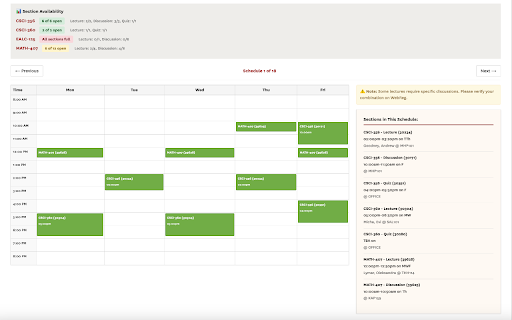
Automatically generate conflict-free schedules for USC WebReg. Visualize your week, filter unavailable seats, and build the perfect schedule.

Build the perfect USC schedule in seconds, right inside WebReg.

Key Features:
- Automatic Schedule Generation: Input your desired courses (e.g., CSCI-104, MATH-225), and instantly see every valid, non-conflicting schedule combination.
- One-Click Visualization: View your weekly schedule in a clean, color-coded calendar grid.
- Smart Filtering: Automatically hides sections that are closed or conflicting. Option to "Only include sections with available seats."
- Native Integration: Works directly within the USC WebReg "Department" pages—no need to switch tabs or use external websites.
- Privacy: All processing happens locally in your browser. No personal data is ever collected or transmitted.

How to Use:
1. Log in to USC WebReg
2. Click the "myScheduleBuilder" tab (next to myCourseBin).
3. Enter your course codes (e.g., CSCI-103, MATH-225).
4. Click "Generate Potential Schedules".
5. Browse through valid options using the Next/Previous buttons!


Important note: This is a student-made tool and is not officially affiliated with the University of Southern California. Always double-check your final schedule on WebReg before registering. Some courses may have specific lecture/discussion linking requirements.
Technical
- Version
- 1.0.0
- Manifest
- V3
- Size
- 68.15KiB
- Min Chrome
- 88
- Languages
- 1
- Featured
- No
Metadata
- ID
- mblbhhoklifglbhpilfkphcdlmonnfpa
- Developer ID
- uf07221b940a2f1a2321c9676eddf1429
- Developer Email
- [email protected]
- Created
- Jan 1, 2026
- Last Updated (Store)
- Jan 1, 2026
- Last Scraped
- Jun 5, 2026
- Website
- —
- Support URL
- —
- Privacy Policy
- —
Similar extensions
Alternatives to USC Schedule Builder, ranked by description similarity.

Course2Cal for RWeb
Extracts course information from RWeb and syncs it to Google Calendar. This extension is not affiliated with or endorsed by UCR.
6

Aggie Schedule Mate
Export UC Davis schedule to calendar with RateMyProfessor integration
759
★ 3.6

Cornell Schedule to Google Calendar
Parse class schedule and add events to Google Calendar.
32

WashU Workday Helper
Show RMP info when hovering over prof names & offers automatic clicker to streamline course selections.
292
★ 5.0

Course Offering
Plan your schedules with this free utility for KFUPM students.
(warning: This project is currently unmaintained)
What's New in…
1.0K
★ 4.9

KISJ MS Schedule
An extension for KISJ MS Students, which shows remaining time and current period.
4
★ 5.0

清大選課助手 NTHU Course Selection Assistant
改善清華大學網路選課系統的體驗,提供進階篩選與評價查詢功能。Enhance NTHU's course selection system with advanced filtering and review lookup features.
27

SUTD Deadline Center
your SUTD deadlines, in one place. auto-pulls from edimension + gradescope. one-click export to google calendar. no signup.
49
★ 5.0
Data sourced from the Chrome Web Store · last verified Jun 5, 2026.