
LinkedIn AI Post Detector
Detects AI-generated posts in your LinkedIn feed using Claude Haiku scoring. BYOK.
As of June 2026, LinkedIn AI Post Detector has — users in the Social & Communication category.
Usersno change0%
—
—
Ratingno change0%
—
— reviews
Reviewsno change0%
—
Version
2.10.3
Manifest V3
90-day change · In the last 90 days this extension 1 version update, changed permissions.
History
2 snapshotsTracking since Apr 2, 2026.
Not enough history yet for this metric — the chart fills in as we collect more snapshots.
View as table
| Date | Users | Rating | Reviews | Version |
|---|---|---|---|---|
| Apr 2, 2026 | — | — | — | 2.8.0 |
| Apr 24, 2026 | — | — | — | 2.8.0 |
| Now | — | — | — | 2.10.3 |
Changelog
- Apr 24, 2026description
Is your LinkedIn feed full of AI-generated posts? Now you can tell at a glance. LinkedIn AI Post Detector scores every post in your feed for AI-generated content, powered by Claude Haiku. Each post gets a color-coded badge showing the AI confidence score (0–100%) right in the post header: green for likely human, amber for mixed signals, red for likely AI.

HOW IT WORKS
The extension reads each post's text and sends it to Claude Haiku for analysis. Haiku evaluates writing style, structure, specificity, and voice to estimate how likely the post was AI-generated. Scores appear inline as small pill badges: no popups, no interruptions.
Posts above your chosen threshold are automatically collapsed, letting you focus on authentic content. Hover any badge for a one-sentence explanation of the score.

FEATURES
• Real-time scoring — posts are scored as they appear in your feed
• Color-coded badges — green (low AI), amber (medium), red (high AI)
• Spinner indicator — see which posts are being scored in real time
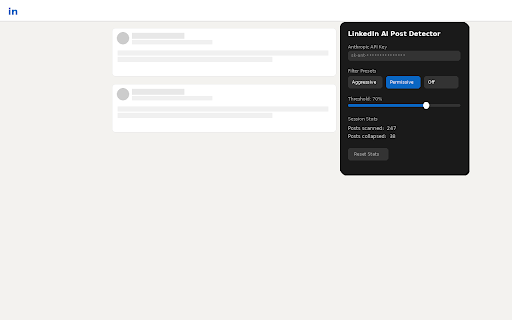
• Adjustable threshold — choose how aggressively to filter (slider + presets)
• Auto-collapse — high-scoring posts collapse to just the author header
• Expand anytime — click the toggle to read any collapsed post
• Activity page support — scores posts on profile activity pages too
• Hover explanations — see why each post got its score
• Session caching — posts aren't re-scored when you navigate around LinkedIn
• Privacy-first — your API key stays local, no data sent except to Anthropic's API

REQUIREMENTS
You need your own Anthropic API key. Get one at console.anthropic.com. Each post costs a fraction of a cent to score via Claude Haiku.

SETUP
Install the extension
Click the extension icon
Enter your Anthropic API key
Browse LinkedIn — scoring starts automatically
Is your LinkedIn feed full of AI-generated posts? Now you can tell at a glance. LinkedIn AI Post Detector scores every post in your feed for AI-generated content, powered by Claude Haiku. Each post gets a color-coded badge showing the AI confidence score (0–100%) right in the post header: green for likely human, amber for mixed signals, red for likely AI.

HOW IT WORKS
The extension reads each post's text and sends it to Claude Haiku for analysis. Haiku evaluates writing style, structure, specificity, and voice to estimate how likely the post was AI-generated. Scores appear inline as small pill badges: no popups, no interruptions.

Posts above your chosen threshold are automatically collapsed, letting you focus on authentic content. Hover any badge for a short AI assessment and a TL;DR summary of what the post is about — so you can decide if it's worth reading without expanding it.

FEATURES
• Real-time scoring — posts are scored in parallel as they appear in your feed
• Color-coded badges — green (low AI), amber (medium), red (high AI)
• Spinner indicator — see which posts are being scored in real time
• Adjustable threshold — choose how aggressively to filter (slider + presets)
• Auto-collapse — high-scoring posts collapse to just the author header
• Expand anytime — click the toggle to read any collapsed post
• TL;DR summaries — hover any badge to see what the post is about at a glance
• Hover explanations — see why each post got its score
• Activity page support — scores posts on profile activity pages too
• Session caching — posts aren't re-scored when you navigate around LinkedIn
• Privacy-first — your API key stays local, no data sent except to Anthropic's API

REQUIREMENTS
You need your own Anthropic API key. Get one at console.anthropic.com. Each post costs a fraction of a cent to score via Claude Haiku.

SETUP
Install the extension
Click the extension icon
Enter your Anthropic API key
Browse LinkedIn — scoring starts automatically
- Apr 24, 2026permissions
storage
storage, scripting, tabs
Permissions & access
- Permissions
- storagescriptingtabs
- Host access
- *://*.linkedin.com/*, https://api.anthropic.com/*
Screenshots

About
Is your LinkedIn feed full of AI-generated posts? Now you can tell at a glance. LinkedIn AI Post Detector scores every post in your feed for AI-generated content, powered by Claude Haiku. Each post gets a color-coded badge showing the AI confidence score (0–100%) right in the post header: green for likely human, amber for mixed signals, red for likely AI.

HOW IT WORKS
The extension reads each post's text and sends it to Claude Haiku for analysis. Haiku evaluates writing style, structure, specificity, and voice to estimate how likely the post was AI-generated. Scores appear inline as small pill badges: no popups, no interruptions.

Posts above your chosen threshold are automatically collapsed, letting you focus on authentic content. Hover any badge for a short AI assessment and a TL;DR summary of what the post is about — so you can decide if it's worth reading without expanding it.

FEATURES
• Real-time scoring — posts are scored in parallel as they appear in your feed
• Color-coded badges — green (low AI), amber (medium), red (high AI)
• Spinner indicator — see which posts are being scored in real time
• Adjustable threshold — choose how aggressively to filter (slider + presets)
• Auto-collapse — high-scoring posts collapse to just the author header
• Expand anytime — click the toggle to read any collapsed post
• TL;DR summaries — hover any badge to see what the post is about at a glance
• Hover explanations — see why each post got its score
• Activity page support — scores posts on profile activity pages too
• Session caching — posts aren't re-scored when you navigate around LinkedIn
• Privacy-first — your API key stays local, no data sent except to Anthropic's API

REQUIREMENTS
You need your own Anthropic API key. Get one at console.anthropic.com. Each post costs a fraction of a cent to score via Claude Haiku.

SETUP
Install the extension
Click the extension icon
Enter your Anthropic API key
Browse LinkedIn — scoring starts automatically
Technical
- Version
- 2.10.3
- Manifest
- V3
- Size
- 31.38KiB
- Min Chrome
- 88
- Languages
- 1
- Featured
- No
Metadata
- ID
- mbioelkjkiedahnfmdkpkhlcmegdiaff
- Developer ID
- u57369cfae2c954fb1f2da57fa51a85c9
- Developer Email
- [email protected]
- Created
- Apr 1, 2026
- Last Updated (Store)
- Apr 24, 2026
- Last Scraped
- Jun 7, 2026
- Website
- https://advizant.ai/
- Support URL
- —
- Privacy Policy
- https://advizant.ai/privacy-policy
Data sourced from the Chrome Web Store · last verified Jun 7, 2026.