Synhix - Read Smarter in Color
Discover a New Way of Reading the Web with Color-Coded Syntax Highlighting. It's Effortless and Completely Free!
As of May 2026, Synhix - Read Smarter in Color has 222 users and a 5.00/5 rating from 3 reviews in the Productivity category.
Usersup 11.6 percent+11.6%
222
222
Ratingno change0%
5.00
3 reviews
Reviewsno change0%
3
Version
25.08.01
Manifest V3
History
5 snapshotsTracking since Apr 1, 2026.
View as table
| Date | Users | Rating | Reviews | Version |
|---|---|---|---|---|
| Apr 1, 2026 | 199 | 5.00 | 3 | 25.08.01 |
| Apr 20, 2026 | 203 | 5.00 | 3 | 25.08.01 |
| May 6, 2026 | 240 | 5.00 | 3 | 25.08.01 |
| May 17, 2026 | 243 | 5.00 | 3 | 25.08.01 |
| May 30, 2026 | 237 | 5.00 | 3 | 25.08.01 |
| Now | 222 | 5.00 | 3 | 25.08.01 |
Permissions & access
- Permissions
- storagecontextMenusidentityidentity.email
- Host access
- https://www.datumtron.com/*
Screenshots

About
Read Smarter in Color
--------------------------------
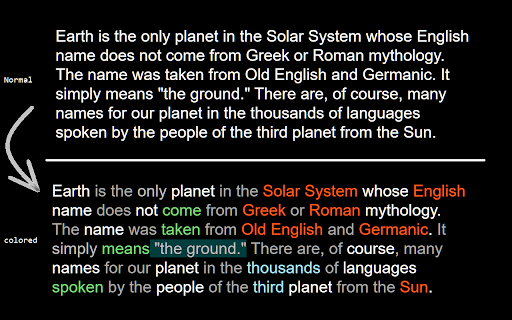
For efficient skimming and focused reading, Synhix uses color-coding to emphasize important words such as proper nouns, numbers, and verbs, while de-emphasizing common words, and highlighting blocks of text like quotes and parentheses. This approach, known as Syntax Highlighting, has been enhancing the readability of programming language texts with significant benefits for over three decades. Completely free to use, the coloring is effortlessly applied and activated instantly with the addition of the extension.  Add to Chrome now; the future of reading is in color.

Key Features:
---------------------
1. Intelligent Emphasis: Our Syntax Highlighter intelligently de-emphasizes common functional words like prepositions and articles, so you can effortlessly skip them and focus on crucial content.

2. Emphasis on Relevance: Proper nouns, symbols, and abbreviations are highlighted in a reddish color, making them stand out for quick recognition.

3. Numbers in Blue: Easily identify numbers in a bluish hue, ensuring you never miss important numerical information.

4. Verbs Anchored in Green: Verbs, the backbone of any sentence, are highlighted in a greenish color, drawing your attention to the key actions.

5. Natural Nouns: Nouns retain their standard color (black for white backgrounds and white for dark backgrounds), maintaining readability while keeping the focus on critical elements.

6. Block Highlighting: Blocks of text, such as quoted text and content within parentheses, are highlighted as units, helping you swiftly skim or concentrate on specific parts.

7. Constant Improvements: We're committed to continuous improvement! Expect updates with new features based on the latest research and user feedback.

Add to Chrome now and see for yourself!

Why Read with Syntax Highlighting?
---------------------------------------------------------
Studies have demonstrated the remarkable benefits of syntax highlighting for programming languages, streamlining comprehension and improving productivity. See the Wikipedia page for Syntax Highlighting at https://en.wikipedia.org/wiki/Syntax_highlighting. With Synhix, our innovative Chrome extension, we're extending these advantages to natural language reading.

Color Taste is Personal
-------------------------------------
Personalize Your Reading Experience with Synhix.
We understand that color preferences are as unique as you are. That's why color customization lies at the heart of our design. With Synhix, you're in control of how vibrant or subtle your reading experience is.

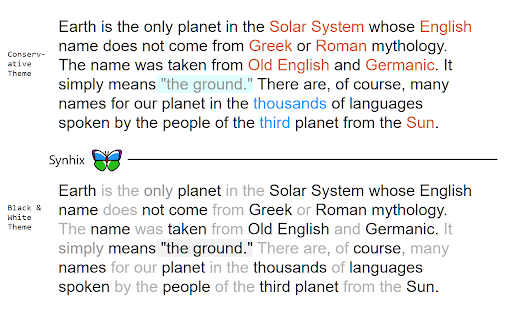
Select Your Theme: Choose from our diverse range of themes, from the detail-rich 'Liberal', which colors most elements, to the more restrained 'Moderate' and 'Conservative' options. For a minimalist approach, the 'Black and White' theme offers various shades of gray.

Explore Color Biases: Fine-tune your experience with a 'color bias' setting – a feature best explored firsthand to truly appreciate its impact.

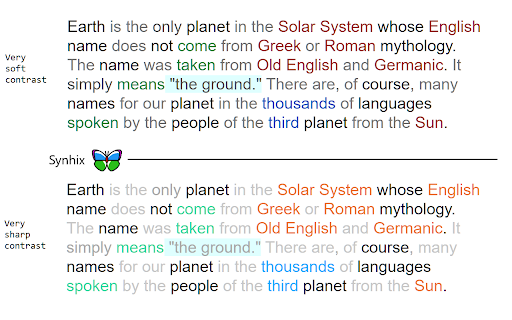
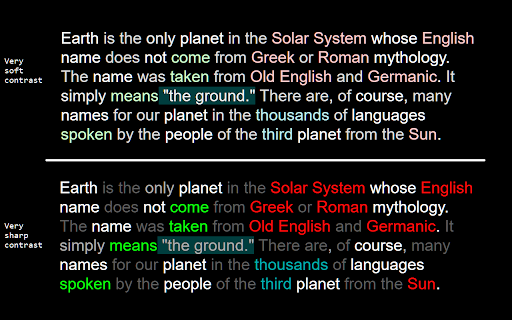
Adjust Contrast Levels: Cater to your visual comfort with five levels of contrast. From 'Very Soft' for a gentler view to 'Very Sharp' for striking clarity. The default 'Medium' setting offers a balanced view, but the choice is yours to make.

Add to Chrome now and dive into a reading experience that's tailored just for you.

Understanding Synhix Permissions and Your Privacy
-----------------------------------------------------------------------------------
Like many browser extensions, Synhix requires permission to read and modify (by adding color information) the content of all websites you visit. However, Synhix is designed to respect your privacy: it does not make any other changes to the websites nor does it use the website text for any purpose other than enhancing your reading experience.

Add to Chrome now and try different color themes.
Technical
- Version
- 25.08.01
- Manifest
- V3
- Size
- 370KiB
- Min Chrome
- 88
- Languages
- 1
- Featured
- No
Metadata
- ID
- mbhcianpafbengiglmifelchphkmlpci
- Developer ID
- u9c5f5958201123fc5e6cf05f8e1ddab2
- Developer Email
- [email protected]
- Created
- Aug 9, 2023
- Last Updated (Store)
- Aug 2, 2025
- Last Scraped
- May 30, 2026
- Website
- —
- Support URL
- https://www.datumtron.com
Similar extensions
Alternatives to Synhix - Read Smarter in Color, ranked by description similarity.

ChromaPage
Customize web colors with presets, dark mode, and site-specific themes.
—

Highlight text
Highlight selected text and manage highlights per page.
362
★ 5.0

Highlighter Extension
Discover highlighter extension that auto-colors your keywords; finds and highlights what’s vital instantly!
1.0K
★ 5.0

Highlight Plus
Search and highlight multiple words on web pages.
123
★ 5.0

Highlight Color Legend
Create and view your personal highlight color meanings to keep annotation consistent across PDFs and websites.
4

ShadeSurfer Black & White Reader Mode
Turn any webpage into a crisp, distraction-free e-paper display for increased focus.
13

Smart Reader
Introducing Smart Reader: Your Ultimate Reading Companion
Say goodbye to eye strain and hello to effortless reading with Smart…
10

MultiHighlight
Advanced text highlighting with real-time style updates for any webpage.
996
★ 3.5
Data sourced from the Chrome Web Store · last verified May 30, 2026.