
Mamma
Personalize your new tab page with your own images
As of May 2026, Mamma has 541 users and a 3.25/5 rating from 4 reviews in the Workflow & Planning category.
Usersup 3.8 percent+3.8%
541
541
Ratingno change0%
3.25
4 reviews
Reviewsno change0%
4
Version
5.1
Manifest V3
History
5 snapshotsTracking since Apr 1, 2026.
View as table
| Date | Users | Rating | Reviews | Version |
|---|---|---|---|---|
| Apr 1, 2026 | 521 | 3.25 | 4 | 5.1 |
| Apr 20, 2026 | 526 | 3.25 | 4 | 5.1 |
| May 6, 2026 | 561 | 3.25 | 4 | 5.1 |
| May 17, 2026 | 572 | 3.25 | 4 | 5.1 |
| May 30, 2026 | 623 | 3.25 | 4 | 5.1 |
| Now | 541 | 3.25 | 4 | 5.1 |
Permissions & access
- Permissions
- tabsstoragewebNavigationcookiestopSitesbookmarkscontextMenusmanagementgeolocation
- Host access
- https://www.mammaextension.com/*
Screenshots


About
Personalize your new tab page with your chosen images, improved bookmarking, personalized greetings, various clocks, and drag-and-drop arrangements.

☆☆ Key Features ☆☆
✓ Ability to craft your own background image library (i.e., favorites)
✓ Access to thousands of background images through Pexels integration
✓ Easily save any image from the web to your background library with one click
✓ Easily arrange your bookmarks into Collections to better organize your online experience

☆☆ Additional Features ☆☆
✓ Right-click bookmarking
✓ Personalized greetings
✓ The time and date
✓ World clocks
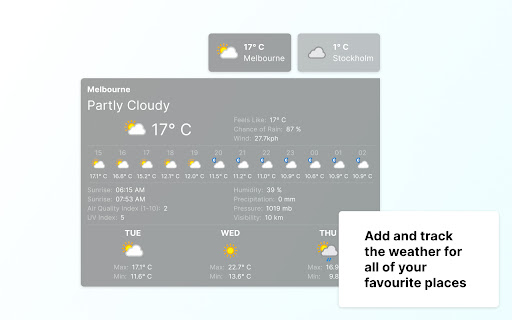
✓ See the weather forecast for cities of interest
✓  Easy access to top-visited sites
✓ To-Do List Manager
✓  Notes
✓  Concentration Timer
✓ Arrange the above features on your page to your liking

IMPORTANT: After installing Mamma click the ‘Keep it’ button on the ‘Change back to Google’ notification. This will show your chosen images on each new tab as desired.  🙂

☆☆ Privacy and Security ☆☆
Mamma takes your security and privacy very seriously. We can ensure that:
- Your information will never be sold to a third party.
- Our collected URL data will never be associated with you or your account.
- You can review our complete terms of service at www.mammaextension.com/terms and our privacy policy at www.mammaextension.com/privacy
- You can read more about us at www.mammaextension.com/about

☆☆ Terms ☆☆
- By clicking "Add to Chrome," I accept and agree to installing the Mamma extension and setting the New Tab to that provided by the Mamma Extension, agreeing to the Terms of Use, and Privacy Policy.
- You can review our complete terms of use at https://www.mammaextension.com/terms

☆☆ Social ☆☆
Follow Mamma for updates at:
https://www.facebook.com/mammaextensions/
https://twitter.com/mammaextensions/
Technical
- Version
- 5.1
- Manifest
- V3
- Size
- 830KiB
- Min Chrome
- 88
- Languages
- 1
- Featured
- Yes
Metadata
- ID
- mallfdijfpnfhfcfancbnecanjnapiop
- Developer ID
- u7e4f0462ba4c6f8b4564be3ef2a660a4
- Developer Email
- [email protected]
- Created
- Jan 22, 2023
- Last Updated (Store)
- Oct 1, 2025
- Last Scraped
- May 30, 2026
- Website
- https://mammaextension.com/
- Support URL
- http://www.mammaextension.com/contact/
- Privacy Policy
- https://www.mamma.com/privacy/
Similar extensions
Alternatives to Mamma, ranked by description similarity.

Startify
Customizable new tab page with greetings, time, todo lists, shortcut links, and personalized background images.
—

BiTab New Tab
BiTab Newtab is Beautiful personal homepage for Google Chrome New Tab - Chrome native newtab
245
★ 4.1

Global Glamours
Global Glamours New Tab
—

TabiTab
The most useful Newtab in the world!
2.0K
★ 3.7

Cmanya
Cmanya -Create your own bookmarks
1
★ 5.0

Bookmark Manager
Bookmark Manager helps you to manage saved bookmarks in new tab
125
★ 1.5
Speed Dial New tab
Speed Dial is an easy-to-use extension that lets you save and organize your most visited websites and customize your new tab page.
10.0K
★ 3.9

Speed Dial 2 New tab
Speed Dial 2 is an easy-to-use extension that lets you save and organize your most visited websites and customize your new tab page.
300.0K
★ 4.1
Data sourced from the Chrome Web Store · last verified May 30, 2026.