
Claude Usage Tracker — Chat & Code Export
Track Claude.ai usage and limits, export chats to Markdown, jump into new chats — works on claude.ai and Claude Code.
As of June 2026, Claude Usage Tracker — Chat & Code Export has 3,000 users and a 4.73/5 rating from 66 reviews in the Productivity category.
Usersup 200.0 percent+200.0%
3.0K
3,000
Ratingdown 3.9 percent−3.9%
4.73
66 reviews
Reviewsup 78.4 percent+78.4%
66
Version
1.2.4
Manifest V3
90-day change · In the last 90 days this extension gained 2.0K users, 3 version updates.
History
11 snapshotsTracking since Apr 17, 2026.
View as table
| Date | Users | Rating | Reviews | Version |
|---|---|---|---|---|
| Apr 17, 2026 | 1.0K | 4.92 | 37 | 1.2.0 |
| Apr 25, 2026 | 1.0K | 4.86 | 43 | 1.2.1 |
| May 2, 2026 | 1.0K | 4.84 | 45 | 1.2.3 |
| May 8, 2026 | 1.0K | 4.78 | 46 | 1.2.3 |
| May 15, 2026 | 2.0K | 4.79 | 52 | 1.2.3 |
| May 20, 2026 | 2.0K | 4.79 | 52 | 1.2.4 |
| May 24, 2026 | 2.0K | 4.79 | 53 | 1.2.4 |
| May 29, 2026 | 2.0K | 4.80 | 54 | 1.2.4 |
| Jun 3, 2026 | 2.0K | 4.73 | 56 | 1.2.4 |
| Jun 8, 2026 | 2.0K | 4.72 | 58 | 1.2.4 |
| Jun 13, 2026 | 3.0K | 4.75 | 63 | 1.2.4 |
| Now | 3.0K | 4.73 | 66 | 1.2.4 |
Changelog
- May 15, 2026description
Claude Track & Export enhances your Claude.ai and Claude for Code experience with real-time usage tracking and seamless chat management.
KEY FEATURES:

Real-time usage tracking - Monitor your 5-hour session, weekly all-models, and weekly Opus limits across both claude.ai and Claude for Code
Integrated sidebar panel - Usage stats display directly in Claude's interface
Smart export system - Export any percentage of your conversation to Markdown
One-click workflow - Export → Download → New chat → Auto-paste in 3 seconds
Multi-platform support - Works seamlessly on both claude.ai web interface and Claude for Code CLI
Adaptive UI - Works in both expanded and collapsed sidebar modes

HOW IT WORKS:

Install the extension
Visit claude.ai or use Claude for Code - Usage panel appears automatically
Track your limits in real-time across all platforms
Click "Export" to save conversations
Choose 20%, 50%, or 100% to export
Automatically opens new chat with content ready to paste

PERFECT FOR:

Long conversations that hit the context limit
Preserving important chat history from both web and CLI sessions
Continuing discussions in fresh sessions
Monitoring your Claude usage across plans and platforms
Developers using Claude for Code who need to track API usage

PRIVACY:

No data collection - Everything stays on your device
No external servers - Direct API calls to Claude only
Open source - Transparent code you can review
Secure - No tracking or analytics

Support: [email protected]
Privacy Policy: https://github.com/jedfan21/claude-track-export-privacy-and-policy/blob/16f98c5637b7d4740821a6a7482c86b8e8dac183/privacy-policy.md
Feature Requests: https://forms.gle/ptB6i9ie6ebep71T9

Changes made:

Added "Claude for Code" to the opening line
Included "Multi-platform support" as a key feature
Updated "How it works" to mention both claude.ai and Claude for Code
Added developer use case in "Perfect for" section
Clarified that tracking works across "all platforms"

Does this capture the Claude for Code integration accurately? Let me know if you want to emphasize any specific aspects of the Code support!
Claude Usage Tracker is the Chrome extension for monitoring your Claude.ai and Claude Code usage limits, exporting chat history to Markdown, and continuing long conversations seamlessly. Built for Claude Pro and Max subscribers who want clear visibility into their 5-hour session and weekly all-models usage — directly inside Claude's sidebar, with one-click export and resume. KEY FEATURES: • Real-time usage tracking — Monitor your 5-hour session and weekly all-models limits, refreshed automatically every 30 seconds • Integrated sidebar panel — Usage stats display directly inside Claude's interface, with no separate window or tab • Smart export system — Export any portion (20%, 50%, or 100%) of your conversation to clean Markdown • One-click workflow — Export → Download → New chat → Auto-paste, in under 3 seconds • Works on Claude Code — Sidebar and export both supported on claude.ai/code conversations • Adaptive UI — Renders correctly in both expanded and collapsed sidebar modes HOW IT WORKS: 1. Install the extension 2. Visit claude.ai or claude.ai/code — the usage panel appears automatically inside Claude's sidebar 3. Watch your 5-hour and weekly limits update in real time 4. Click "Export" on any conversation to save it as Markdown 5. Choose 20%, 50%, or 100% of recent messages 6. Optionally auto-open a new chat with the exported content already pasted PERFECT FOR: • Long conversations approaching the context limit • Preserving important chat history before sessions reset • Continuing discussions in fresh sessions without losing context • Monitoring your Claude Pro or Max usage across the week • Developers using Claude Code in the browser who want to track web-session usage PRIVACY: • No data collection — everything stays on your device • No external servers — the extension talks only to Claude's own API • No tracking, no analytics, no telemetry • Open source — code is published and reviewable FAQ: Q: Does this work with Claude Code (the CLI / terminal tool)? A: It works on the web version of Claude Code at claude.ai/code. The terminal CLI tool is a separate product and is not tracked by this extension. Q: Does it track Opus usage separately? A: It tracks two limits: your 5-hour session and your 7-day all-models usage. These are the limits Claude.ai exposes. There is no separate Opus-only counter at the moment. Q: Where does my data go? A: Nowhere. The extension reads your usage from Claude's own /api/organizations/{id}/usage endpoint using your existing browser session. Nothing is sent anywhere else. Q: I'm on Claude Free / Pro / Max — does this work? A: Yes for all subscription tiers. The extension simply reads whatever limits Claude.ai reports for your account. Q: Why does the sidebar disappear sometimes? A: Claude.ai re-renders its sidebar during navigation. The extension automatically re-attaches the panel within a second. Support: [email protected] Privacy Policy: https://github.com/jedfan21/claude-track-export-privacy-and-policy/blob/16f98c5637b7d4740821a6a7482c86b8e8dac183/privacy-policy.md Feature Requests: https://forms.gle/ptB6i9ie6ebep71T9 - May 15, 2026short_description
Track Claude usage, export conversations to Markdown, and jump into new chats instantly.
Track Claude.ai usage and limits, export chats to Markdown, jump into new chats — works on claude.ai and Claude Code.
- May 15, 2026name
Claude Usage Tracker & Chat Exporter
Claude Usage Tracker — Chat & Code Export
Permissions & access
- Permissions
- activeTabstoragedownloadsalarmsscripting
- Host access
- https://claude.ai/*
Screenshots


About
Claude Usage Tracker is the Chrome extension for monitoring your Claude.ai and Claude Code usage limits, exporting chat history to Markdown, and continuing long conversations seamlessly. Built for Claude Pro and Max subscribers who want clear visibility into their 5-hour session and weekly all-models usage — directly inside Claude's sidebar, with one-click export and resume.

KEY FEATURES:

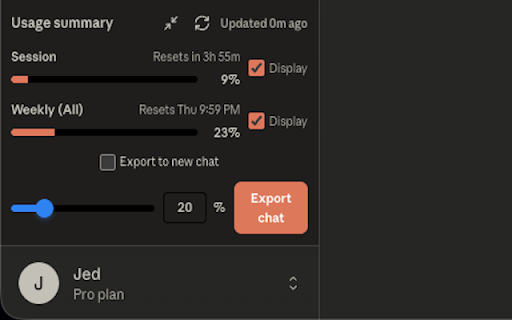
• Real-time usage tracking — Monitor your 5-hour session and weekly all-models limits, refreshed automatically every 30 seconds
• Integrated sidebar panel — Usage stats display directly inside Claude's interface, with no separate window or tab
• Smart export system — Export any portion (20%, 50%, or 100%) of your conversation to clean Markdown
• One-click workflow — Export → Download → New chat → Auto-paste, in under 3 seconds
• Works on Claude Code — Sidebar and export both supported on claude.ai/code conversations
• Adaptive UI — Renders correctly in both expanded and collapsed sidebar modes

HOW IT WORKS:

1. Install the extension
2. Visit claude.ai or claude.ai/code — the usage panel appears automatically inside Claude's sidebar
3. Watch your 5-hour and weekly limits update in real time
4. Click "Export" on any conversation to save it as Markdown
5. Choose 20%, 50%, or 100% of recent messages
6. Optionally auto-open a new chat with the exported content already pasted

PERFECT FOR:

• Long conversations approaching the context limit
• Preserving important chat history before sessions reset
• Continuing discussions in fresh sessions without losing context
• Monitoring your Claude Pro or Max usage across the week
• Developers using Claude Code in the browser who want to track web-session usage

PRIVACY:

• No data collection — everything stays on your device
• No external servers — the extension talks only to Claude's own API
• No tracking, no analytics, no telemetry
• Open source — code is published and reviewable

FAQ:

Q: Does this work with Claude Code (the CLI / terminal tool)?
A: It works on the web version of Claude Code at claude.ai/code. The terminal CLI tool is a separate product and is not tracked by this extension.

Q: Does it track Opus usage separately?
A: It tracks two limits: your 5-hour session and your 7-day all-models usage. These are the limits Claude.ai exposes. There is no separate Opus-only counter at the moment.

Q: Where does my data go?
A: Nowhere. The extension reads your usage from Claude's own /api/organizations/{id}/usage endpoint using your existing browser session. Nothing is sent anywhere else.

Q: I'm on Claude Free / Pro / Max — does this work?
A: Yes for all subscription tiers. The extension simply reads whatever limits Claude.ai reports for your account.

Q: Why does the sidebar disappear sometimes?
A: Claude.ai re-renders its sidebar during navigation. The extension automatically re-attaches the panel within a second.

Support: [email protected]
Privacy Policy: https://github.com/jedfan21/claude-track-export-privacy-and-policy/blob/16f98c5637b7d4740821a6a7482c86b8e8dac183/privacy-policy.md
Feature Requests: https://forms.gle/ptB6i9ie6ebep71T9
Technical
- Version
- 1.2.4
- Manifest
- V3
- Size
- 44.12KiB
- Min Chrome
- 88
- Languages
- 1
- Featured
- No
Metadata
- ID
- madhogacekcffodccklcahghccobigof
- Developer ID
- u7928740c39d1e59381d09c23f87c1e15
- Developer Email
- [email protected]
- Created
- Oct 31, 2025
- Last Updated (Store)
- May 12, 2026
- Last Scraped
- Jun 13, 2026
- Website
- —
- Support URL
- —
Similar extensions
Alternatives to Claude Usage Tracker — Chat & Code Export, ranked by description similarity.

AI Chat Exporter: Save Claude as PDF, MD and more
Export Claude chats to PDF, Markdown, Text, CSV... Free and fully customizable. Supports artifacts, reasoning & advanced outputs.
70.0K
★ 4.8

Claude Chat Exporter
Export Claude.ai conversations to Markdown
7.0K
★ 5.0

Claude Chat Extractor
Extract, edit, and save Claude conversations as beautiful markdown notes with syntax highlighting
169
★ 5.0

CLAUDE TO PDF, DOCX, MARKDOWN, CSV, HTML AND ETC. FREE FOREVER
Export Claude AI conversations to multiple formats: PDF, HTML, Markdown, DOCX, Text AND MORE - Free Forever
268
★ 5.0

Claude to Obsidian & Markdown Export
Sync, backup, and bulk export Claude conversations to Obsidian/Markdown with one click.
4.0K
★ 4.8

Claude Chat Manager
Organize, manage and search your Claude AI conversations
1.0K
★ 2.2

Export AI Chat
Export your Claude AI conversations to PDF, Markdown, Text, CSV, and JSON formats with one click.
10

Claude Exporter
Export conversations and artifacts from Claude.ai
6.0K
★ 5.0
Data sourced from the Chrome Web Store · last verified Jun 13, 2026.