
JSON Beautifier and Editor
Display JSON objects by transforming them into Syntax editable highlighted HTML to validate, format, and save
As of June 2026, JSON Beautifier and Editor has 30,000 users and a 4.75/5 rating from 53 reviews in the Workflow & Planning category.
Usersno change0%
30.0K
30,000
Ratingno change0%
4.75
53 reviews
Reviewsno change0%
53
Version
0.6.6
Manifest V3
History
4 snapshotsTracking since Apr 5, 2026.
View as table
| Date | Users | Rating | Reviews | Version |
|---|---|---|---|---|
| Apr 5, 2026 | 30.0K | 4.75 | 53 | 0.6.6 |
| Apr 16, 2026 | 30.0K | 4.76 | 54 | 0.6.6 |
| May 7, 2026 | 40.0K | 4.76 | 54 | 0.6.6 |
| Jun 5, 2026 | 30.0K | 4.76 | 54 | 0.6.6 |
| Now | 30.0K | 4.75 | 53 | 0.6.6 |
Permissions & access
- Permissions
- storagecontextMenusscripting
- Host access
- <all_urls>
Screenshots
About
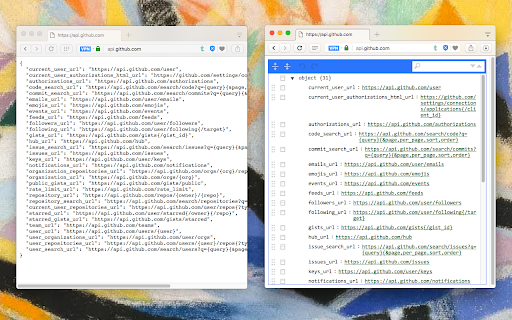
This extension monitors JSON pages and converts them into a human-readable object. You can view, edit, search through values and keys. You can even change the format of a key or drag it into a new place. There is no need to do anything after installation. Just open a JSON page and the extension automatically converts the page into the editor mode.

As of version 0.2.0, the extension uses a dark theme if your browser's default theme is dark.

Supported mime types:
   ► application/json
   ► application/x-javascript
   ► application/hal+json
   ► application/vnd.error+json
   ► application/vnd.api+json
   ► text/javascript
   ► text/x-javascript
   ► text/x-json
   ► text/plain

FEATURES
   ► Supports both JSON & JSONP formats
   ► Has light and dark syntax highlighting themes
   ► Supports collapsible trees
   ► Converts text links into clickable URLs
   ► Supports raw, code, and parsed JSON views
   ► Keeps expanded structure when refreshing the JSON page
   ► Copy Object Path
   ► Copy Outer JSON
   ► Copy Inner JSON
   ► Open a new editor to write a new JSON object
   ► Open a new editor from selection text (right-click context menu)
   ► Supports large numbers (BigInt, BigFloat, ...)

--

Change Logs:
0.1.3:
1. It is now possible to beautify local (file://) JSON files.
2. Extension now uses "persistent = false" background page (event page) to have no performance effect when it is not used.
0.1.6:
1. It is now possible to change the view mode to "Tree", "Code", and "Text" modes. The coding mode is useful to edit the raw JSON, and the text mode is useful to copy the raw data. The default view is the tree view which displays the JSON in a formatted and highlighted format.
Technical
- Version
- 0.6.6
- Manifest
- V3
- Size
- 490KiB
- Min Chrome
- 88
- Languages
- 13
- Featured
- No
Metadata
- ID
- lpopeocbeepakdnipejhlpcmifheolpl
- Developer ID
- u7816faddd64dac806af1e7ae97ee7f10
- Developer Email
- [email protected]
- Created
- Jan 16, 2017
- Last Updated (Store)
- Feb 23, 2026
- Last Scraped
- Jun 5, 2026
- Website
- —
- Privacy Policy
- https://add0n.com/policies/yokris.dev.txt
Similar extensions
Alternatives to JSON Beautifier and Editor, ranked by description similarity.

JSON Tools
Collection of small & convenient JSON tools.
1.0K
★ 4.5

Quick Notes Pro
Take notes quickly from the browser with rich text, save images, videos, make lists or save your code with highlight functionality!
78
★ 5.0

JSON Formatter
Format your JSON so that it is indented correctly for easier reading.
325

JSON Formatter
Format JSON in textbox or read/format from file
978
★ 5.0

Beautify JSON
Pretty print collapsible JSON
158

JSON Format Tool
A simple Chrome extension to format JSON data
135

CSV Tools
Collection of small & convenient CSV tools.
198

Annotate web pages/CONTEXT
Use this extension to annotate (edit, highlight, popup/embedded notes & page notes) your web-pages.
1.0K
★ 3.5
Data sourced from the Chrome Web Store · last verified Jun 5, 2026.