
Export My NFT Listings
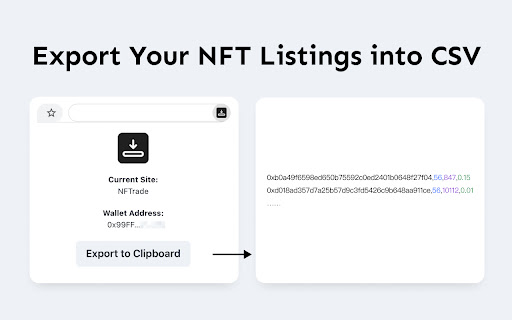
Reads out your NFT listings with prices on marketplaces and export as CSV to be imported by other marketplaces like tofuNFT.
As of May 2026, Export My NFT Listings has 2,000 users and a 4.00/5 rating from 1 reviews in the Workflow & Planning category.
Usersno change0%
2.0K
2,000
Ratingno change0%
4.00
1 reviews
Reviewsno change0%
1
Version
1.2
Manifest V3
History
1 snapshotsTracking since Apr 24, 2026.
View as table
| Date | Users | Rating | Reviews | Version |
|---|---|---|---|---|
| Apr 24, 2026 | 2.0K | 4.00 | 1 | 1.2 |
| Now | 2.0K | 4.00 | 1 | 1.2 |
Permissions & access
- Permissions
- clipboardWritetabswebRequestbackgroundstoragescripting
- Host access
- https://nftrade.com/, https://api.nftrade.com/, https://scv.finance/, https://opensea.io/, https://api.opensea.io/
Screenshots
About
If you want to move a bunch of NFTs listed on one marketplace to another, this extension might could help you.

【How to Use】
1. Open the marketplace & visit the page that shows all your listings
2. Click the extension icon and hit the Export to Clipboard button
3. Paste the text to the import page of marketplace that supports import from CSV.

Currently support: NFTrade, SCV, OpenSea
Technical
- Version
- 1.2
- Manifest
- V3
- Size
- 156KiB
- Min Chrome
- 88
- Languages
- 1
- Featured
- Yes
Metadata
- ID
- lpmogjockhdkcepliphdfbhpcdacbhki
- Developer ID
- ucb8936818738e1f4adc3ded1b5c6560b
- Developer Email
- [email protected]
- Created
- Dec 3, 2021
- Last Updated (Store)
- Dec 28, 2021
- Last Scraped
- May 20, 2026
- Website
- —
- Support URL
- —
- Privacy Policy
- https://telegra.ph/Privacy-policy-12-02-24
Similar extensions
Alternatives to Export My NFT Listings, ranked by description similarity.

Quanzoom extension
Add 'Add to Quanzoom' button into amazon.com, redbubble.com, teepublic.com site
135
★ 5.0

Rewear AI Extension V1
Connect to third party marketplaces
14
★ 5.0

Voolist – Cross-list in One Click
Cross-list your items to Poshmark, Depop, eBay, Etsy, Shopify and more — all from Voolist.
233

Vendoo Crosslist Extension v3
Connect and crosslist to 10+ third party marketplaces with Vendoo!
60.0K
★ 3.6
NabPush: 100% Free Product Lister
Free one click cross product lister for all major reseller marketplaces
39

eBay Extractor - Export search results & product listings
Scrape eBay product listings from eBay search results & categories & shops, one click to download eBay data to CSV/Excel/JSON.
105

Steam MultiSeller
Re-directs you to the hidden Steam multi-sell feature!
717
★ 4.0

ScrapeMaster | Merch MBA
ScrapeMaster by Merch.mba allows you to scrape and display listing information from the search page, optimizing time and effort!
1.0K
★ 4.8
Data sourced from the Chrome Web Store · last verified May 20, 2026.