
InSite Highlighter
The extension is designed to help you search for relevant keywords on LinkedIn, GitHub or Stack Overflow
As of May 2026, InSite Highlighter has 53 users and a 5.00/5 rating from 3 reviews in the Workflow & Planning category.
Usersup 8.2 percent+8.2%
53
53
Ratingno change0%
5.00
3 reviews
Reviewsno change0%
3
Version
1.0
Manifest V3
History
2 snapshotsTracking since Apr 24, 2026.
View as table
| Date | Users | Rating | Reviews | Version |
|---|---|---|---|---|
| Apr 24, 2026 | 49 | 5.00 | 3 | 1.0 |
| May 20, 2026 | 56 | 5.00 | 3 | 1.0 |
| Now | 53 | 5.00 | 3 | 1.0 |
Permissions & access
- Permissions
- storage
- Host access
- https://*.linkedin.com/*, https://*.github.com/*, https://*.stackoverflow.com/*
Screenshots

About
How does the InSite Highlighter work?

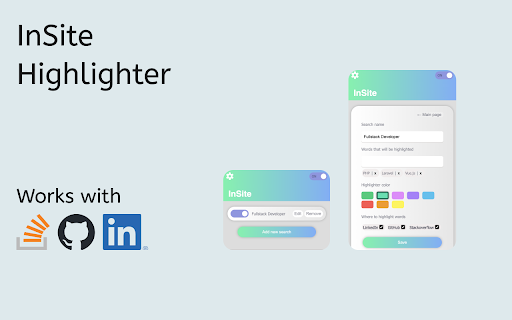
InSite Highlighter requires no registration or special installation. It is very simple:

1. Create a search in the extension.
2. Add keywords. For example, stack, locations, positions, etc.
3. Save and run the search and InSite Highlighter will highlight keywords on all sites that are available in the extension

Note that you can set the colour of the highlighter and also the sites where it will underline the words.

🤩We've also added a night mode feature, you can find this in the extension settings by clicking on the ⚙️
Technical
- Version
- 1.0
- Manifest
- V3
- Size
- 2.23MiB
- Min Chrome
- 88
- Languages
- 1
- Featured
- Yes
Metadata
- ID
- lpibfdnafmhjjjbglaedkbegelnllibc
- Developer ID
- u9cc5a4a8a81fdaf9c480536142d897bf
- Developer Email
- [email protected]
- Created
- Jun 14, 2023
- Last Updated (Store)
- Jun 14, 2023
- Last Scraped
- May 20, 2026
- Website
- —
- Support URL
- —
- Privacy Policy
- —
Similar extensions
Alternatives to InSite Highlighter, ranked by description similarity.

Text Highlighter
Enter a keyword and get the text you're looking for highlighted - all the time while surfing the web!
55
★ 5.0

Keywords Highlighter
a chrome extension that highlights keywords on web pages, making it easy to find or skip information
2.0K
★ 3.8

Domain Link Highlighter
Highlight links: green (dofollow), neon yellow (nofollow), orange (sponsored). Toggle per-site or All Links from the toolbar.
13
★ 5.0

Highlighter Plus
✨ A powerful text highlighter that helps you highlight and organize text. Perfect for research and study!
198
★ 5.0

Web highlighter & take notes
Instantly highlight web content and take notes directly on any page.
51
★ 2.0

Multi Highlight
Search and highlight multiple words on web pages.
3.0K
★ 2.6

Web Highlighter – Highlight Text, Save Notes & AI Study Tool
Highlight text on any webpage, save notes, AI flashcards & summaries. Free annotation & research tool. Liner & Weava alternative.
811
★ 4.6

LinkLight - Highlighter for the Web
Highlight text on any webpage and save it to your personal notebook with tags and colors.
4
★ 5.0
Data sourced from the Chrome Web Store · last verified May 20, 2026.