
Sampler
Record tab audio with waveform editing and DAW export
As of June 2026, Sampler has 179 users and a 5.00/5 rating from 1 reviews in the Productivity category.
Usersno change0%
179
179
Ratingno change0%
5.00
1 reviews
Reviewsno change0%
1
Version
1.1.0
Manifest V3
90-day change · In the last 90 days this extension 1 version update.
History
8 snapshotsTracking since Apr 29, 2026.
View as table
| Date | Users | Rating | Reviews | Version |
|---|---|---|---|---|
| Apr 29, 2026 | — | — | — | 1.0.0 |
| May 6, 2026 | — | — | — | 1.0.0 |
| May 11, 2026 | 18 | 5.00 | 1 | 1.0.0 |
| May 17, 2026 | 38 | 5.00 | 1 | 1.0.0 |
| May 23, 2026 | 51 | 5.00 | 1 | 1.0.0 |
| May 30, 2026 | 68 | 5.00 | 1 | 1.0.0 |
| Jun 5, 2026 | 100 | 5.00 | 1 | 1.1.0 |
| Jun 13, 2026 | 130 | 5.00 | 1 | 1.1.0 |
| Now | 179 | 5.00 | 1 | 1.1.0 |
Changelog
- May 30, 2026description
Message from author:
Hey all! This app is completely free (no annoyoing paywalls), and I'll be rolling out new features every two weeks.

Please send feedback!! ESPECIALLY IF IT'S NEGATIVE. I want to rapidly evolve this extension to make producer workflows simpler.

---

Heard something online that had an interesting texture or sound signature? Sampler lets you capture and mix without the friction that kills your creative flow.

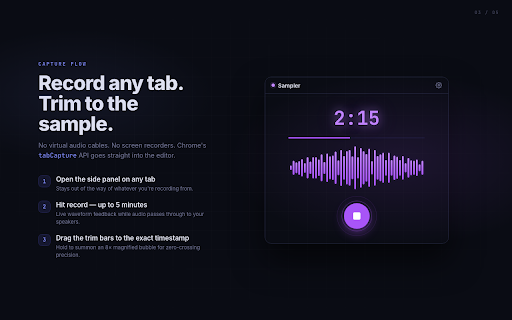
Click the Sampler icon, hit Record, and your active tab's audio streams directly into the side panel. When the moment is right, stop the recording, trim the waveform to exactly what you need, run it through the FX chain, and export to your downloads folder. Open it in Ableton, Logic, FL Studio, or any other DAW and start making music.

Everything happens locally in your browser. Sampler has no servers, no sign-in, and no analytics. Your audio never leaves your machine.

CAPTURE: Record any tab's audio with one click; anything playing in your tab can be used for you to flip.

EDIT: Trim the waveform down to the exact timestamp you want. Loop a region to audition it before you export.

FX: Use pitch shift, reverse, delay, and more while inspiration is hot so the sample is ready to export straight into your project.

EXPORT: Save as WAV or MP3 to your local downloads folder. Files go exactly where you choose, named and organized the way you work.

PRIVATE BY DESIGN: Recordings are stored on your device, accessible across sessions, never uploaded anywhere.

PERFECT FOR: Musicians and producers who sample from the browser or anyone who needs a quick-capture tool that integrates with their existing DAW workflow
New version updates 5/26/2026 (1.1.0):
- Pitch detection added: view pitch regions for the recorded sample
- Quality of life improvements for moving the cursor position on the sample
- Minor bug fixes (e.g. timestamp bug)

Message from dev:
Hey all! This app is completely free (no annoying paywalls), and I'll be rolling out new features every two weeks.

Please send feedback!! ESPECIALLY IF IT'S NEGATIVE. I want to rapidly evolve this extension to make producer workflows simpler.

---

Heard something online that had an interesting texture or sound signature? Sampler lets you capture and mix without the friction that kills your creative flow.

Click the Sampler icon, hit Record, and your active tab's audio streams directly into the side panel. When the moment is right, stop the recording, trim the waveform to exactly what you need, run it through the FX chain, and export to your downloads folder. Open it in Ableton, Logic, FL Studio, or any other DAW and start making music.

Everything happens locally in your browser. Sampler has no servers, no sign-in, and no analytics. Your audio never leaves your machine.

PITCH DETECT: View pitch regions for your recorded sample

CAPTURE: Record any tab's audio with one click; anything playing in your tab can be used for you to flip.

EDIT: Trim the waveform down to the exact timestamp you want. Loop a region to audition it before you export.

FX: Use pitch shift, reverse, delay, and more while inspiration is hot so the sample is ready to export straight into your project.

EXPORT: Save as WAV or MP3 to your local downloads folder. Files go exactly where you choose, named and organized the way you work.

PRIVATE BY DESIGN: Recordings are stored on your device, accessible across sessions, never uploaded anywhere.

PERFECT FOR: Musicians and producers who sample from the browser or anyone who needs a quick-capture tool that integrates with their existing DAW workflow
- May 6, 2026description
Heard something online that had an interesting texture or sound signature? Sampler lets you capture and mix without the friction that kills your creative flow.

Click the Sampler icon, hit Record, and your active tab's audio streams directly into the side panel. When the moment is right, stop the recording, trim the waveform to exactly what you need, run it through the FX chain, and export to your downloads folder. Open it in Ableton, Logic, FL Studio, or any other DAW and start making music.

Everything happens locally in your browser. Sampler has no servers, no sign-in, and no analytics. Your audio never leaves your machine.

CAPTURE: Record any tab's audio with one click; anything playing in your tab can be used for you to flip.

EDIT: Trim the waveform down to the exact timestamp you want. Loop a region to audition it before you export.

FX: Use pitch shift, reverse, delay, and more while inspiration is hot so the sample is ready to export straight into your project.

EXPORT: Save as WAV or MP3 to your local downloads folder. Files go exactly where you choose, named and organized the way you work.

PRIVATE BY DESIGN: Recordings are stored on your device, accessible across sessions, never uploaded anywhere.

PERFECT FOR: Musicians and producers who sample from the browser or anyone who needs a quick-capture tool that integrates with their existing DAW workflow
Message from author:
Hey all! This app is completely free (no annoyoing paywalls), and I'll be rolling out new features every two weeks.

Please send feedback!! ESPECIALLY IF IT'S NEGATIVE. I want to rapidly evolve this extension to make producer workflows simpler.

---

Heard something online that had an interesting texture or sound signature? Sampler lets you capture and mix without the friction that kills your creative flow.

Click the Sampler icon, hit Record, and your active tab's audio streams directly into the side panel. When the moment is right, stop the recording, trim the waveform to exactly what you need, run it through the FX chain, and export to your downloads folder. Open it in Ableton, Logic, FL Studio, or any other DAW and start making music.

Everything happens locally in your browser. Sampler has no servers, no sign-in, and no analytics. Your audio never leaves your machine.

CAPTURE: Record any tab's audio with one click; anything playing in your tab can be used for you to flip.

EDIT: Trim the waveform down to the exact timestamp you want. Loop a region to audition it before you export.

FX: Use pitch shift, reverse, delay, and more while inspiration is hot so the sample is ready to export straight into your project.

EXPORT: Save as WAV or MP3 to your local downloads folder. Files go exactly where you choose, named and organized the way you work.

PRIVATE BY DESIGN: Recordings are stored on your device, accessible across sessions, never uploaded anywhere.

PERFECT FOR: Musicians and producers who sample from the browser or anyone who needs a quick-capture tool that integrates with their existing DAW workflow
Permissions & access
- Permissions
- tabCapturestoragedownloadsunlimitedStoragesidePanel
- Host access
- None declared
Screenshots




About
New version updates 5/26/2026 (1.1.0):
- Pitch detection added: view pitch regions for the recorded sample
- Quality of life improvements for moving the cursor position on the sample
- Minor bug fixes (e.g. timestamp bug)

Message from dev:
Hey all! This app is completely free (no annoying paywalls), and I'll be rolling out new features every two weeks.

Please send feedback!! ESPECIALLY IF IT'S NEGATIVE. I want to rapidly evolve this extension to make producer workflows simpler.

---

Heard something online that had an interesting texture or sound signature? Sampler lets you capture and mix without the friction that kills your creative flow.

Click the Sampler icon, hit Record, and your active tab's audio streams directly into the side panel. When the moment is right, stop the recording, trim the waveform to exactly what you need, run it through the FX chain, and export to your downloads folder. Open it in Ableton, Logic, FL Studio, or any other DAW and start making music.

Everything happens locally in your browser. Sampler has no servers, no sign-in, and no analytics. Your audio never leaves your machine.

PITCH DETECT: View pitch regions for your recorded sample

CAPTURE: Record any tab's audio with one click; anything playing in your tab can be used for you to flip.

EDIT: Trim the waveform down to the exact timestamp you want. Loop a region to audition it before you export.

FX: Use pitch shift, reverse, delay, and more while inspiration is hot so the sample is ready to export straight into your project.

EXPORT: Save as WAV or MP3 to your local downloads folder. Files go exactly where you choose, named and organized the way you work.

PRIVATE BY DESIGN: Recordings are stored on your device, accessible across sessions, never uploaded anywhere.

PERFECT FOR: Musicians and producers who sample from the browser or anyone who needs a quick-capture tool that integrates with their existing DAW workflow
Technical
- Version
- 1.1.0
- Manifest
- V3
- Size
- 258KiB
- Min Chrome
- 88
- Languages
- 1
- Featured
- No
Metadata
- ID
- lpfooebakgdefkbahlhbhjlhnodplpeb
- Developer ID
- u96127d11a5ed1e46997d5d854950c898
- Developer Email
- [email protected]
- Created
- Apr 28, 2026
- Last Updated (Store)
- May 29, 2026
- Last Scraped
- Jun 13, 2026
- Website
- —
- Support URL
- —
- Privacy Policy
- https://branboyo.github.io/sampler/privacy/
Data sourced from the Chrome Web Store · last verified Jun 13, 2026.