
Wyloc — Prompt Secret Guard
Detects credentials and secrets before you send them. Local-first, no sign-in, no telemetry.
As of June 2026, Wyloc — Prompt Secret Guard has — users in the Developer Tools category.
Usersno change0%
—
—
Ratingno change0%
—
— reviews
Reviewsno change0%
—
Version
0.5.2
Manifest V3
History
1 snapshotsTracking since Jun 11, 2026.
Not enough history yet for this metric — the chart fills in as we collect more snapshots.
View as table
| Date | Users | Rating | Reviews | Version |
|---|---|---|---|---|
| Jun 11, 2026 | — | — | — | 0.5.2 |
| Now | — | — | — | 0.5.2 |
Permissions & access
- Permissions
- storagescripting
- Host access
- <all_urls>
Screenshots

About
Stop leaking credentials to AI tools.

Developers paste API keys, database URLs, .env files, and private keys into AI assistants and other web tools every day. Wyloc catches those secrets before they leave your machine.

HOW IT WORKS

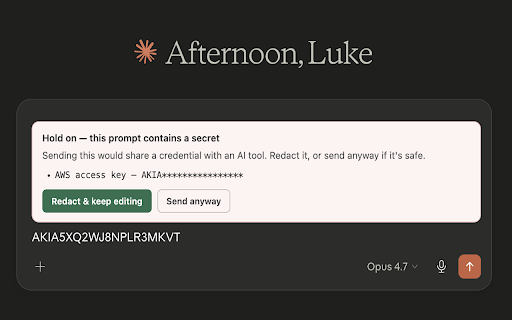
When you press Enter or click Send on any web page, Wyloc scans your text for credentials. If it finds one, it holds submission and shows a clear, non-intrusive banner:

- Block — high-confidence production secrets (cloud keys, database URLs with passwords, private keys) are held until you explicitly choose to proceed.
- Warn — possible secrets (JWTs, test keys, high-entropy strings) show a dismissible warning.
- Redact — one click replaces detected secrets with safe placeholders like [REDACTED_AWS_ACCESS_KEY].
- Swap — replace a secret with a realistic stand-in so the AI can still help with your code, then restore the real value when you copy the response back.

WHAT IT DETECTS

Wyloc recognizes 80+ types of credentials across major categories:

- Cloud providers (access keys, secret keys, service account files, storage keys)
- Source control and CI (personal access tokens, deploy tokens, pipeline secrets)
- Payment processors (live and test keys)
- AI and ML services (API keys)
- Databases (connection strings with embedded passwords)
- Developer and SaaS tools (API tokens)
- Generic secrets (JWTs, OAuth bearer tokens, PEM private keys, .env credential assignments, and high-entropy strings near credential keywords)

PRIVACY — BY DESIGN, NOT BY PROMISE

- Zero network requests. None. Ever. Check the Network tab yourself.
- No account, no sign-in, no telemetry, no analytics.
- Your prompt text is scanned in memory and immediately discarded. Never stored, never logged, never transmitted.
- The only thing stored is a local count of detected secret types — no values, no text.
- Fully open for inspection: the extension is unminified so you can read every line.

WORKS EVERYWHERE

Wyloc protects you on every website, not just a curated list. If a page has a text input and you're about to paste a secret into it, Wyloc checks it first — AI assistants, chat tools, support tickets, web forms, and internal dashboards alike, with no per-site setup.

BUILT FOR DEVELOPERS

- Non-intrusive: no constant scanning, no background activity. Only activates on submit.
- Smart allowlisting: localhost URLs, example values, test prefixes, and placeholder keys are automatically ignored.
- Low false-positive rate: entropy-only matches require nearby context keywords. Common patterns (git SHAs, UUIDs, hex hashes) are excluded.
- Dev-aware: secrets in dev/test contexts are warned, not blocked. Production secrets are blocked.
Technical
- Version
- 0.5.2
- Manifest
- V3
- Size
- 46.5KiB
- Min Chrome
- 88
- Languages
- 1
- Featured
- No
Metadata
- ID
- lpfhmmmelnkpgccgpehejiohpaddjgbp
- Developer ID
- u357d2b56cf68ae889769079b79f30d4e
- Developer Email
- [email protected]
- Created
- Jun 10, 2026
- Last Updated (Store)
- Jun 10, 2026
- Last Scraped
- Jun 11, 2026
- Website
- —
- Support URL
- https://wyloc.dev
- Privacy Policy
- https://wyloc.dev/privacy
Data sourced from the Chrome Web Store · last verified Jun 11, 2026.