
Viewport (alpha)
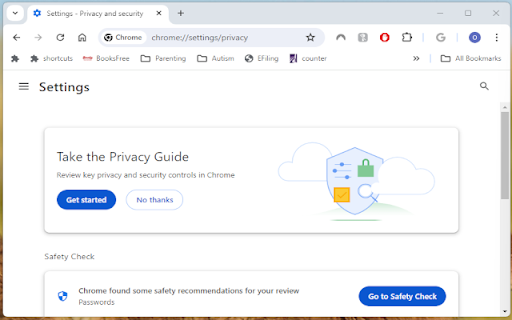
Allows tabs to be opened in separate minimalistic windows.
As of May 2026, Viewport (alpha) has 8 users in the Productivity category.
Usersup 14.3 percent+14.3%
8
8
Ratingno change0%
—
— reviews
Reviewsno change0%
—
Version
2024.6.6
Manifest V3
History
1 snapshotsTracking since Apr 24, 2026.
View as table
| Date | Users | Rating | Reviews | Version |
|---|---|---|---|---|
| Apr 24, 2026 | 7 | — | — | 2024.6.6 |
| Now | 8 | — | — | 2024.6.6 |
Permissions & access
- Permissions
- activeTabmanagementstoragesystem.displaywebNavigationfavicon
- Host access
- *://*/*
Screenshots

About
This is meant to allow users with small screen real estate (laptops) to maximize their workspace.

Main feature: Quickly converts regular window (with omnibar, bookmark bar, and other UI elements) to minimalistic window (popup window) and vice versa (while keeping the coordinates and height/width of the origin type the same), using keyboard shortcut: Ctrl + Shift + Period (default value, but modifiable in "chrome://extensions/shortcuts". On MacOS, it also uses "Ctrl" not "Command").

Display status in Title Bar: Although meant for having workspace in minimalistic windows, this extension displays the most current URL on the title bar in addition to the original title of the current page. This feature can be toggled with Ctrl + Shift + Alt + T, which might be useful when users want to save page to PDF or print page with original title.

Copy URL to clipboard: For convenience, users can quickly copy the current URL to the OS's clipboard with Ctrl + Shift + Alt + U.

Preset size and location: This extension would quickly popout the current tab, then resize the new popup window to preset locations onto your current monitor: try Ctrl + Shift + "1 - 9", these shortcuts will be removed in future versions to give way for new experimented features as a more useful set of shortcuts are now available "Ctrl + Shift + ArrowLeft/Right/Up/Down". These will move the current window to the edge of the current display. It will intuitively move to the next monitor if repeated. "Ctrl + Shift + Alt + ArrowLeft/ArrowRight" will move the current window directly to the adjacent display. This feature is implemented in the injected content script of the current page. That means it will not work on pages that do not allow content scripts (such chrome/edge://*/*, including chrome://new-tab-page, Chrome Web Store).

Hard reload: Sometimes users might want do "hard reload" of a page (bypassing old, cached data of a page). There is a way to do so within the devTool page, but this extension quickly allows hard reload with Ctrl + Shift + Alt + R.

Auto-popout: this extension will automatically pop a tab out when users visit youtube.com, edge://*, chrome://* (except for "chrome://new-tab-page'" and "edge://newtab"), file:///* (if extension allowed local file access), *.(pdf|jpg|png|gif|tiff). Other domains will be added such as Netflix, Prime Video, Disney Plus. They will be modifiable in the options page in future versions.

This extension is in beta stage, which is being actively updated with new features. If the extension becomes too packed with features, they might be broken up into multiple extensions later. It is based on previous versions of Ett Chung's work (https://chromewebstore.google.com/detail/popup-window/nnlippelgfbglbhiccffmnmlnhmbjjpe) which is a purer implementation of the main feature without bells or whistles, or keyboard shortcut pollution.
Technical
- Version
- 2024.6.6
- Manifest
- V3
- Size
- 184KiB
- Min Chrome
- 88
- Languages
- 1
- Featured
- No
Metadata
- ID
- lpddmphgnecpakhlnaibncaphflhchpo
- Developer ID
- u4a33f219d42505426a6b02ca1835483e
- Developer Email
- [email protected]
- Created
- May 14, 2024
- Last Updated (Store)
- Jun 7, 2024
- Last Scraped
- May 20, 2026
- Website
- —
- Support URL
- —
- Privacy Policy
- —
Similar extensions
Alternatives to Viewport (alpha), ranked by description similarity.

Open as Popup V3
Open the current tab or any link as a popup window.
1.0K
★ 4.0

Mini Popup Browser
Open a clean popup window to your saved URL. Configure URL, size, and position. No data collected.
20

Open link in small window.
Right-click to open a link in a small new window.
610
★ 5.0

Open in Clean Window
Clean Window adds simple right-click tools that let you instantly open pages or links in distraction-free Chrome windows.
With one…
7
★ 5.0

Tab Tree
Live hierarchical tree of all open Browser tabs.
21
Tab To Popup Window
Quickly convert any tab into a standalone popup window. Supports batch conversion and shortcut customization.
8.0K
★ 4.6

mini browser popup
Open your saved URL in a clean popup. First click opens Settings; after saving, the icon reuses the same window.
59
★ 5.0

Page Info
Show the page info and the canonical URL, Copy as Markdown, and more
475
★ 3.5
Data sourced from the Chrome Web Store · last verified May 20, 2026.