
Extract Email From Gmail
Extracts email addresses from senders and email bodies on Gmail.
As of June 2026, Extract Email From Gmail has 656 users and a 4.40/5 rating from 5 reviews in the Workflow & Planning category.
Usersup 42.3 percent+42.3%
656
656
Ratingdown 12.0 percent−12.0%
4.40
5 reviews
Reviewsup 150.0 percent+150.0%
5
Version
2.8
Manifest V3
90-day change · In the last 90 days this extension 1 version update.
History
8 snapshotsTracking since Apr 3, 2026.
View as table
| Date | Users | Rating | Reviews | Version |
|---|---|---|---|---|
| Apr 3, 2026 | 461 | 5.00 | 2 | 2.7 |
| Apr 17, 2026 | 483 | 5.00 | 2 | 2.7 |
| Apr 27, 2026 | 532 | 5.00 | 2 | 2.7 |
| May 7, 2026 | 538 | 5.00 | 2 | 2.7 |
| May 14, 2026 | 563 | 4.40 | 5 | 2.7 |
| May 23, 2026 | 596 | 4.40 | 5 | 2.7 |
| Jun 2, 2026 | 602 | 4.40 | 5 | 2.7 |
| Jun 8, 2026 | 618 | 4.40 | 5 | 2.8 |
| Now | 656 | 4.40 | 5 | 2.8 |
Permissions & access
- Permissions
- activeTabscriptingtabsstorage
- Host access
- None declared
Screenshots
About
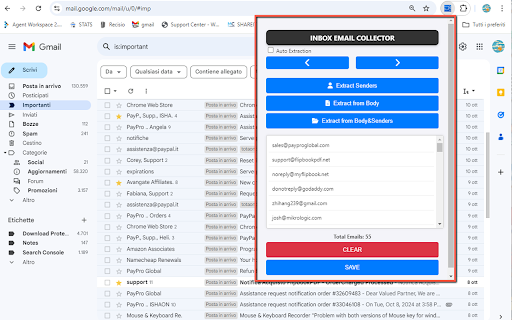
This Inbox Email Collector is a powerful chrome extension designed to help users efficiently capture email addresses from their Gmail inbox. Whether you are a marketer, recruiter, or simply someone looking to organize contacts, this extension simplifies the process by scanning both the sender information and the body of your emails to extract valuable addresses.

With an intuitive interface, using Extract Email From Gmail is straightforward. Users need to log in to their Gmail accounts and activate the extension. Once opened, simply click the “Extract” button, and the tool will begin scanning through your inbox. Unlike many other tools, Inbox Email Collector is capable of scanning all pages of your Gmail inbox, ensuring you don’t miss any crucial contacts hidden beyond the first page.

After the extraction process is complete, all captured email addresses will be displayed within the extension for easy review. Users can quickly scroll through the list to verify the collected addresses. For added convenience, the extension includes a “SAVE” button, which allows users to export all extracted email addresses into a text file (.txt) for easy access and further use.

Extract Email From Gmail is an invaluable tool for anyone looking to streamline their email management and improve contact organization. By simplifying the process of capturing email addresses, it saves users time and effort, making it a must-have extension for Gmail users.
Technical
- Version
- 2.8
- Manifest
- V3
- Size
- 48.25KiB
- Min Chrome
- 88
- Languages
- 1
- Featured
- No
Metadata
- ID
- lpdchpdbpkhcekopncacopjhhghehdij
- Developer ID
- u01e5f5dd223da0382cfd6bd2837866e2
- Developer Email
- [email protected]
- Created
- Oct 16, 2024
- Last Updated (Store)
- Jun 2, 2026
- Last Scraped
- Jun 8, 2026
- Website
- —
- Support URL
- https://www.estrattoredati.com/supporto.html
- Privacy Policy
- https://www.estrattoredati.com/terms.html
Similar extensions
Alternatives to Extract Email From Gmail, ranked by description similarity.

MailScoop - Download Email Addresses from Gmail
Export email addresses from Gmail folders and download the email list in a CSV or JSON.
41

Email Extractor Plus - Auto Save & Auto Tasks
Discover & extract emails from any webpage. Auto save emails as you browse. Automated tasks can extract emails from multiple pages.
424
★ 5.0

Email Extractor - One Click Lead
Effortlessly collect leads with our powerful extension that auto-extracts and saves email IDs from visited web pages.
356
★ 5.0

Email Extractor — Lead Finder & Contact Scraper on Any Page
Extract emails, find leads & scrape contacts from any website. LinkedIn, company sites, directories — boost your sales everywhere!
74

Email extractor
Auto extractor email addresses from anywhere on the web.
263
★ 5.0

Free Email Finder
Free Email finder is a tool that save time and efforts. Forget copying and pasting. It collects emails as you browse websites.
513
★ 5.0

Email Collector
Email Collector extracts email addresses and vaults them for safe storage.
11

Email Extractor Live Web Scraper
Extract email addresses by simply searching the web. Fast, accurate, and easy to use — just search and collect.
3
Data sourced from the Chrome Web Store · last verified Jun 8, 2026.