
Peer2Peer Bookmark Sync and Share for Teams
Share, manage & organize bookmarks on your chrome browser across your organization, departments, and employees.
As of May 2026, Peer2Peer Bookmark Sync and Share for Teams has 272 users and a 2.00/5 rating from 1 reviews in the Social & Communication category.
Usersdown 2.2 percent−2.2%
272
272
Ratingno change0%
2.00
1 reviews
Reviewsno change0%
1
Version
2.6
Manifest V3
History
2 snapshotsTracking since Apr 24, 2026.
View as table
| Date | Users | Rating | Reviews | Version |
|---|---|---|---|---|
| Apr 24, 2026 | 278 | 2.00 | 1 | 2.6 |
| May 20, 2026 | 282 | 2.00 | 1 | 2.6 |
| Now | 272 | 2.00 | 1 | 2.6 |
Permissions & access
- Permissions
- bookmarksstoragenotificationsbackground
- Host access
- https://*/, *://www.googleapis.com/*
Screenshots

About
Are you still getting lost in sharing links and documents across your organization? Finding it hard to keep track of important bookmarks and files?
Well, the future is here!
Share, manage & organize bookmarks on your chrome browser across your organization, departments, and employees just with a few clicks.
Introducing….Peer2Peer Bookmark Sync and Share for Teams!
The easiest and most convenient way to train new team members and increase team-wide awareness of online tools is by sharing research resources.
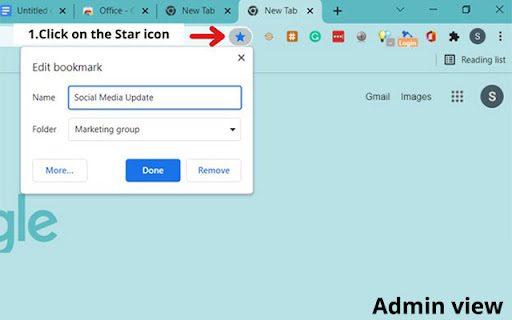
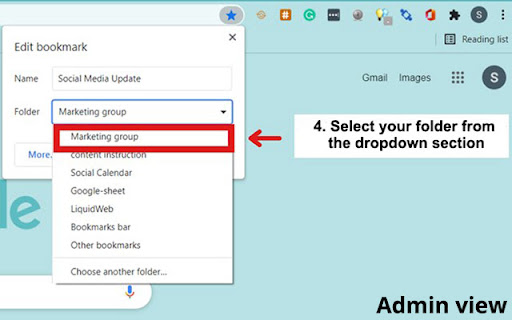
You can share, manage, and sync any bookmarks with employees, co-workers, teammates, and customers in shared Peer2Peer Bookmark Sync and Share for Teams groups.
All-in-one bookmark manager that does it all. Take your bookmark sharing game to the next level with features like:

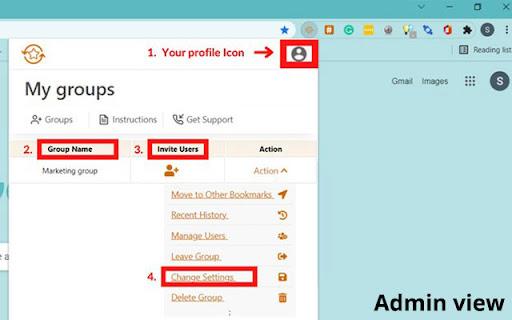
1) Create separate group folders that you can share with different customers and team members.
2) Turn on the admin feature so you are the only one who can add or delete bookmarks
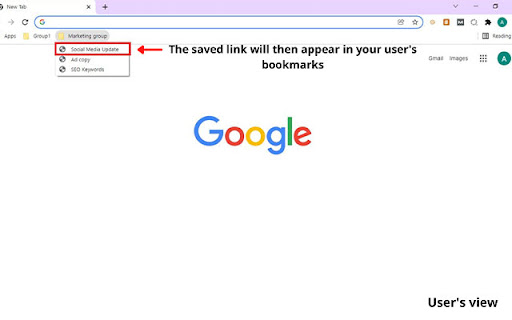
3) Instantly Share bookmarks in real-time, much like an instant message
4) Add members of your team to shared bookmark folders with a few easy steps.
5) Manage individual permissions and check who has accepted your invitation.


How does Peer2Peer Bookmark Sync and Share for Teams make your work easier?


1) Organize your folders with TeamSync so everyone gets faster access to the most important material

2) Provide a dedicated folder for your clients and different teams to readily access their projects.
3) Sort through the documentation, case studies, and URLs that your team will need for your project.

4) Make onboarding of new hires easier by organizing HR resources in a single folder for future reference.

5) Auto-sync with all your devices and browsers allows you to access your Bookmarks on any platform and device.
Add Peer2Peer Bookmark Sync and Share for Teams Now!
Technical
- Version
- 2.6
- Manifest
- V3
- Size
- 750KiB
- Min Chrome
- 88
- Languages
- 1
- Featured
- No
Metadata
- ID
- lpdblhcngfjdjmhbakgfdcgpnhhnmgfc
- Developer ID
- ue36434398dd643885e8df4c3da1ee609
- Developer Email
- [email protected]
- Created
- Nov 27, 2021
- Last Updated (Store)
- Mar 29, 2023
- Last Scraped
- May 20, 2026
- Website
- —
- Support URL
- —
- Privacy Policy
- https://kuware.com/privacy-notice/
Similar extensions
Alternatives to Peer2Peer Bookmark Sync and Share for Teams, ranked by description similarity.

Just Linked it
Just Linked it
6

Beemarks Extension
Save your bookmarks in the cloud and share them with your friends
4
★ 5.0

Grow Together
Discover and share valuable content from Twitter/X and Reddit
—

Share-it
Share or Copy web pages to anywhere by various format.
1.0K
★ 4.6

Akonter Share link & Page Buttons
Chrome Extension to share links and pages to multiple networks, Akonter bookmarks, Facebook,Twitter,more share buttons.
283
★ 5.0

Social Media Pocket Diary
Save your Social Media links here. In a Pocket Diary
6
Youtube Bookmarker
A bookmark extension for your videos
1.0K
★ 4.7

Indaloop
Indaloop is the newest platform for sharing and discussing any interesting content you may find online.
6
Data sourced from the Chrome Web Store · last verified May 20, 2026.