
Mark and Learn
Combine creating and practicing a vocabulary in one extension.
As of May 2026, Mark and Learn has — users in the Workflow & Planning category.
Usersno change0%
—
—
Ratingno change0%
—
— reviews
Reviewsno change0%
—
Version
0.0.2
Manifest V3
Permissions & access
- Permissions
- storagecontextMenus
- Host access
- None declared
Screenshots


About
Combine creating and practicing a vocabulary in one extension.

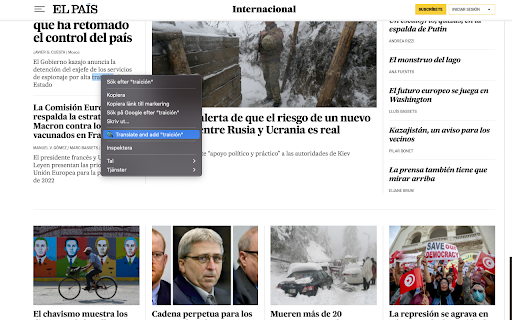
The Mark And Learn extension makes it easy to save words and their translation into a glossary in the browser. All you need to do is to highlight the word and save it, the word will then be translated and stored in the glossary for you to later practice. You don't need to switch tabs and lose your focus!

1. Identify the word you want to learn.
2. Highlight the word
3. Right-click and choose the Mark And Learn option.
4. Open the Mark And Learn extension in your top right corner and start practicing your vocabulary.

Mark and Learn use deepl for translating words and phrases, and during this beta version, you will need to get your deepl API key which is free.

You can create your account here: www.deepl.com

This extension is open source, and the code can be found here: https://github.com/mile95/mark-and-learn

Here's a blog post about the extension:
https://mile95.github.io/mark-and-learn/

All feature requests and bug reports are handled via https://mile95.github.io/mark-and-learn/
Technical
- Version
- 0.0.2
- Manifest
- V3
- Size
- 5.05MiB
- Min Chrome
- 88
- Languages
- 1
- Featured
- No
Metadata
- ID
- lpbdbbjfcohnhnhkndnaapannpehngee
- Developer ID
- ud195369c3a8459120d1c7dacc62d4b22
- Developer Email
- [email protected]
- Created
- Jan 9, 2022
- Last Updated (Store)
- Feb 2, 2022
- Last Scraped
- May 20, 2026
- Website
- —
- Support URL
- https://github.com/mile95/mark-and-learn
- Privacy Policy
- —
Similar extensions
Alternatives to Mark and Learn, ranked by description similarity.

Word Enhancer: Dictionary & Vocabulary Aid
Word Enhancer: define words and grow your vocabulary while browsing the web -- simply highlight a word.
The extension makes it…
480
★ 4.0

iHeart Dictionary
A dictionary helps you to remember new words and getting results from most well-known dictionaries.
10
★ 5.0

Vocabulary translate Booster
a powerful Chrome extension designed to help you translate and memorize vocabulary effortlessly.
5
Duolingo Vocabulary Downloader
Easily download your Duolingo words.
2.0K
★ 3.8

phreview: Custom Language Learning Quizzes
Harness the incredible power of active recall for language learning, right from your web browser!
6

Vocabu Cards
The extension translates words and lets you learn them by spaced repetition
37
★ 5.0

CarveWords (beta version)
Expand your vocabulary in any language by practicing retrieval while you read.
12

Spaced Repetition Vocabulary
Learn words and improve your vocabulary by news, blogs, Youtube captions and Youtube Music lyrics using spaced repetition method
10
Data sourced from the Chrome Web Store · last verified May 20, 2026.