
Better Formula Editor for Anaplan
This extension enhances Anaplan formula editing in several ways; providing code completion, hover info and validity checks.
As of May 2026, Better Formula Editor for Anaplan has 501 users and a 4.75/5 rating from 4 reviews in the Developer Tools category.
Usersno change0%
501
501
Ratingno change0%
4.75
4 reviews
Reviewsno change0%
4
Version
3.0.6
Manifest V3
History
2 snapshotsTracking since Apr 24, 2026.
View as table
| Date | Users | Rating | Reviews | Version |
|---|---|---|---|---|
| Apr 24, 2026 | 501 | 4.75 | 4 | 3.0.6 |
| May 20, 2026 | 495 | 4.75 | 4 | 3.0.6 |
| Now | 501 | 4.75 | 4 | 3.0.6 |
Permissions & access
- Permissions
- None declared
- Host access
- https://*.app.anaplan.com/*/anaplan/*, https://*.app.anaplan.com/a/modeling/*
Screenshots


About
Works best with the 'new model experience', but can work with the old/current.

Formula Validation: Various checks are performed on formulas including simple things like ensuring all entities are named / referenced correctly or ensuring the correct data types are used throughout the formula, through to things like checking for dimension miss-matches when referring to line items with different dimensions.

Formula Formatting: Provides basic formatting for valid formulas; breaking up IF...THEN....ELSE onto multiple lines with proper indentation.

Hover Information: You can hover your mouse over most elements of a formula to get contextual information, for example hovering over line items shows their dimensions and data type and hovering over function names to get information about that function.

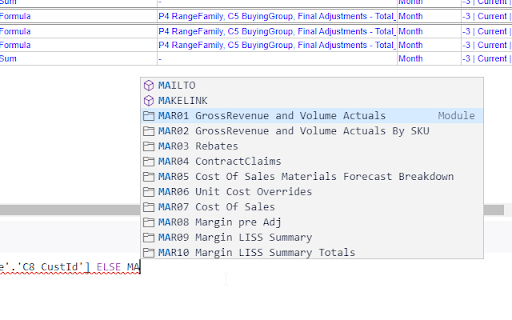
Code Completion: As you are typing the editor will offer auto-complete suggestions for things like line items within the current module, fully qualified line items within other modules, function names etc. As well as that, where you reference a line item with differing dimensions to the current modules dimensions it can auto-complete the required LOOKUPs or SUMs needed based on what you've used elsewhere.

Quick Fixes: When errors are encountered the extension will allow the user to choose an appropriate fix from a menu which when chosen would make the required changes to the formula automatically.

Function Information: When completing functions with parentheses you get popup contextual information relating to the parameters of the function together with an explanation of both the function and the parameters. You also get parameter type checking, and if the given parameter expects a keyword, these get auto-completed.

Shortcuts: Standard Monaco editor shortcuts apply. Ctrl-Space; Open code completion. Ctrl-Shift-Space; Open function info (when within function parentheses). Shift-Alt-F for formatting.

I welcome ideas for future enhancements; this is very much in active development. If you would like to sponsor me, you can do so here: https://github.com/sponsors/georgeduckett There are various tiers available with a variation of benefits.
Technical
- Version
- 3.0.6
- Manifest
- V3
- Size
- 1.36MiB
- Min Chrome
- 88
- Languages
- 1
- Featured
- No
Metadata
- ID
- lonibgccfehnjjhchfcbdhkaajhobeak
- Developer ID
- ucdb1d14e111ff209d13479f2ff54f84d
- Developer Email
- [email protected]
- Created
- Oct 30, 2021
- Last Updated (Store)
- Mar 14, 2023
- Last Scraped
- May 20, 2026
- Website
- —
- Support URL
- —
- Privacy Policy
- —
Similar extensions
Alternatives to Better Formula Editor for Anaplan, ranked by description similarity.

Salesforce.com Enhanced Formula Editor
Enhances Salesforce formulas with syntax highlighting, autocomplete, formatting, field analysis, and syntax checking.
5.0K
★ 4.3

Wonder Salesforce Formula Editor 🪄
Your Salesforce Formula Editor. Format, validate & enjoy a stunning UI. Perfect formulas effortlessly 🪄
133
★ 1.0

Salesforce Formula Enhancer
Colorise et facilite la création de champs formule dans Salesforce.
75
★ 5.0

Salesforce Admin Plus
Salesforce formula editor with autocomplete and instant error checks—write formulas faster.
200
★ 3.8

PowerUI for Power Automate
Improves the flow editor user interface for Power Automate
1.0K
★ 4.5

Snippy Code Enhancer
Upgrades Quickbase Code Pages and Formulas with themes and error checking. Allows revision saving.
23

EADashboardHelper
Chrome extension to help with Einstein Analytics v2
850
★ 5.0

Formula Builder Pro
AI Formula Builder with Testing, Library & Enterprise Guardrails - Privacy First
26
Data sourced from the Chrome Web Store · last verified May 20, 2026.