
Tab Steward
Calm, local-first tab archiving for people who keep too many tabs open.
As of June 2026, Tab Steward has — users in the Productivity category.
Usersno change0%
—
—
Ratingno change0%
—
— reviews
Reviewsno change0%
—
Version
0.1.1
Manifest V3
History
3 snapshotsTracking since May 3, 2026.
Not enough history yet for this metric — the chart fills in as we collect more snapshots.
View as table
| Date | Users | Rating | Reviews | Version |
|---|---|---|---|---|
| May 3, 2026 | — | — | — | 0.1.1 |
| May 9, 2026 | — | — | — | 0.1.1 |
| May 14, 2026 | 20 | — | — | 0.1.1 |
| Now | — | — | — | 0.1.1 |
Changelog
- May 20, 2026description
Tab Steward is a calm, local-first Chrome extension for people who keep too many tabs open.

Instead of forcing you into a heavy workspace system, Tab Steward quietly watches for tabs that have gone stale, moves them into a review queue, and helps you decide what to keep, snooze, protect, archive, or restore later.

Tabs are archived before cleanup, so closing or discarding a tab never feels destructive.

Highlights:
- Review stale tabs after a configurable quiet period
- See why each tab is in review
- Archive tabs before closing or discarding them
- Restore archived tabs anytime
- Snooze review items for 7 days
- Detect and clean up duplicate tabs
- Create reusable archive groups
- Auto-group tabs locally into broad categories
- Add private notes to archived tabs
- Protect important domains from cleanup
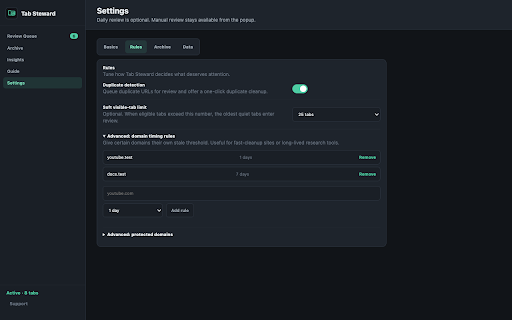
- Configure per-domain stale rules
- Export archive data as JSON
- Use a dark default theme or warm Paper light mode

Privacy:
Tab Steward stores tab metadata and archive data locally using Chrome extension storage. It does not run analytics, does not sell data, and does not send your tab titles, URLs, archive entries, notes, or settings to a remote server.

The Buy Me a Coffee support link opens an external page only when clicked.
Tab Steward is a calm, local-first Chrome extension for people who keep too many tabs open.

Instead of forcing you into a heavy workspace system, Tab Steward quietly watches for tabs that have gone stale, moves them into a review queue, and helps you decide what to keep, snooze, protect, archive, or restore later.

Tabs are archived before cleanup, so closing or discarding a tab never feels destructive.

Highlights:
- Review stale tabs after a configurable quiet period
- See why each tab is in review
- Archive tabs before closing or discarding them
- Restore archived tabs anytime
- Snooze review items for 7 days
- Detect and clean up duplicate tabs
- Create reusable archive groups
- Auto-group tabs locally into broad categories
- Add private notes to archived tabs
- Protect important domains from cleanup
- Configure per-domain stale rules
- Export archive data as JSON
- Use a dark default theme or warm Paper light mode

Privacy:
Tab Steward stores tab metadata and archive data locally using Chrome extension storage. It does not run analytics, does not sell data, and does not send your tab titles, URLs, archive entries, notes, or settings to a remote server.

Why Tab Steward asks for tab access:

Tab Steward needs tab access to review currently open tabs, detect stale or duplicate tabs, archive tab titles and URLs locally before cleanup, and restore archived tabs later.

Tab Steward does not read page content, does not use analytics, does not sell data, and does not send tab metadata to a remote server. Tab data stays in Chrome extension storage on your device.


The Buy Me a Coffee support link opens an external page only when clicked.
Permissions & access
- Permissions
- alarmsstoragetabs
- Host access
- None declared
Screenshots


About
Tab Steward is a calm, local-first Chrome extension for people who keep too many tabs open.

Instead of forcing you into a heavy workspace system, Tab Steward quietly watches for tabs that have gone stale, moves them into a review queue, and helps you decide what to keep, snooze, protect, archive, or restore later.

Tabs are archived before cleanup, so closing or discarding a tab never feels destructive.

Highlights:
- Review stale tabs after a configurable quiet period
- See why each tab is in review
- Archive tabs before closing or discarding them
- Restore archived tabs anytime
- Snooze review items for 7 days
- Detect and clean up duplicate tabs
- Create reusable archive groups
- Auto-group tabs locally into broad categories
- Add private notes to archived tabs
- Protect important domains from cleanup
- Configure per-domain stale rules
- Export archive data as JSON
- Use a dark default theme or warm Paper light mode

Privacy:
Tab Steward stores tab metadata and archive data locally using Chrome extension storage. It does not run analytics, does not sell data, and does not send your tab titles, URLs, archive entries, notes, or settings to a remote server.

Why Tab Steward asks for tab access:

Tab Steward needs tab access to review currently open tabs, detect stale or duplicate tabs, archive tab titles and URLs locally before cleanup, and restore archived tabs later.

Tab Steward does not read page content, does not use analytics, does not sell data, and does not send tab metadata to a remote server. Tab data stays in Chrome extension storage on your device.


The Buy Me a Coffee support link opens an external page only when clicked.
Technical
- Version
- 0.1.1
- Manifest
- V3
- Size
- 34.46KiB
- Min Chrome
- 88
- Languages
- 1
- Featured
- No
Metadata
- ID
- lohnpjnlkldlkkcdedihapjcbeijnecj
- Developer ID
- u6b485895c8753cdceb5d8e4591307ec3
- Developer Email
- [email protected]
- Created
- May 2, 2026
- Last Updated (Store)
- May 18, 2026
- Last Scraped
- Jun 8, 2026
- Website
- —
- Support URL
- https://tab-steward.vercel.app/support
- Privacy Policy
- https://tab-steward.vercel.app/privacy
Data sourced from the Chrome Web Store · last verified Jun 8, 2026.