Control Panel for YouTube
Gives you more control over YouTube by adding missing options and UI improvements
As of June 2026, Control Panel for YouTube has 100,000 users and a 4.31/5 rating from 248 reviews in the Functionality & UI category.
Usersup 25.0 percent+25.0%
100.0K
100,000
Ratingup 1.2 percent+1.2%
4.31
248 reviews
Reviewsup 14.3 percent+14.3%
248
Version
1.34.0
Manifest V3
90-day change · In the last 90 days this extension gained 20.0K users, 2 version updates.
History
19 snapshotsTracking since Apr 5, 2026.
View as table
| Date | Users | Rating | Reviews | Version |
|---|---|---|---|---|
| Apr 5, 2026 | 80.0K | 4.26 | 217 | 1.31.6 |
| Apr 9, 2026 | 80.0K | 4.27 | 220 | 1.31.8 |
| Apr 16, 2026 | 80.0K | 4.27 | 220 | 1.32.0 |
| Apr 20, 2026 | 90.0K | 4.27 | 225 | 1.33.1 |
| Apr 23, 2026 | 90.0K | 4.27 | 226 | 1.33.1 |
| Apr 26, 2026 | 90.0K | 4.28 | 228 | 1.33.1 |
| Apr 29, 2026 | 90.0K | 4.28 | 229 | 1.33.1 |
| May 5, 2026 | 90.0K | 4.28 | 229 | 1.33.2 |
| May 11, 2026 | 100.0K | 4.28 | 233 | 1.33.2 |
| May 17, 2026 | 90.0K | 4.29 | 234 | 1.33.2 |
| May 20, 2026 | 100.0K | 4.29 | 234 | 1.33.2 |
| May 23, 2026 | 100.0K | 4.28 | 236 | 1.33.3 |
| May 25, 2026 | 100.0K | 4.29 | 237 | 1.34.0 |
| May 28, 2026 | 100.0K | 4.28 | 238 | 1.34.0 |
| Jun 3, 2026 | 100.0K | 4.29 | 242 | 1.34.0 |
| Jun 6, 2026 | 100.0K | 4.29 | 243 | 1.34.0 |
| Jun 8, 2026 | 100.0K | 4.30 | 244 | 1.34.0 |
| Jun 15, 2026 | 100.0K | 4.30 | 245 | 1.34.0 |
| Jun 22, 2026 | 100.0K | 4.30 | 246 | 1.34.0 |
| Now | 100.0K | 4.31 | 248 | 1.34.0 |
Permissions & access
- Permissions
- storage
- Host access
- None declared
Screenshots
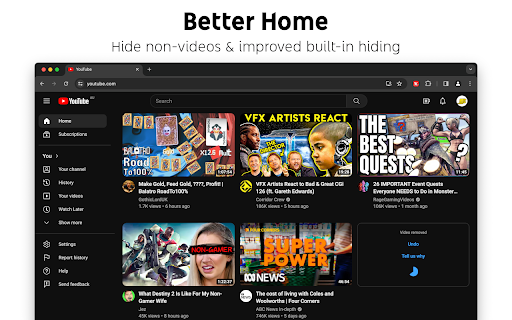
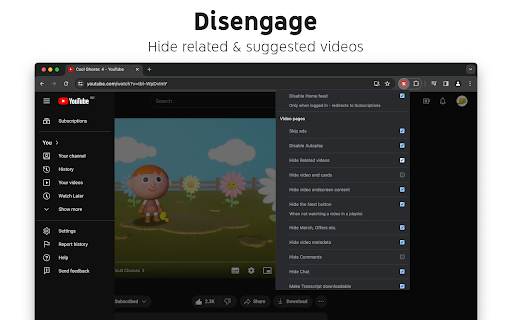
About
Features

Ads:

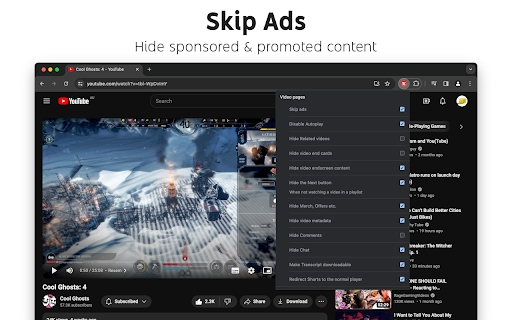
• Block ads
• Hide Sponsored videos & promos
• Hide Merch, Offers etc. (desktop version)

New video player UI:

• Disable new progress bar and controls (desktop version) - Note: this will stop working when YouTube removes the old player UI
• Hide new full screen controls
• Hide "More videos" in full screen
• Always use compact Play button (desktop version)
• Remove background from controls (desktop version)
• Restore Miniplayer button (desktop version)
• Restore corner click to toggle full screen (desktop version)
• Hide full screen title (desktop version)
• Hide full screen like/dislike buttons (desktop version)

Annoyances:

• Hide AI summaries
• Remove pink gradient from progress bars
• Hide information panels
• Hide Premium upsells
• Disable themed hover effects (desktop version)
• Restore small thumbnails in Related (desktop version)
• Automatically pause channel trailers (desktop version)
• Allow background playback (mobile version)
• Hide Open App links (mobile version)

Video lists:

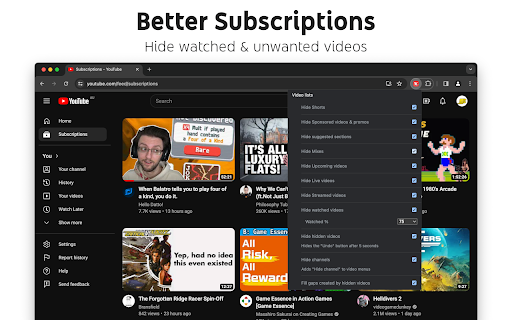
• Hide suggested sections
• Hide Live videos
• Hide Streamed videos
• Hide Mixes
• Hide Playlists
• Hide Movies and TV
• Hide Upcoming videos
• Hide Members only videos
• Hide Auto-dubbed videos in Related
• Hide watched videos
• Hide hidden videos - Hides the "Undo" button after 5 seconds
• Hide channels - Adds "Hide channel" to video menus
• Disable Home feed
• Search thumbnail size (desktop version)
• Minimum grid items per row (desktop version)
• Hide Collaborations in Subscriptions (desktop version)
• Hide Posts in Home (mobile version)

Video pages:

• Disable Autoplay
• Disable Ambient mode
• Hide Related videos
• Hide the Next button
• Hide channel watermark
• Hide Share/Thanks/Clip etc.
• Hide video metadata
• Hide Comments
• Always use theater mode (desktop version)
• Full size theater mode (desktop version)
• Disable enlarged UI in theater mode (desktop version)
• Always use original audio (desktop version)
• Hide video end cards (desktop version)
• Hide video endscreen content (desktop version)
• Hide Chat (desktop version)
• Add Take snapshot to video menu (JPEG / PNG)  (desktop version)
• Make Transcript downloadable (desktop version)
• Hide Posts in Home (mobile version)

Shorts:

• Hide Shorts
• Redirect Shorts to the normal player
• Hide suggested actions
• Hide link to related Short by the same channel
• Always show progress bar
• Stop Shorts looping
• Hide Remix button (desktop version)
• Hide Shorts metadata until hover (desktop version)
• Minimum Shorts per row (desktop version)

UI tweaks:

• Show full video titles
• Use square corners for thumbnails and videos
• Hide categories in Home
• Hide channel banner images
• Hide Search with your voice
• Link YouTube logo to Subscriptions (desktop version)
• Tidy Guide sidebar (desktop version)
• Hide "Latest" bar in Subscriptions (desktop version)
• Use grid view for Subscriptions & Search (portrait only) (mobile version)
• Hide Explore button in Home (mobile version)
• Hide channel list in Subscriptions (mobile version)

Embedded videos:

• Hide Share button
• Hide pause overlay
Technical
- Version
- 1.34.0
- Manifest
- V3
- Size
- 117KiB
- Min Chrome
- 88
- Languages
- 5
- Featured
- No
Metadata
- ID
- lodcanccmfbpjjpnngindkkmiehimile
- Developer ID
- u1d4878418b7af0f1324a02bdd67e6a8e
- Developer Email
- [email protected]
- Created
- Feb 25, 2024
- Last Updated (Store)
- May 22, 2026
- Last Scraped
- Jun 22, 2026
- Website
- soitis.dev
Similar extensions
Alternatives to Control Panel for YouTube, ranked by description similarity.

Optube
Focus your YouTube experience. Block distracting elements and enhance productivity.
16

Amazing YouTube for Chrome
Simplifies YouTube's Interface
24

Remove Shorts
Hide Shorts, unnecessary YouTube UI elements, and automatically select Videos as the search option!
3
★ 5.0

TubeFocus - Youtube UnDistract
Hide distracting elements on YouTube. Toggle precisely what you want to see, focus with a timer, and keep your feed clean.
4

Youtube Rush
Add a small css style to remove outline for progress bar, enhance UI/UX. Support new MUI from 28th April
15

YouTube Suggestion Blocker
Block YouTube suggestions.
17
★ 5.0
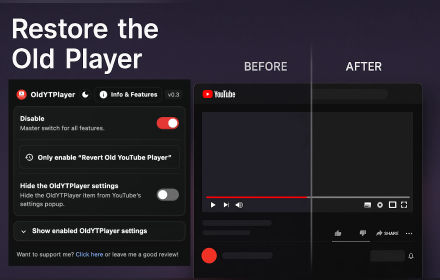
OldYTPlayer | YouTube Old Player UI + Minimal Tweaks
Restores YouTube's pre-2025 player UI and optional tweaks (dislikes, SponsorBlock, etc.). Includes popup controls.
4.0K
★ 4.6

YouTube Playlist Filters
Enhance your YouTube Watch Later and other playlists experience with search and filtering capabilities.
771
★ 4.5
Data sourced from the Chrome Web Store · last verified Jun 22, 2026.