
MiTERAS KINTAI Helper
This extension enters break times in MiTERAS KINTAI.
As of May 2026, MiTERAS KINTAI Helper has 78 users in the Workflow & Planning category.
Usersup 20.0 percent+20.0%
78
78
Ratingno change0%
—
— reviews
Reviewsno change0%
—
Version
1.2.0
Manifest V3
History
2 snapshotsTracking since Apr 24, 2026.
View as table
| Date | Users | Rating | Reviews | Version |
|---|---|---|---|---|
| Apr 24, 2026 | 65 | — | — | 1.2.0 |
| May 20, 2026 | 75 | — | — | 1.2.0 |
| Now | 78 | — | — | 1.2.0 |
Permissions & access
- Permissions
- tabscontextMenusstorage
- Host access
- https://kintai.miteras.jp/*/work-condition
Screenshots
About
Initial configuration

1. Open the add-on options and configure the break time.

How to use

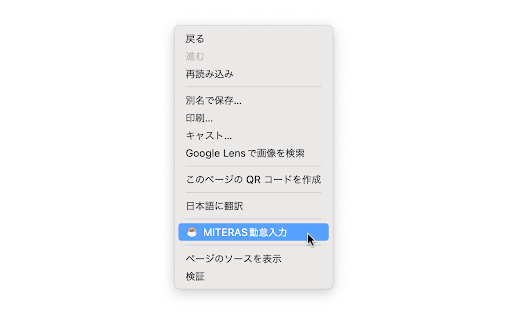
1. Show the context menu (normally right click) on the break time input page of MiTERAS KINTAI.
2. Select "MiTERAS KINTAI Helper" from the context menu.
3. The break times will be entered automatically.
Technical
- Version
- 1.2.0
- Manifest
- V3
- Size
- 53.62KiB
- Min Chrome
- 88
- Languages
- 2
- Featured
- No
Metadata
- ID
- lnpodkficjcocjggmhjeckdlfjkjndhg
- Developer ID
- u6285512689584df3f8300c44557bc471
- Developer Email
- [email protected]
- Created
- Apr 12, 2022
- Last Updated (Store)
- Nov 12, 2023
- Last Scraped
- May 20, 2026
- Website
- —
- Privacy Policy
- —
Similar extensions
Alternatives to MiTERAS KINTAI Helper, ranked by description similarity.

Relaxation Times
Relaxation Times reminds you to rest at a specific time.
2
★ 5.0

ポモドーロタイマー(Pomodoro Timer)
ポモドーロテクニックを使いたい方向けタイマーです。設定時間毎に通知画面が表示されます。
2.0K
★ 5.0

Set Working Hours
Sets working hours for the weekdays.
—

Effective working
A small app that simply help people to timebox their work, nothing less, nothing more
13
★ 5.0

Stopwatch, Timer and Alarm
For your browser, a simple to use and lightweight timer, alarm, and stopwatch.
1.0K
★ 4.2

SV Tools
西威小工具,页面全新升级,更友好的操作体验
22
★ 5.0

Kivo Time Tracker
Track daily work hours, manage breaks, and calculate monthly averages with real-time insights for Keka.
51
★ 5.0
Take a Break
Take a break from your computer after X minutes.
13
Data sourced from the Chrome Web Store · last verified May 20, 2026.