
Spreadsheet Connector
"Spreadsheet Connector" is a Chrome extension tailored for efficiency, offering a streamlined approach to managing and updating…
As of May 2026, Spreadsheet Connector has 155 users and a 5.00/5 rating from 1 reviews in the Productivity category.
Usersup 2.6 percent+2.6%
155
155
Ratingno change0%
5.00
1 reviews
Reviewsno change0%
1
Version
1.0.3
Manifest V3
History
3 snapshotsTracking since Apr 1, 2026.
View as table
| Date | Users | Rating | Reviews | Version |
|---|---|---|---|---|
| Apr 1, 2026 | 151 | 5.00 | 1 | 1.0.3 |
| Apr 30, 2026 | 156 | 5.00 | 1 | 1.0.3 |
| May 29, 2026 | 160 | 5.00 | 1 | 1.0.3 |
| Now | 155 | 5.00 | 1 | 1.0.3 |
Permissions & access
- Permissions
- identitystorage
- Host access
- None declared
Screenshots


About
"Spreadsheet Connector" is a Chrome extension tailored for efficiency, offering a streamlined approach to managing and updating Google Spreadsheets. Ideal for professionals and casual users alike, it integrates directly into your browser, delivering a convenient and accessible tool for spreadsheet management.

Key Features:

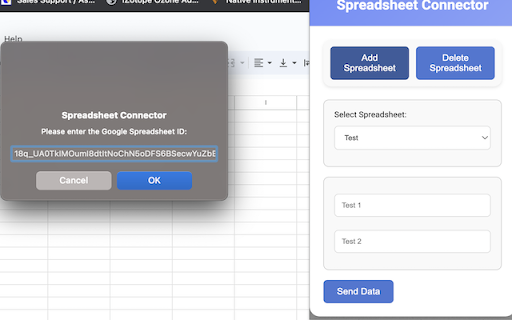
Add and Manage Spreadsheets: Easily add new spreadsheets or select from existing ones within your Google account, all from a user-friendly interface.

Intuitive Data Input: Enter and submit data to any chosen spreadsheet without the need to navigate away from the extension's pop-up window.

Customizable Columns: Adapt your spreadsheets to your data needs by customizing the number and names of columns.

Dynamic Spreadsheet Interaction: Engage with your spreadsheets in real-time, adding columns, inputting data, and deleting spreadsheets as necessary.

Simple, Clear Interface: The minimalistic and straightforward design of "Spreadsheet Connector" ensures that your focus stays on your data, not on navigating complex software.

Secure and Seamless Google Integration: Utilizing Google's robust OAuth 2.0 authentication, the extension guarantees secure access to your spreadsheets while providing ease of use.

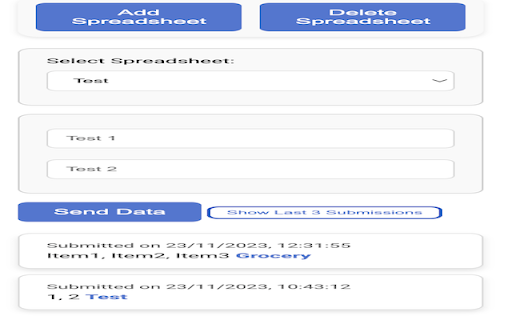
Last Submissions Tracking: Keep tabs on your recent activity with a display of the last three submissions, including detailed timestamps and the specific spreadsheets updated, presented in a visually appealing and interactive manner.

How to find the spreadsheet ID: https://github.com/Atk1589/Find_SpreadsheetID/blob/main/README.md
Technical
- Version
- 1.0.3
- Manifest
- V3
- Size
- 1.52MiB
- Min Chrome
- 88
- Languages
- 1
- Featured
- No
Metadata
- ID
- lnmokijgbdnpgliddjcnkebbjabimkjo
- Developer ID
- u29d695c40210a80d4b8d488dbdf4c275
- Developer Email
- [email protected]
- Created
- Nov 19, 2023
- Last Updated (Store)
- Nov 23, 2023
- Last Scraped
- May 29, 2026
- Website
- —
- Privacy Policy
- https://github.com/Atk1589/privacy-policy
Similar extensions
Alternatives to Spreadsheet Connector, ranked by description similarity.

SheetFlow - Beta
Boost your productivity with our cutting-edge Chrome extension designed to seamlessly integrate with Google Sheets! This powerful…
6

Simple Spreadsheet Extension
Opens a new tab with a simple spreadsheet interface.
79
★ 5.0

Convert XLSX and CSV to Google Sheets™
Import CSV or XLSX and paste into Google Sheets™ with one click.
38

Convert Google Sheets™ to Json
Downloading JSON from Google Sheets. A complimentary tool.
39

Linktiva
This powerful Chrome extension revolutionizes how you manage and interact with Google Sheets and Docs, bringing advanced search and…
46
★ 4.5

My Tiny Sheet Extension
A Chrome extension that opens a pop-up window with a tiny Excel-like spreadsheet that runs in your browser and allows syncing
37
★ 5.0

Google Sheets View Only Mode
Adds a toggle button to Google Sheets that enables view-only mode, preventing edits while allowing search
56

QuickSheet Adder
Easily add data to your Google Sheets directly from your browser
2
Data sourced from the Chrome Web Store · last verified May 29, 2026.