
Refactoring Aware Commit Review
Refactoring-Aware-Commit-Review is a useful tool that visualizes refactoring information directly on GitHub.
As of May 2026, Refactoring Aware Commit Review has 334 users and a 3.60/5 rating from 5 reviews in the Developer Tools category.
Usersdown 2.6 percent−2.6%
334
334
Ratingno change0%
3.60
5 reviews
Reviewsno change0%
5
Version
2.0.8
Manifest V3
History
3 snapshotsTracking since Apr 1, 2026.
View as table
| Date | Users | Rating | Reviews | Version |
|---|---|---|---|---|
| Apr 1, 2026 | 343 | 3.60 | 5 | 2.0.8 |
| Apr 30, 2026 | 351 | 3.60 | 5 | 2.0.8 |
| May 29, 2026 | 360 | 3.60 | 5 | 2.0.8 |
| Now | 334 | 3.60 | 5 | 2.0.8 |
Permissions & access
- Permissions
- storage
- Host access
- https://github.com/*
Screenshots


About
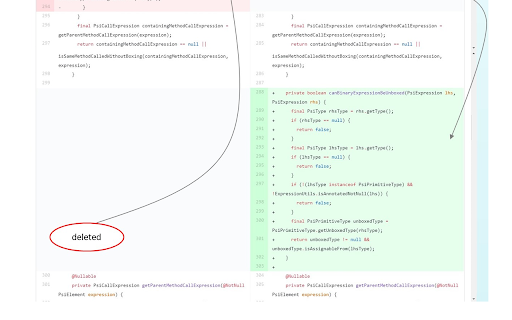
This extension integrates refactoring information into GitHub repositories commits written in Java.

The extension was created to provide more advanced visualization of the refactoring changes and to make the inspection of source code changes easier for developers to improve their productivity.

USER GUIDE:

• open a GitHub commit webpage on Chrome browser (ex: github.com/user/project/commit/id or github.com/user/project/pull/id/commits/id)

(first-time use only: right-click on the extension icon on the top right of the browser, select "options", then set the waiting-time you want).

• got to the commit page and click on the extension icon. You should see a loading spinning circle.

• upon getting the result, you will see a button at the bottom of the page, indicating whether or not there's any refactoring been made to the commit.

IF YES, then these are some hints:

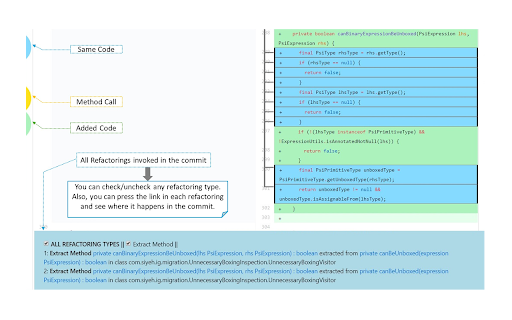
• hover the mouse over the "Refactoring" button; you will see all Refactoring types that are applied in the commit, with an accessible link that takes you to the exact location of the corresponding Refactoring method in the code.

• on the left side of the page, you will see a navigation bar with colored bubbles; each colored bubble indicates the existence of its type (i.e. its meaning; you can see what each bubble means by hovering over it).

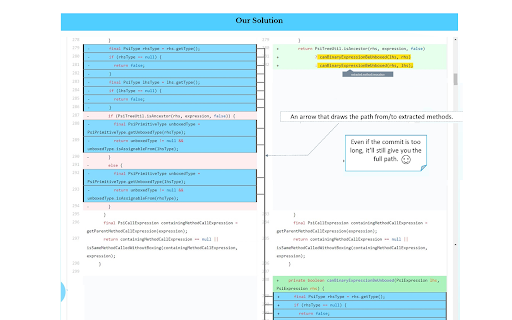
• for "same code" methods (those in blue), you can see where they are exactly extracted to/from by: either clicking on the code itself in the commit, or clicking the link inside the Refactoring links at the bottom. A corresponding arrow will appear and direct you to the exact location of the extracted method.

• every colored method has a toolbar that appears on top of it just upon hovering over the code, indicating the type of the method. Moreover, Yellow code is an indication for a method call, so its toolbar is an accessible link that will take you (when it's pressed) to the Refactoring method it's calling.


Acknowledgments and Credits:

The integrated refactoring information used are obtained from:
RefactoringMiner (https://github.com/tsantalis/RefactoringMiner).

The extension was a project funded by The Natural Sciences and Engineering Research Council of Canada (NSERC) and the Department of Computer Science and Software Engineering of Concordia University.

Questions/Recommendations:
The project is currently maintained by Victor Veloso (Ph.D. Concordia University)
Please send us an email at: [email protected] or [email protected]
Technical
- Version
- 2.0.8
- Manifest
- V3
- Size
- 117KiB
- Min Chrome
- 88
- Languages
- 1
- Featured
- No
Metadata
- ID
- lnloiaibmonmmpnfibfjjlfcddoppmgd
- Developer ID
- uc60eec8a17d121a2f0e081e4ab073a24
- Developer Email
- [email protected]
- Created
- Sep 18, 2019
- Last Updated (Store)
- Nov 13, 2024
- Last Scraped
- May 29, 2026
- Website
- —
- Privacy Policy
- —
Similar extensions
Alternatives to Refactoring Aware Commit Review, ranked by description similarity.

GitHub Repo Code Stats
Elevate your GitHub browsing experience with the Github Repo Code Stats Chrome extension!
What does it do?
When you're viewing a…
29

GitHub Hyper
A Chrome extension that enhances GitHub's user interface with helpful features.
1

GitHub Commit & Comment Search
GitHub 리포지토리 내에서 특정 키워드가 포함된 커밋과 코멘트를 검색합니다.
—

Codecode Review for GitLab
Adds more features to GitLab code reviews
178
★ 4.9

GitHub Conventional Comments
A browser extension to help you write conventional comments.
7

ReRe - Reset Review for GitHub Pull Request
Clear All Viewed Files / Mark All Files Viewed
15

App/API Version to GitHub
Instantly jump from deployed version strings to their GitHub commits. Great for tracking what's running in production.
14
★ 5.0

GitHub PR Cleaner
Clean up GitHub PR conversations by filtering comments
13
Data sourced from the Chrome Web Store · last verified May 29, 2026.