
Simple Invoicing
NEW! Simple Invoicing Android app -- get it on Google Play -- https://goo.gl/fziALH -- Professional, FREE and a Google…
As of May 2026, Simple Invoicing has 4,000 users and a 3.56/5 rating from 75 reviews.
Usersdown 20.0 percent−20.0%
4.0K
4,000
Ratingno change0%
3.56
75 reviews
Reviewsno change0%
75
Version
1
Manifest V2
90-day change · In the last 90 days this extension lost 1.0K users.
History
2 snapshotsTracking since Apr 30, 2026.
View as table
| Date | Users | Rating | Reviews | Version |
|---|---|---|---|---|
| Apr 30, 2026 | 5.0K | 3.56 | 75 | 1 |
| May 29, 2026 | 5.0K | 3.56 | 75 | 1 |
| Now | 4.0K | 3.56 | 75 | 1 |
Permissions & access
- Permissions
- None declared
- Host access
- None declared
Screenshots



About
NEW! Simple Invoicing Android app -- get it on Google Play -- https://goo.gl/fziALH   --

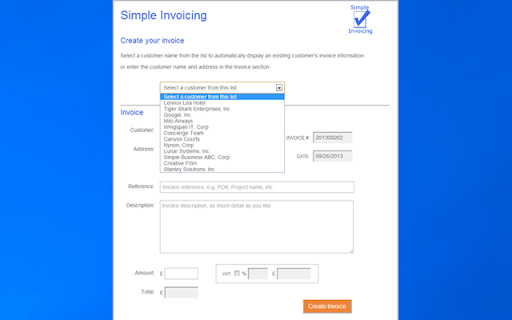
Professional, FREE and a Google competition semi finalist. Automatically generates your invoices, emails a PDF version of the invoice to you, so you can review and forward to your customer. Simple Invoicing stores your invoices in your Google Drive (you will always have your invoices - other invoicing apps keep your invoices in the vendor's environment). Choose from TAX or VAT tax labels on your invoices.

Simple Invoicing is a Google Apps Developer Challenge 2012 competition semi finalist for Small Business Solutions! Visit our website for more information www.simpleinvoicingapp.com

Additional features include creating invoices from a list of previously invoiced customers, you can optionally auto-fill customer invoice information (a real time-saver), auto calculates tax and totals and generates invoice numbers. An invoice log spreadsheet is also created in your Google Drive that is automatically updated with all the invoices you have created, enabling you to track who you invoiced and when.

User Guide: when you run Simple Invoicing, you are presented with the Invoice Template setup, just one form to enter and maintain your information, such as your company name and address, customizable invoice information lines and a footer for your invoices (good for general invoice information, such as your contact information and payment terms). You can setup your invoices for $, €, or £. Choose your tax label: TAX or VAT. When you have updated the invoice template you are presented with the Invoice form where you enter the invoice information, including the customer, the service or product and cost. Optionally, you can select to add tax, specify the tax percentage and the app will automatically calculate the tax and total amount. Simple Invoicing also presents a list of previously invoiced customers to select from; this saves time entering customer names and addresses, and you can optionally auto-fill invoice information from the customer’s previous invoice, great for recurring or similar invoices. You can also update the invoice template information right in the Invoice form. When you’re ready, click the ‘Create Invoice’ button and Simple Invoicing does the rest. You will then be prompted if you’d like to create another invoice, click the ‘New Invoice’ button to continue creating invoices. When you've finished, you will find the invoice(s) you have created in your Gmail Inbox; you can review and forward the invoice(s) to your customers and get paid much quicker! As you create more invoices, you will find the invoice log spreadsheet valuable; it’s in your Google Drive and contains the data on all the invoices you've created in Simple Invoicing.
Technical
- Version
- 1
- Manifest
- V2
- Size
- 6.18KiB
- Min Chrome
- —
- Languages
- 1
- Featured
- No
Metadata
- ID
- lnlklifaiimahijfjacikenlhlplboii
- Developer ID
- u95a60ea3925cbab77ac1a216b34cce33
- Developer Email
- [email protected]
- Created
- Nov 21, 2012
- Last Updated (Store)
- Oct 30, 2016
- Last Scraped
- May 29, 2026
- Support URL
- —
- Privacy Policy
- —
Similar extensions
Alternatives to Simple Invoicing, ranked by description similarity.

Invoices for Gmail™
Create and send professional invoices directly in Gmail™. Manage customers, track sent invoices, and customize templates in seconds.
12

Invoice-App
Create invoices, track time and manage expenses. iOS, Android & Browser app.
427

Cloud Invoice Creator (Invoice to PDF)
Create any invoice and export to PDF format. This app lets you quickly make invoices with attractive invoice template from browser.
149
★ 3.7

InvoiceFlow
Professional invoice generator with Gmail integration for freelancers and entrepreneurs
1

InvoiceBharat - GST Invoice Generator
Generate professional GST-compliant invoices instantly for Indian freelancers. Free, easy, and powerful.
8
ONE UP Accounting & Invoicing
ONE UP is the ONE-STOP app for running your business. All-in-one invoicing, accounting, inventory, CRM and expenses.
1.0K
★ 4.1

Free ebankbooks Invoicing
Free Invoicing for touch devices and PC
97
★ 3.5
Invoices Maker
This software can let you do less work and send invoices effortlessly in a timely manner.
490
★ 3.7
Data sourced from the Chrome Web Store · last verified May 29, 2026.