
Webpage to PDF Pro
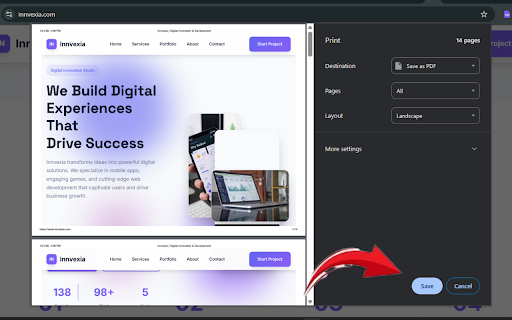
Convert webpages to PDF with full-page capture, hyperlink preservation, and dark mode support. No refresh, perfect quality.
As of June 2026, Webpage to PDF Pro has 19 users in the Productivity category.
Usersup 46.2 percent+46.2%
19
19
Ratingno change0%
—
— reviews
Reviewsno change0%
—
Version
2.0.1
Manifest V3
History
9 snapshotsTracking since Apr 1, 2026.
View as table
| Date | Users | Rating | Reviews | Version |
|---|---|---|---|---|
| Apr 1, 2026 | 13 | — | — | 2.0.1 |
| Apr 10, 2026 | 14 | — | — | 2.0.1 |
| Apr 20, 2026 | 13 | — | — | 2.0.1 |
| Apr 26, 2026 | 18 | — | — | 2.0.1 |
| May 4, 2026 | 17 | — | — | 2.0.1 |
| May 11, 2026 | 16 | — | — | 2.0.1 |
| May 20, 2026 | 18 | — | — | 2.0.1 |
| May 30, 2026 | 16 | — | — | 2.0.1 |
| Jun 7, 2026 | 21 | — | — | 2.0.1 |
| Now | 19 | — | — | 2.0.1 |
Permissions & access
- Permissions
- activeTabdownloadsstoragescriptingtabs
- Host access
- <all_urls>
Screenshots

About
🚀 Webpage to PDF Pro - The Ultimate PDF Converter

Transform any webpage into a professional PDF document with just one click! Webpage to PDF Pro is the most feature-rich PDF converter available on the Chrome Web Store.

✨ Key Features:

📄 Full Page Capture - Automatically captures entire scrollable pages, no matter how long
🔗 Clickable Hyperlinks - Preserves all links in your PDF for easy navigation
🌙 Dark Mode Support - Generate beautiful dark-themed PDFs from any website
⚡ No Page Refresh - Convert pages without interrupting your browsing experience
🎯 Perfect Quality - Multiple quality settings for optimal file size and clarity
🎨 Smart Formatting - Maintains original layout, styling, and design elements
💡 Why Choose Webpage to PDF Pro?

🔹 Professional Results: Generate print-ready PDFs that maintain the original website's design and formatting
🔹 Lightning Fast: Advanced optimization ensures quick conversion without compromising quality
🔹 Universal Compatibility: Works on all websites including news articles, blogs, documentation, and more
🔹 Privacy First: All processing happens locally on your device - no data sent to external servers
🔹 Customizable Settings: Adjust quality, page size, orientation, and more to suit your needs

🎯 Perfect For:

📚 Saving articles and blog posts for offline reading
💼 Creating professional documentation from web pages
📋 Generating PDF receipts and invoices
📖 Building research libraries and reference materials
🖨️ Printing web content with perfect formatting
⚡ Quick Start:

Install Webpage to PDF Pro
Navigate to any webpage you want to convert
Click the extension icon or use Ctrl+Shift+P (Cmd+Shift+P on Mac)
Choose your settings and click "Convert to PDF"
Your PDF downloads instantly!
🛠️ Advanced Features:

output format (PDF)
Custom page sizes and orientations
Quality settings (Medium, High, Ultra)
Batch conversion support
Keyboard shortcuts for power users
Smart file naming with date and title
🔒 Security & Privacy:

✅ No tracking or analytics
✅ Works completely offline
✅ No data collection or storage
✅ Open source and transparent
Technical
- Version
- 2.0.1
- Manifest
- V3
- Size
- 106KiB
- Min Chrome
- 88
- Languages
- 1
- Featured
- No
Metadata
- ID
- lngoeeolgmkmpadokhjfjlbapcdchmpm
- Developer ID
- ub47274dcc6a751833003ec471f9c0078
- Developer Email
- [email protected]
- Created
- Jan 23, 2026
- Last Updated (Store)
- Jan 27, 2026
- Last Scraped
- Jun 7, 2026
- Website
- —
- Support URL
- —
Similar extensions
Alternatives to Webpage to PDF Pro, ranked by description similarity.

Web2PDF - Webpage to PDF Converter
Convert any web page into a downloadable PDF with one click.
40

Screenshot to PDF Pro - Full Page Converter
Convert any webpage to high-quality PDF with customizable settings. Full page screenshot with selectable text.
100

Web2PDF - HTML to PDF Converter
Download web pages as PDF, DOC or TXT. Maintains layout, images and links. Free web content converter for Chrome.
1.0K
★ 3.7

Convert webpage to PDF
Let Convert webpage to PDF simplify your workflow! Our tool converts webpages, saves them as PDFs, and keeps their original look.
30.0K
★ 4.8

SavePDF
Save web pages as PDF and upload to Google Drive
18

Website to PDF Converter
Convert any webpage to PDF with one click
34
★ 1.0

Website to PDF Converter
One-click Website to PDF Converter easily convert website page to pdf online and save web page to desktop.
554
★ 4.2

FullPagePDF - Convert Web Pages to PDF Instantly
Transform any webpage into pixel-perfect, searchable PDFs with one click. Privacy-first design with Google Drive integration.
4.0K
★ 4.2
Data sourced from the Chrome Web Store · last verified Jun 7, 2026.