
Canopie - Find it, save it, use it.
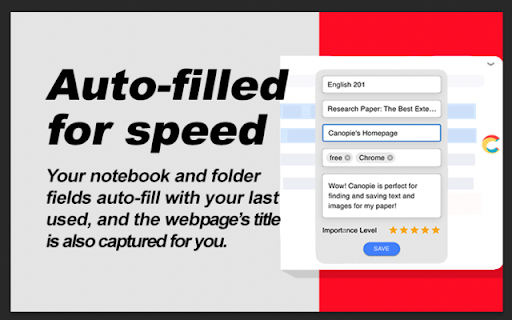
Highlight text, take a screenshot, and add tags or a quick note. Canopie helps you quickly organize the info you find on the web
As of May 2026, Canopie - Find it, save it, use it. has 20 users in the Workflow & Planning category.
Usersdown 20.0 percent−20.0%
20
20
Ratingno change0%
—
— reviews
Reviewsno change0%
—
Version
4.3.7
Manifest V3
History
2 snapshotsTracking since Apr 1, 2026.
View as table
| Date | Users | Rating | Reviews | Version |
|---|---|---|---|---|
| Apr 1, 2026 | 25 | — | — | 4.3.7 |
| Apr 30, 2026 | 23 | — | — | 4.3.7 |
| Now | 20 | — | — | 4.3.7 |
Permissions & access
- Permissions
- storagecontextMenusactiveTabcookies
- Host access
- *://*.mycanopie.com/*
Screenshots



About
WHAT'S NEW?
1. Reinvented our extension design, functionality, and user experience
2. Implement auto-save last notebook/folder, so no need to re-select your notebook/folder if you don't want to.
3. Improved screenshot feature to allow for saving the entire visible screen area

TUTORIAL VIDEOS:
To watch tutorial videos, please visit our YouTube Channel: https://www.youtube.com/playlist?list=PLoVKPRvMklZ6qatYA5Jgmxre6ITqXAzNu
You could also visit: https://mycanopie.com/features or
https://mycanopie.com/faqs-%26-tips to learn more

Find it. Save it. Use it. Research smarter and write better papers with Canopie! FREE to use.

Canopie enables users to quickly capture, organize, bookmark, AND CITE their online research in one place for a more efficient, effective, and visual research-saving workflow.

Canopie helps college students do smarter research for papers by creating a bookmark from either:
> Highlighting text, or
> Taking a screenshot

Next, users can save their bookmark as a note, complete with:
> Website URL
> Citation info
> Personalized tags
> Added comments
> 5-Star rating system

Create an organizational flow to your saved notes with Notebooks and Folders, personalized to specific classes or assignments, even using this feature as a "framework" to fill in according to a paper's outline.

Share notebooks and folders with other Canopie users and work collaboratively as a team.

Once tagged and/or annotated, come back to your Canopie Dashboard to put it all together. Canopie's visual, annotated style of saving your online research is far better than just saving a bookmark or keeping a bunch of tabs open. Knowing why you saved something makes it massively more efficient to put it all together for papers/ projects later.

IMPORTANT THINGS TO NOTICE:
> Please note that OCCASIONALLY when clicking into the pop-up icon after users highlight text, users will see a new, full-screen tab pop up instead of the normal top-left-corner popup screen. If this happens, please close and relaunch Chrome browser. If this problem persists, please reach out to [email protected].
> While Canopie's extension popup works on most websites, please note that some websites have conflicting code that results in the extension popup not functioning properly.

FEATURE REQUESTS:
At Canopie, we welcome any feature requests to help us improve your user experience! Feel free to submit a request at https://m2.tm00.com/u/lp/MyCanopie/t/c-uvK7Gc3gXQ3nf0-QIOpsHBtDc6NwD-QBsYdKjMp-QkW8SJ/m/e/Feedback-Form.htm

CUSTOMER SUPPORT:
To contact us for customer support, please see https://m2.tm00.com/u/lp/MyCanopie/t/c-uvK7Gc3gXQ3nf0-QIOpsHBtDc6NwD-QBsYdKjMp-QkW8SJ/m/e/Feedback-Form.htm or email us at [email protected]

By installing the extension, you agree to Canopie's Terms and Conditions (https://mycanopie.com/terms-and-conditions)and Privacy Policy (https://mycanopie.com/privacy-policy)
Technical
- Version
- 4.3.7
- Manifest
- V3
- Size
- 770KiB
- Min Chrome
- 88
- Languages
- 1
- Featured
- No
Metadata
- ID
- lnffagfhhfaafgalnjibnepicdnapnhi
- Developer ID
- u7f0805f657d33fb02a30bb3bdb51819f
- Developer Email
- [email protected]
- Created
- Oct 19, 2021
- Last Updated (Store)
- May 15, 2022
- Last Scraped
- May 29, 2026
- Website
- mycanopie.com
- Privacy Policy
- https://mycanopie.com/privacy-policy
Similar extensions
Alternatives to Canopie - Find it, save it, use it., ranked by description similarity.

NoteSkrib Clipper
Capture web content, videos, and images to your NoteSkrib account
6

Diigo Web Collector - Capture and Annotate
Bookmark, Archive, Screenshot & Markup - All-In-One Web Collector, must-have research tool
200.0K
★ 4.6

Web Highlights: PDF & Web Highlighter + Notes & AI Summary
Productivity Highlighter & Annotation Tool for Websites & PDFs with AI Summary - free, easy to use, no sign-up required.
200.0K
★ 4.8

Highlighter Plus Copier Pro
Highlight and categorize text on web pages
42
★ 5.0

Save To Note
Capture every web wonder, turn them into personal notes.Let your favorite things orbit around you like digital constellations.
2

Take Note - Boost your productivity
Take Note is a chrome extension that allows you to take notes and manage your notes with ease.
8

Quantum Highlighter PRO
Web annotation system inspired by Zotero. Highlight, underline, and manage annotations on any page.
452
★ 5.0

NotableHQ: Your Personalized AI Research Manager
NotableHQ: Revolutionize Your Research and Note Management
Seamlessly integrate into your browser with NotableHQ, the ultimate…
10
Data sourced from the Chrome Web Store · last verified May 29, 2026.