
QCampusmate Mate 4 Class
Export your transcript at Kyushu University in excel format.
As of May 2026, QCampusmate Mate 4 Class has — users in the Workflow & Planning category.
Usersno change0%
—
—
Ratingno change0%
—
— reviews
Reviewsno change0%
—
Version
1.0.0
Manifest V3
History
3 snapshotsTracking since Apr 1, 2026.
View as table
| Date | Users | Rating | Reviews | Version |
|---|---|---|---|---|
| Apr 1, 2026 | 184 | — | — | 1.0.0 |
| Apr 30, 2026 | 234 | — | — | 1.0.0 |
| May 29, 2026 | 247 | — | — | 1.0.0 |
| Now | — | — | — | 1.0.0 |
Permissions & access
- Permissions
- storageactiveTabscripting
- Host access
- None declared
Screenshots


About
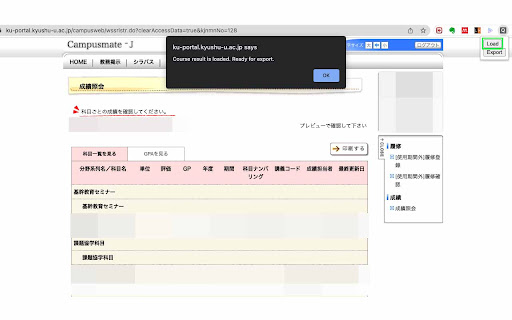
Steps to export your transcript:
1. Log into your Campusmate - Kyushu University
2. Go to Course Registration/Course Results > Course Results
3. Click on this extension (the one with the "Q" icon)
4. Click `Load`
5. Click `Export`
Technical
- Version
- 1.0.0
- Manifest
- V3
- Size
- 317KiB
- Min Chrome
- 88
- Languages
- 1
- Featured
- Yes
Metadata
- ID
- lnbkeppndndpmhjebgbdblobjilfkidf
- Developer ID
- u389a45cf307b8002ba5b7eb894b8c6f0
- Developer Email
- [email protected]
- Created
- May 4, 2022
- Last Updated (Store)
- May 4, 2022
- Last Scraped
- May 29, 2026
- Website
- —
- Support URL
- —
- Privacy Policy
- —
Similar extensions
Alternatives to QCampusmate Mate 4 Class, ranked by description similarity.

UIUCProfCritic
Helping you save time in registering for your classes
3

Export Lautman Courses
Add the ability to export your bid-it schedule in a way easily pasteable to the Lautman forms.
70
★ 5.0

psau schedule
تعمل هذه الاضافة على تحويل جدول الطالب الموجود في (المقررات المسجلة) بالخدمات الالكترونية لجامعة سطام الى ملف بصيغة .csmo والذي…
68
★ 5.0

UT Registration Plus
UT Registration Plus is a Chrome extension that allows students to easily register for classes.
50.0K
★ 5.0

UW Madison Schedule Downloader
Adds a download button to the schedule viewer page, allowing you to automatically import your schedule into any calendar
16

Download Intercom transcript
Click to download Intercom conversation transcript (html format).
3

RMP Schedule Builder Links
Get links to the ratemyprofessor pages for the professor(s) of each class!
59

RateMyUWPlan
Extension to help UW students make better informed decisions when signing up for classes.
—
★ 5.0
Data sourced from the Chrome Web Store · last verified May 29, 2026.