
AI Powered Alt-Text For Webflow - Supersonic
Generate AI Powered Alt-Text For Webflow assets via vision-enabled OpenAI.
As of June 2026, AI Powered Alt-Text For Webflow - Supersonic has 16 users and a 5.00/5 rating from 5 reviews in the Productivity category.
Usersno change0%
16
16
Ratingno change0%
5.00
5 reviews
Reviewsno change0%
5
Version
0.4.3
Manifest V3
History
2 snapshotsTracking since Apr 1, 2026.
View as table
| Date | Users | Rating | Reviews | Version |
|---|---|---|---|---|
| Apr 1, 2026 | 16 | 5.00 | 5 | 0.4.3 |
| Jun 4, 2026 | 14 | 5.00 | 5 | 0.4.3 |
| Now | 16 | 5.00 | 5 | 0.4.3 |
Permissions & access
- Permissions
- scriptingstorage
- Host access
- https://*.webflow.com/design/*, https://*.design.webflow.com/*, https://api.openai.com/*
Screenshots
About
AI Powered Alt-Text For Webflow integrates OpenAI’s vision-enabled GPT-4 right into your Webflow Designer. With a single click, you’ll get concise, accurate, keyword-rich alt text—perfect for accessibility and SEO—without ever leaving your design panel.

Key features

One-click AI generation
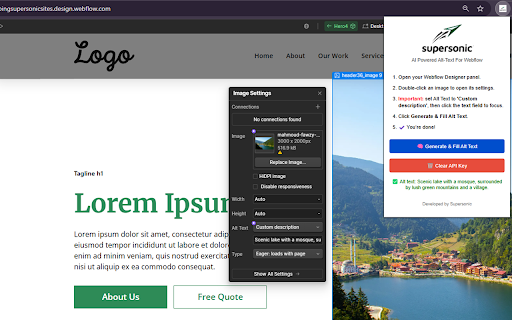
Double-click any image in the Webflow Designer and hit Generate & Fill Alt Text to inject a description under 125 characters.

Vision-enabled GPT-4 support
Leverages OpenAI’s image-aware Chat API to “see” your image and craft natural-language alt text.

Built for Webflow
Works smoothly on *.webflow.com/design/* and *.design.webflow.com/*—no extra setup.

Local API key storage
Your OpenAI key stays secure in chrome.storage.local. We don’t collect or store it anywhere else.

Lightweight & fast
Minimal permissions (scripting, storage), no trackers or bloat.

Privacy-first
Image URLs and requests go directly to OpenAI; we never log your data on our servers.

How it works

Click the Supersonic logo in your Chrome toolbar to open the popup.

Open Settings and paste your OpenAI API key.

In the Webflow Designer, double-click an image to open its settings.

Click Generate & Fill Alt Text—watch GPT-4 draft your description and auto-inject it into the Alt Text field.

Why you’ll love it

Save time—no more guessing or writer’s block.

Boost SEO & accessibility—every image gets a tailored, keyword-rich description.

Stay in flow—all within Webflow’s UI, no context-switching required.

Requirements

Chrome (v95+)

An OpenAI API key (GPT-4 or GPT-4o enabled)

Ready to supercharge your Webflow workflow? Install AI Powered Alt-Text For Webflow now and watch your image SEO—and accessibility—soar!
Technical
- Version
- 0.4.3
- Manifest
- V3
- Size
- 37.35KiB
- Min Chrome
- 88
- Languages
- 1
- Featured
- No
Metadata
- ID
- lmmbhgojmckkpkjfobamjohhlmflpnaa
- Developer ID
- u803bd6c0f417982478adf6e6bf0181f3
- Developer Email
- [email protected]
- Created
- May 2, 2025
- Last Updated (Store)
- May 2, 2025
- Last Scraped
- Jun 4, 2026
- Website
- supersoniclandscaping.com
- Privacy Policy
- https://www.supersoniclandscaping.com/privacy-policy
Similar extensions
Alternatives to AI Powered Alt-Text For Webflow - Supersonic, ranked by description similarity.

AltTextLab – AI Alt Text Generator
Auto-generate accurate, SEO-optimized and accessible alt text for every image. Perfect for SEO, accessibility and content workflows.
171
★ 5.0

Alt Text Generator
Try Alt Text Generator to create alternative text for images. Smart image describer that helps with accessibility and SEO practice.
257
★ 4.7

AltText.ai: Alt text generator
Generate alt text for images using AI. Connects to your AltText.ai account.
7.0K
★ 4.8

INKLU: AI Alt Text, Aria Label & Accessibility Fixes
Fix accessibility issues, optimize content, and boost your SEO — instantly.
14

GistMag Alt Text Generator
AI-powered alt text generation for images
—

LLM Hotkey
AI-powered text enhancement with keyboard shortcuts. Select text, press Alt+A, get smart variants instantly.
9

IMG Alt Gen Pro - AI Alt Text Generator
Generate AI alt text for images instantly. Processing with visual progress tracking. Great for SEO, accessibility & WCAG compliance.
9
★ 5.0

AskAI
Talk to AI on any page.
42
Data sourced from the Chrome Web Store · last verified Jun 4, 2026.