
Gemini Exporter
Save your Gemini conversations for offline use, sharing, and archiving.
As of June 2026, Gemini Exporter has 2 users in the Productivity category.
Usersno change0%
2
2
Ratingno change0%
—
— reviews
Reviewsno change0%
—
Version
1.0.1
Manifest V3
90-day change · In the last 90 days this extension 1 version update.
History
3 snapshotsTracking since May 22, 2026.
Not enough history yet for this metric — the chart fills in as we collect more snapshots.
View as table
| Date | Users | Rating | Reviews | Version |
|---|---|---|---|---|
| May 22, 2026 | — | — | — | 1.0.0 |
| Jun 4, 2026 | — | — | — | 1.0.0 |
| Jun 10, 2026 | — | — | — | 1.0.1 |
| Now | 2 | — | — | 1.0.1 |
Permissions & access
- Permissions
- storageunlimitedStorageactiveTabscripting
- Host access
- https://*.googleusercontent.com/*, https://*.gstatic.com/*, https://gemini.export.anhbui.dev/*
Screenshots


About
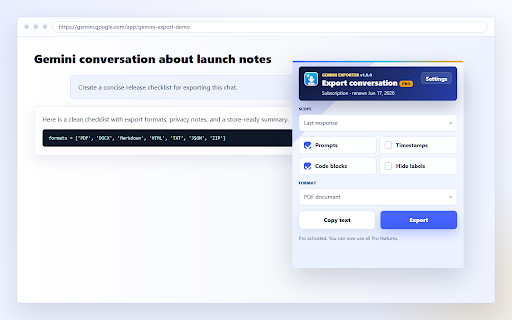
Gemini Exporter lets you save any Gemini conversation in seconds — without copying and pasting manually.

Export to PDF, Word (DOCX), Markdown, HTML, plain text, JSON, or a ZIP archive containing all formats at once. Ideal for researchers, students, and professionals who want to archive, share, or continue working with their AI conversations offline.

KEY FEATURES
• One-click export from any Gemini conversation
• PDF — formatted, print-ready
• DOCX — open in Word or Google Docs
• Markdown — for notes apps and GitHub
• HTML — keeps formatting for web use
• TXT & JSON — plain data, easy to process
• ZIP — all formats bundled in one download
• Copy to clipboard in one click

FREE & PRO
Free: unlimited exports in all formats
Pro: priority support + future premium features

PRIVACY
The extension only reads the active Gemini tab when you click export. No conversation data is sent to any server. Your chats stay on your device.
Technical
- Version
- 1.0.1
- Manifest
- V3
- Size
- 567KiB
- Min Chrome
- 88
- Languages
- 1
- Featured
- No
Metadata
- ID
- lmhfjenkcgpjfefaejklkfncgndjomem
- Developer ID
- ufe2820f93bc50f23f4b090a0a34a3d98
- Developer Email
- [email protected]
- Created
- May 21, 2026
- Last Updated (Store)
- Jun 3, 2026
- Last Scraped
- Jun 10, 2026
- Website
- —
- Support URL
- https://gemini.export.anhbui.dev/contacts
- Privacy Policy
- https://gemini.export.anhbui.dev/privacy
Data sourced from the Chrome Web Store · last verified Jun 10, 2026.